Italiano
18
Italiano
19
English
20
English
21
English
22
English
23
Pulizia e manutenzione
ATTENZIONE:
Nonimmergereilgruppoinacqua.
• Pulireildispositivoconunpannomorbidosenzadeter-
genti.
Risoluzione di problemi
Problema Causa/Risoluzione
Il gruppo non funziona. Tutte le anomalie di esercizio
possono essere risolte premen-
do il tasto RESET. Utilizzare un
cavo o un oggetto simile per
premere il tasto RESET (8).
Il lettore MP3 non può
essere acceso.
Ricarica della batteria troppo
bassa. Ricaricare la batteria.
La riproduzione si inter-
rompe automaticamente.
Nessun audio. Controllareseilvolumeèimpo-
stato troppo basso. Aumentare
il volume.
Illemusicaleèdanneggiato.
Provare un'altra canzone.
Labatterianonècarica. Accendere il computer.
Ilcomputerèinstand-byoin
modalità ibernazione. Disatti-
vare la modalità di risparmio
energetico.
Il computer non rileva il
lettore MP3.
La carica residua della batteria
ètroppobassa.Inquestocaso
sono necessari alcuni misuri
nchéilPCrilevaillettoreMP3.
Controllare il cavo USB in caso
di guasti e corretta connessio-
ne.
Smaltimento
Questo apparecchio contiene una
batteria al litio ricaricabile. Le batterie
esaurite e ricaricabili non possono
esseresmaltiteneiriutidomestici.
Rimuovere la batteria prima dello
smaltimento dell‘apparecchio. Alla
nedellasuaduratanonsmaltire
l‘apparecchioconiriutidomestici.
Consegnarlo ad un centro di raccolta
perilriciclaggio.Inquestomodosi
aiuterà l‘ambiente.
Rimozione della card
1. Premeredelicatamentelapartenaledellamemory
card.
2. Estrarrequindilacarddalrelativeslot.
Caricamento della batteria integrata
Illettoreèalimentatomediantelabatteriaallitioricaricabile
integrata. Caricare la batteria seguendo le seguenti istruzio-
ni:
1. Collegare il lettore mediante il cavo USB in dotazione
ad un computer attivo. Dopo poco tempo l’indicatore
distato/ricaricainiziaalampeggiareelabatteriaè
ricaricata.
2. Al termine della ricarica della batteria la spia di stato/
ricarica si accende.
3. Rimuovere con cura il lettore MP3 dal PC. Seguire il
software operativo del PC per rimuovere il lettore con
attenzione.
4. Scollegare il cavo USB dal lettore MP3 e dal PC.
NOTA:
• Importante! Quando viene scollegato dal PC, il grup-
po comincia a riprodurre musica automaticamente.
Se non si desidera utilizzare il gruppo dopo la carica,
spegnerlo.
• LabatteriaècaricatasoloseilPCèacceso.
• Noncollegareillettoreperunlungoperiodoadun
computer portatile scollegato dalla corrente. In caso
contrario la batteria del computer portatile potrebbe
scaricarsi.
• Iltempodiricaricavariainbaseall’usodellabatteria.
• Ricaricarelabatteriaalmenoogni6-12mesisenonsi
usa il lettore per un lungo periodo.
• Lariproduzionesiinterrompereseilcaricamentodella
batterianonèsufciente.
Problema Causa/Risoluzione
Il tempo di riproduzione
dellabatteriaèbreve.
Latemperaturaambienteè
al di sotto di -5°C. Il tempo di
riproduzione diminuisce con la
temperatura ambientale troppo
bassa.
I brani non possono
essere trasferiti.
Nonc'ècapacitàsufciente
sullamemoriaashintegrata.
Hai provato a trasferire un
formatolemusicalechenonè
supportato.
Specifiche tecniche
Modello: ......................................................................... MMS 4221
Batteria: ..............................Batteria al litio ricaricabile integrata
3,7 V 120 mAh
Dimensioni: ...........................................................35 x 45 x 16 mm
Porta USB: ............................................................................USB 2.0
Memoria Flash interna: ..........................................................4 GB
Micro SD memory cards utilizzabili: ........................1 GB-16 GB
Formato musicale digitale: ........................................MP3, WMA
Formatole: ...........................................................................FAT32
Velocità bit MP3: .........................................................8 - 320 kbps
Velocità bit WMA: ....................................................32 - 192 kbps
Sistemi operativi supportati: ....Windows 2000/XP e superiori
.............Mac OS 10.3 e superiori
...... Redhat Linux 8.0 e superiori
Peso netto: ...........................................................................ca. 16 g
Soggettoavariazionitecnichesenzanotica!
QuestoapparecchioèconformealledirettiveCErelativeed
èprodottosecondoipiùrecentistandardsullasicurezza.
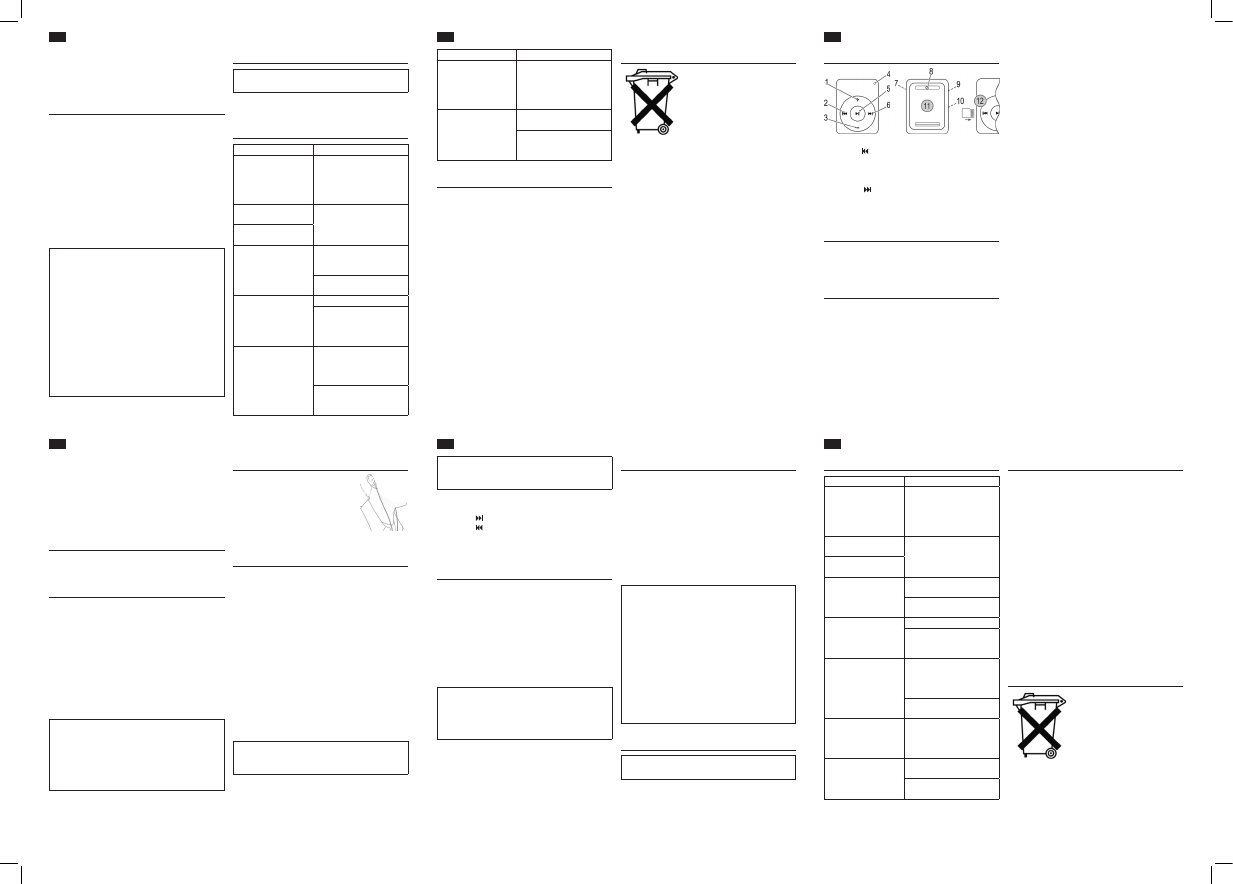
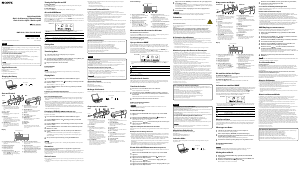
Location Of Controls (Fig.1)
1 Increase Volume (+)
2 Rewind ( )
3 Decrease Volume (–)
4 Status/Charge
5 On/Off / Play/Pause
6 Forward ( )
7 USB Port
8 Reset the device (RESET)
9 3.5mmheadphonejack
10 Micro SD memory card
slot
11 Clip to pin for example,
to your shirt, T-shirt,
pants…
12 Correct installation of a
micro SD card
In The Box
1 MP3 Earphone
1 USB Cable
1 set of earphones
Safety Precautions
Carefully read the instruction manual before operating this
device and keep the manual including warranty card, proof
of purchase and packaging materials, preferably includ-
ing the inner box, in a safe place. Please pass on the user
manual in case you pass the device on to a third party.
• Onlyusethedeviceprivatelyandforitsintendeduse.
This device is not intended for commercial use.
• Donotusetheunitwithwethands.
• Toavoidtheriskofreorelectricshock,donotexpose
the unit to rain or moisture. Do not operate the unit in
the immediate vicinity of water (e.g. bathrooms, swim-
Maintenance
• Thisdevicedoesnotcontainanyuser-serviceablecom-
ponents.
• Contactanauthorizedservicecentreformaintenance
and repair work.
• Contactyourdealer,whenindoubtwithregardtoinstal-
lation, operation or device safety.
Before First Use
1. Chargethebatterybeforerstuse.Seedetailsinchap-
ter “Charge Integrated Battery“.
Transfer Music
Connect the player via USB cable to your PC.
1. Insert the smaller USB connector in the MP3 player’s
USB port and the other end in a free USB port of your
PC.
2. The computer detects the MP3 player as removable
media and it can be used accordingly.
3. Forsavingandexportinglesfollowtheoperating
software of your PC.
4. Safely remove the MP3 player from your PC after data
transfer. Follow the operating software of your PC for
safely removing the player.
5. Disconnect the USB cable from MP3 player and PC.
CAUTION:
• DonotdisconnecttheMP3playerfromthePCdur-
ingdatatransfer.Thisappliesalsoifthedataowis
inactive. Follow the operating software of your PC for
safely removing the MP3 player from your PC.
• Wearenotresponsiblefordatalossduetoimproper
operation.
WARNING:
Listening to music at high volume can damage your hear-
ing.
Select Music (2/6)
• Pressthe (6) button to skip to the next track.
• Pressthe (2) button to skip to the previous track.
Press and hold the buttons to search through the track. The
soundismuted.Thestatus/chargeindicatorashesquickly.
Using a micro SD memory card
(Memory card not included)
YoucanexpandtheinternalashmemorywithamicroSD
card.
Inserting the card
Please follow the correct installation of the memory card
(Fig. 1/12).
1. Insert the memory card into the card slot (10).
2. Press gently on the end of the memory card until it
“clicks”intoplace.
NOTE :
• Thememorycardprotrudesslightlyfromthecardslot.
• IftheMP3playerisconnectedwithaninserted
memory card to the PC, it appears as an additional
storage device.
Removing the card
1. Press gently on the end of the memory card.
2. Then pull the card from the card slot.
Troubleshooting
Problem Cause/Remedy
The unit cannot be oper-
ated.
Any malfunctions during
operation can be resolved by
pressing the RESET button. Use
a wire or similar to press the
RESET button (8).
The MP3 player cannot
be switched on.
Battery charge too low. Re-
charge the battery.
Playback stops automati-
cally.
No sound. Check if the volume is set very
low. Increase the volume.
Themusicleisdamaged.Try
another song.
Battery is not charged. Switch the computer on.
The computer is in sleep or
hibernation mode. Deactivate
the energy saving mode.
The computer does not
detect the MP3 player.
The residual charge of the bat-
tery is too low. In this case it can
take some minutes until the PC
detects the MP3 player.
Check the USB cable for dam-
ages and proper connection.
The battery’s playback
time is short.
The ambient temperature is
below -5°C. The playback time
decreases with low ambient
temperature.
Tracks cannot be trans-
ferred.
Nosufcientfreecapacityon
theintegratedashmemory.
Youtrytotransferamusicle
format, which is not supported.
ming pool).
• Protectthedevicefromheat,directsunlightandsharp
edges.
• Donotsubjectthebatterytohardimpactsorpressure.
• Protectthedevicefromopenames.
• Donotplaceheavyobjectsonthedevice.Donotsub-
jectthedevicetohardimpactsorknocks.Thiscanresult
in malfunctions or damages.
• Donotinsertanymetalobjectsinthedevice.Riskof
short circuit
• Donotusethedeviceinextremelydamporhumidenvi-
rons.
• Toavoidstaticchargesdonotusethedeviceinex-
tremely dry climates.
• Checkthedeviceregularlyfordamagesormaterial
fatigue. Do not use the device in case of damages.
Avoid Hearing Damage
• Setyourearphone’svolumelevelnottoohigh,sincethis
can cause hearing damage and you might endanger
yourself and others.
• Setthevolumetoalowlevel,soyouarenotbothering
your surroundings.
• Incaseoftinnitusdiseaseusethedevicewithalow
volume level or abstain from using it.
• Earspecialistsrecommendnotcontinuouslyusing
earphones over a long period of time.
Road Safety
• Roadsafetyistherstpriority.Donotusethedevice
whiledrivingamotorvehicle,cyclingorjogginginthe
street. Set the volume to a level that it does not interfere
withthecurrenttrafcsituation.
• Donotusethedeviceinsituations,whereabsolute
hearing is imperative.
Insert earphones
1. Plug the earphones into the head-
phonejack(9)oftheunit.
2. Insert the earplugs into your ears as
shown. Note the labeling on the
earplugs.
R= right, L= left
The earphones should sit comfortably inside the ear.
Operation
Thedeviceisequippedwithmulti-functionalbuttons.For
differentfunctionspresstherespectivebuttonbrieyor
press and hold.
On/Off (5)
• Pressandholdthebuttonapprox.2secondstoturnthe
playeron.Thestatus/chargeindicatorashesslowly.
Playback starts with the track, which was played last.
• Pressandholdthebuttonagainapprox.2secondsto
turntheplayeroff.Thestatus/chargeindicatorashes
veryquicklyandthengoesout.
Pause (5)
• Brieypressthebuttontopauseplayback.Thestatus/
charge indicator lights.
• Pressthebuttonagaintocontinueplayback.Thestatus/
chargeindicatorashesslowly.
NOTE:
After playback of all tracks is completed playback starts
againwiththersttrack.
Adjust Volume (1/3)
Press the + (1) and –(3)buttonstoadjustthedesiredvolume
step by step. Press and hold the buttons to continuously
change the volume level.
Charge Integrated Battery
The player is powered by the integrated rechargeable
lithium battery. Charge the battery as follows:
1. Connect the player via the supplied USB cable to an ac-
tive computer. After a short moment the status/charge
indicatorstartsashingandthebatteryischarged.
2. After the battery is fully charged the status/charge
indicator lights up.
3. Safely remove your MP3 player from the PC. Follow the
operating software of your PC for safely removing the
player.
4. Disconnect the USB cable from MP3 player and PC.
NOTE :
• Important! After disconnecting from the PC, the unit
starts music playback automatically. If you do not want
to use the unit after charging, turn it off.
• ThebatteryisonlychargedwhilethePCisswitched
on.
• Donotconnecttheplayerforalongperiodoftimeto
a laptop computer disconnected from mains power.
Otherwise the laptop computer’s battery may be
discharged.
• Thechargingtimevariesaccordingtobatteryuse.
• Rechargethebatteryatleastevery6to12monthsif
you do not use the player for a long period of time.
• Playbackstopsifthebatterychargeisnotsufcient.
Cleaning And Maintenance
CAUTION:
Do not immerse the unit in water!
• Cleanthedevicewithaslightlydampclothwithoutany
detergents.
Technical Data
Model : ........................................................................... MMS 4221
Battery : .................................................Integrated rechargeable
lithium battery 3.7 V 120 mAh
Dimensions : .........................................................35 x 45 x 16 mm
USB Port: ..............................................................................USB 2.0
Internal Flash Memory: ...........................................................4 GB
Usable micro SD memory cards: .............................1 GB-16 GB
Digital Music Format: .................................................MP3, WMA
File Format: .............................................................................FAT32
MP3 Bit Rates: .............................................................8 - 320 kbps
WMA Bit Rates: .........................................................32 - 192 kbps
Supported operating systems: .................... Windows 2000/XP
and above
.............Mac OS 10.3 and higher
......Redhat Linux 8.0 and higher
Net Weight: ................................................................approx. 16 g
Subjecttotechnicalmodicationswithoutpriornotice!
This device complies with the relevant CE directives and is
manufactured according to the latest safety regulations.
Disposal
This device contains a rechargeable
lithium battery. Exhausted batteries
and rechargeable batteries do not be-
long in the household waste. Remove
the battery before disposing of the
device. At the end of its life cycle do
not dispose of the device with the
household waste. Return it to a col-
lecting point for recycling. In this way
you help to protect our environment.


Joignez-vous à la conversation sur ce produit
Ici, vous pouvez partager ce que vous pensez du AEG MMS 4221 Lecteur Mp3. Si vous avez une question, lisez d’abord attentivement le mode d’emploi. La demande d’un mode d’emploi peut être effectuée en utilisant notre formulaire de contact.