Mode d’emploi Aiwa XP-R207 Lecteur CD portable

Besoin d'un mode d’emploi pour votre Aiwa XP-R207 Lecteur CD portable ? Ci-dessous, vous pouvez consulter et télécharger gratuitement le mode d’emploi PDF en français. Ce produit a actuellement 1 de question fréquemment posée, 0 de commentaires et 0 votes. Si ce n'est pas le mode d’emploi que vous souhaitez, veuillez nous contacter.

Votre produit est défectueux et le mode d’emploi n’offre aucune solution ? Rendez-vous à un Repair Café pour obtenir des services de réparation gratuits.

Mode d’emploi

Loading…
A
OWNER’S RECORD
For your convenience, record the model number and the serial number (you will
find it on the bottom of your set) in the space provided below. Please refer to
them when you contact your Aiwa dealer in case of difficulty.
Model No.
Serial No.
NOTE
FOR USE IN THE U.S.A.
This equipment has been tested and found to comply with the limits for a Class
B digital device, pursuant to Part 15 of the FCC Rules. These limits are designed
to provide reasonable protection against harmful interference in a residential
installation.
This equipment generates, uses, and can radiate radio frequency energy and, if
not installed and used in accordance with the instructions, may cause harmful
interference to radio communications. However, there is no guarantee that
interference will not occur in a particular installation. If this equipment does cause
harmful interference to radio or television reception, which can be determined by
turning the equipment off and on, the user is encouraged to try to correct the
interference by one or more of the following measures:
Reorient or relocate the receiving antenna.
Increase the separation between the equipment and receiver.
Connect the equipment into an outlet on circuit different from that to which
the receiver is connected.
Consult the dealer or an experienced radio/TV technician for help.
CAUTION
Modifications or adjustments to this product, which are not expressly approved
by the manufacturer, may void the user’s right or authority to operate this product.
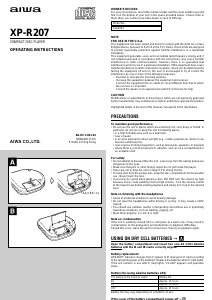
Highlighted letters in the text of this manual correspond to the illustrations.
PRECAUTIONS
To maintain good performance
Do not use the unit in places which are extremely hot, cold, dusty or humid. In
particular, do not use or keep the unit in following places.
in a high humidity area such as a bathroom
near a heater
in an area exposed to direct sunlight (e.g., inside a parked car, where it can
become extremely hot)
near sources of strong magnetism, such as televisions, speakers, or magnets
where there is a lot of movement or vibration, such as on a car dashboard or
an unstable shelf
For safety
Do not attempt to disassemble the unit. Laser rays from the optical pickup are
dangerous to the eyes.
Make sure that pins or other foreign object do not get inside the player.
Take care not to drop the unit or subject it to strong shocks.
To keep dust from the pickup lens, keep the disc compartment lid closed after
use. Never touch the lens.
If you hear no sound when playing a disc, DO NOT turn the volume up high
because music could suddenly start at high volume. Turn the volume control
to the lowest level before starting playback and slowly turn it up to the desired
level.
Note on listening with the headphones
Listen at moderate volumes to avoid hearing damage.
Do not wear the headphones while driving or cycling. It may create a traffic
hazard.
You should use extreme caution or temporarily discontinue use in potentially
hazardous situations, such as walking, jogging, etc.
Wear them properly; L is left, R is right.
Note on condensation
If the unit is suddenly moved from a cold place to a warm one, it may result in
condensation on the pickup lens and malfunction or playback difficulties.
Should this occur, leave the unit for a few hours, then try to playback again.
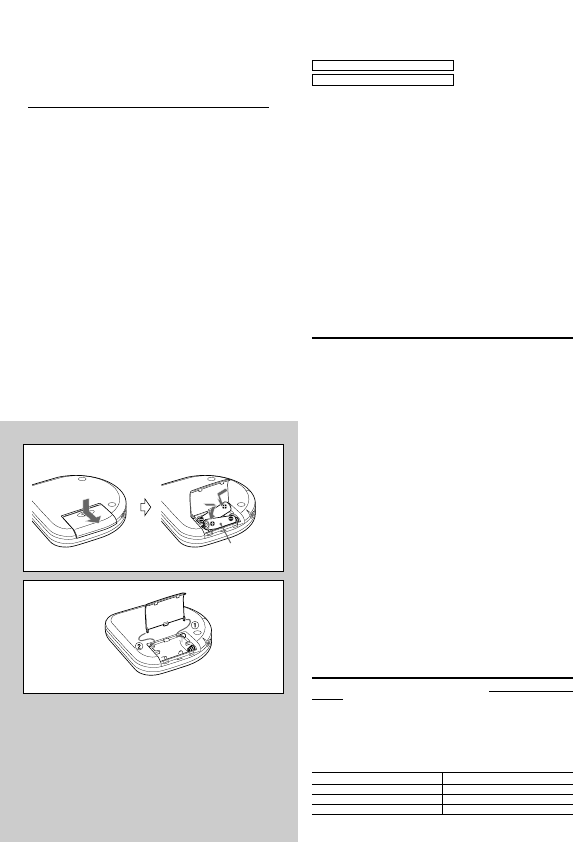
USING ON DRY CELL BATTERIES A
Open the battery compartment and insert two size AA (LR6) alkaline
batteries with the 0 and 9 marks correctly aligned.
Battery replacement
OPE/BATT indicator changes from F (green) to M (orange) to E (red) according
to the remaining power of the batteries. Replace the batteries when E (red) lights.
If the unit remains in use after E (red) lights, “Lo-bAtt” appears and operation
stops.
Battery life (using alkaline batteries LR6)
Battery life may vary depending on conditions of use.
If the cover of the battery compartment comes off B
B
AA (LR6) × 2
A
d
XP-R207
COMPACT DISC PLAYER
OPERATING INSTRUCTIONS
8A-HC1-941-01
000824AYO-OX
Printed in Hong Kong
c
The setting of the EASS switch Battery life
48 Approx. 20 hours
12 Approx. 19 hours
OFF Approx. 15 hours
Télécharger mode d’emploi en Français (PDF, 1.69 MB)
(Tenez compte de l’environnement et imprimez ce manuel uniquement si c’est vraiment nécessaire)

Loading…

Évaluation

Dites-nous ce que vous pensez du Aiwa XP-R207 Lecteur CD portable en laissant une note de produit. Vous voulez partager vos expériences avec ce produit ou poser une question ? Veuillez laisser un commentaire au bas de la page.
Etes-vous satisfait du Aiwa XP-R207 Lecteur CD portable ?
Oui Non
Soyez le premier à évaluer ce produit
0 évaluations

Joignez-vous à la conversation sur ce produit

Ici, vous pouvez partager ce que vous pensez du Aiwa XP-R207 Lecteur CD portable. Si vous avez une question, lisez d’abord attentivement le mode d’emploi. La demande d’un mode d’emploi peut être effectuée en utilisant notre formulaire de contact.

En savoir plus sur ce mode d’emploi

Nous comprenons qu’il est agréable d’avoir un mode d’emploi papier pour vos Aiwa XP-R207 Lecteur CD portable. Vous pouvez toujours télécharger le mode d’emploi depuis notre site Web et l’imprimer vous-même. Si vous souhaitez disposer d’un mode d’emploi original, nous vous recommandons de contacter Aiwa. Ils pourront peut-être fournir un mode d’emploi original. Recherchez-vous le mode d’emploi de votre Aiwa XP-R207 Lecteur CD portable dans une autre langue ? Choisissez votre langue préférée sur notre page d’accueil et recherchez le numéro de modèle pour voir si nous l’avons disponible.

Caractéristiques

Marque Aiwa
Modèle XP-R207
Catégorie Lecteurs CD portable
Type de fichier PDF
Taille du fichier 1.69 MB

Tous les modes d’emploi pour Aiwa Lecteurs CD portable
Plus de modes d’emploi de Lecteurs CD portable

Foire aux questions sur Aiwa XP-R207 Lecteur CD portable

Notre équipe d’assistance recherche des informations utiles sur les produits et des réponses aux questions fréquemment posées. Si vous trouvez une inexactitude dans notre foire aux questions, veuillez nous le faire savoir en utilisant notre formulaire de contact.

Puis-je moi-même réparer des rayures sur un CD ? Vérifié

Les rayures empêchent le laser de lire le disque correctement. Lorsque les rayures ne sont que superficielles, il est possible de les réparer soi-même en polissant le disque avec un composé légèrement abrasif. Idéalement, vous utilisez un composé abrasif professionnel, mais vous pouvez également utiliser un dentifrice ordinaire. Après avoir poli le disque, il faut le laver et laisser sécher. Il existe des entreprises spécialisées qui peuvent le faire.

Cela a été utile (38) En savoir plus
Mode d’emploi Aiwa XP-R207 Lecteur CD portable

Produits connexes

Catégories associées

×
Download