Mode d’emploi Black and Decker DCM2500K Cafetière

Besoin d'un mode d’emploi pour votre Black and Decker DCM2500K Cafetière ? Ci-dessous, vous pouvez consulter et télécharger gratuitement le mode d’emploi PDF en français. Ce produit a actuellement 2 questions fréquemment posées, 0 commentaires et 0 votes. Si ce n'est pas le mode d’emploi que vous souhaitez, veuillez nous contacter.

Votre produit est défectueux et le mode d’emploi n’offre aucune solution ? Rendez-vous à un Repair Café pour obtenir des services de réparation gratuits.

Mode d’emploi

Loading…
4
How to Use
This appliance is intended for household use only.
GETTING STARTED
1. Remove all stickers, packing material, and literature.
2. Wash all parts as instructed in the Care and Cleaning section.
3. Pour cold water up to 11-cup level mark in the water reservoir. Brew it through as
instructed in "BREWING", but do not add coffee grounds to the paper filter. When done,
turn off the coffeemaker and discard the water from the carafe.
BREWING
1. Lift the one-piece cover. Use the carafe to fill water reservoir with cold water.
2. Place a paper filter into the brew basket. Add ground coffee, (we recommend one or two
heaping tablespoons for every 2 cups). Close the cover.
3. Place carafe on the "Keep Hot" plate and plug in the unit.
4. Press "ON/OFF" button and the indicator light comes on, or for delayed brewing,
see "SETTING THE CLOCK/TIMER & AUTO-BREW." You do not have to set the clock
if you want to brew coffee right away.
5. Replace the carafe on the “Keep Hot” plate when not serving to keep coffee hot.
The coffeemaker will keep coffee warm for 2 hours before it automatically shuts off.
Sneak-A-Cup
®
Interrupt Feature
You can pour a cup of coffee while coffee is brewing without leaking from the brew
basket. When finished pouring coffee, place the carafe under brew basket. The brewing
process continues.
Important: To avoid possible overflow after removing the carafe, be sure to replace the
carafe under the brew basket within one minute or less.
Setting the Clock/Timer & Auto-Brew
Plug in unit, clock flashes 12:00 a.m. until correct time is set. The coffeemaker works
without settingthe clock.
1. To set current time of day: Press the HOUR button. Press the MINUTES button.
Once set, clock continues to keep time unless coffeemaker is unplugged or a power
failure occurs.
2. To set the Auto On time: Press the PROGRAM button and the light near the AUTO ON
button will start flashing indicating it is being programmed. Press the HOUR, then
MINUTES buttons to set the time you would like coffee to automatically begin brewing
(for example 7:15 a.m.). Press the HOUR and MINUTES buttons to 7:15 a.m. Make sure
the PM indicator light is not lit. When finished, press the AUTO ON button. The AUTO
ON light will stop flashing and will stay on to show the timer is activated.
3. Prepare the coffeemaker for brewing as instructed in BREWING but don’t turn
the unit on.
4. To check your pre-set auto time, press PROGRAM and it will display. When the clock
returns to the current time of day, press AUTO ON to reactivate the timer. To
automatically brew coffee again at the same pre-set auto-on time, prepare your
coffeemaker for brewing again and press the AUTO ON button.
Note: The AUTO ON function can be canceled at any time by pressing the AUTO ON
button a second time. The AUTO ON light will go out.
3
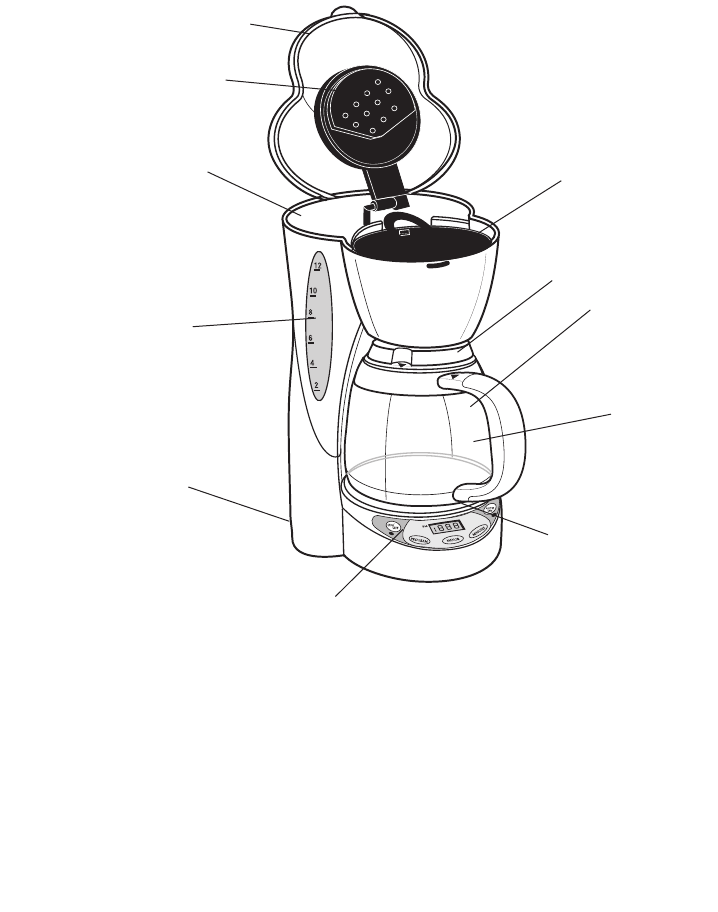
Product may vary slightly from what is illustrated.
†1.One-piece cover
(Part # DCM2000W (w))
(Part # DCM2000B)(b))
2. Water spreader
3. Water reservoir
4. Water windows (on both sides)
with cup level markings
5. Cord storage (inside of unit)
6. Control panel
7. "Keep Hot" plate
8. Brewed-coffee markings (not shown)
†9.12-cup/60 oz. (1800 ml) Carafe
(Part # GC2000 (w))
(Part # GC2000B (b))
†10. Carafe lid
(Part # 175554-00 (w))
(Part # 175554-01 (b)
†11. Removable brew basket
(Part # 175555-00)
†Consumer replaceable/removable parts
DCM2500BUCRV01 7/13/07 3:35 PM Page 4
Télécharger mode d’emploi en Français (PDF, 0.3 MB)
(Tenez compte de l’environnement et imprimez ce manuel uniquement si c’est vraiment nécessaire)

Loading…

Évaluation

Dites-nous ce que vous pensez du Black and Decker DCM2500K Cafetière en laissant une note de produit. Vous voulez partager vos expériences avec ce produit ou poser une question ? Veuillez laisser un commentaire au bas de la page.
Etes-vous satisfait du Black and Decker DCM2500K Cafetière ?
Oui Non
Soyez le premier à évaluer ce produit
0 évaluations

Joignez-vous à la conversation sur ce produit

Ici, vous pouvez partager ce que vous pensez du Black and Decker DCM2500K Cafetière. Si vous avez une question, lisez d’abord attentivement le mode d’emploi. La demande d’un mode d’emploi peut être effectuée en utilisant notre formulaire de contact.

En savoir plus sur ce mode d’emploi

Nous comprenons qu’il est agréable d’avoir un mode d’emploi papier pour vos Black and Decker DCM2500K Cafetière. Vous pouvez toujours télécharger le mode d’emploi depuis notre site Web et l’imprimer vous-même. Si vous souhaitez disposer d’un mode d’emploi original, nous vous recommandons de contacter Black and Decker. Ils pourront peut-être fournir un mode d’emploi original. Recherchez-vous le mode d’emploi de votre Black and Decker DCM2500K Cafetière dans une autre langue ? Choisissez votre langue préférée sur notre page d’accueil et recherchez le numéro de modèle pour voir si nous l’avons disponible.

Caractéristiques

Marque Black and Decker
Modèle DCM2500K
Catégorie Cafetières
Type de fichier PDF
Taille du fichier 0.3 MB

Tous les modes d’emploi pour Black and Decker Cafetières
Plus de modes d’emploi de Cafetières

Foire aux questions sur Black and Decker DCM2500K Cafetière

Notre équipe d’assistance recherche des informations utiles sur les produits et des réponses aux questions fréquemment posées. Si vous trouvez une inexactitude dans notre foire aux questions, veuillez nous le faire savoir en utilisant notre formulaire de contact.

Qu’est-ce que la mouture dit à propos du café ? Vérifié

Le type de mouture détermine fortement le goût du café. Une mouture plus fine signifie généralement un goût plus fort et une mouture plus grossière signifie un goût plus doux. Une mouture très fine peut donner un café amer.

Cela a été utile (763) En savoir plus

Quelle est la meilleure façon pour conserver du café ? Vérifié

Le café se conserve de préférence dans une boîte propre et hermétiquement fermée.

Cela a été utile (373) En savoir plus
Mode d’emploi Black and Decker DCM2500K Cafetière

Produits connexes

Catégories associées

×
Download