Mode d’emploi Camry CR 7956 Humidificateur

Besoin d'un mode d’emploi pour votre Camry CR 7956 Humidificateur ? Ci-dessous, vous pouvez consulter et télécharger gratuitement le mode d’emploi PDF en français. Ce produit a actuellement 2 questions fréquemment posées, 1 commentaire et 2 votes avec une note moyenne du produit de 50/100. Si ce n'est pas le mode d’emploi que vous souhaitez, veuillez nous contacter.

Votre produit est défectueux et le mode d’emploi n’offre aucune solution ? Rendez-vous à un Repair Café pour obtenir des services de réparation gratuits.

Mode d’emploi

Loading…

dangerous temperature rise and can damage the device. Always connect the power
adaptor cable to the device, and then connect the power adaptor to the power socket.
22. Never turn on a humidifier if it is not filled with water.
23. Use only clean, cold distilled water.
24. Do not add drugs or chemical substances to the tank, base or vapor outlet. Do not add
aromatic oils, salt, decalcifying tablets, powders or cleaning agents to water.
25. Water tank cap should always be tightly screwed.
26. Make sure that the water mist outlet is not aimed directly at the walls, furniture,
electrical outlets, electrical and electronic equipment and children.
27. Do not block the device ventilation. Keep at least 20 cm free space around the device.
Do not block the water mist outlet.
28. Do no use the device if there is risk of developing condensation. Moisture may occur on
the external or internal device parts if:
– the device is moved from a cold to a warm place,
– the heating system has just been turned on,
– the device is being used in a high moisture area,
– the device is cooled by the air conditioning cooling system.
If the unit may not operate properly if it develops moisture condensation; in extreme cases
it can become damaged. In such case, do not use the device and leave it to dry for a few
hours.
29. Do not tilt or overturn the device and do not attempt to add or drain water when the
device is operating.
30. Do not remove the tank from the device base during the device operation.
31. Do not touch the device with wet hands.
32. The filled tank is heavy. When moving it, support it also from the bottom.
33. Do not use the humidifier when you see the water leak at the bottom.
34. Do not leave water in the humidifier it is not in use.
35. Clean the humidifier after each use. Follow the cleaning recommendations in this
instruction.
36. Never let the tank in the humidifier base develop sediment, moisture or gather water (it
could contaminate or even damage the ultrasonic nebulizer).
37. When the device is operating for a long time, the water mist emitted by the humidifier
can settle on the floor and make it wet.
38. Too much humidity in the room can lead to moisture accumulation causing the growth of
bacteria and fungi and damage to walls, furniture and wallpaper.
39. Do not lift the water tank with the water mist outlet.
40. Do not submerge the base of the humidifier.
DESCRIPTION OF THE DEVICE (fig A)
1. Water mist outlet 2. Water tank
3. Base 4. Control panel
CONTROL PANEL (diagram B)
1. ON/OFF button 2. RESET button
3. MIST button 4. Humidity icon
5. ANION button 6. HUMIDISTAT button
7. TIMER button 8. “Waterless” icon
9. Ionization icon 10. Humidity and time indicator
11. Humidity level Indicator
USING THE DEVICE
1. Make sure that the humidifier is unplugged. Add water to the tank (A2) only when the device is not connected to power.
2. Remove the water tank (A2), unscrew the water filler and will the tank with cold distilled water.
3. Wipe the tank with dry cloth until its dry and put it on the base.
4. Connect the device to power. The display panel (A4) will light up for two seconds, then it will go out. The humidifier will wait for the
setting mode.
Delayed start: Allows for setting off the start time in a certain number of hours. Press the PRESET button (B2) to set the number
of hours. Each time you press the button (B2) the hour increases by one. The maximum start delay is 24 hours. The “0” setting
cancels the delayed start.
Continuous operation: Start the humidifier by pressing the ON/OFF (B1) button. The humidity icon (B4) will light up showing the
current humidity level (B10) in the room. To change the humidity level press the MIST button (B3). Adjusting the humidity level is
a 4-step operation; each pressing of the button (B3) changes the humidity by 1 degree. The humidity level is shown on the
humidity level indicator (B11).
Delayed stop: to program turning off the device after a certain time, press the TIMER (B7) button when the device is on. Each
4
Télécharger mode d’emploi en Français (PDF, 3.92 MB)
(Tenez compte de l’environnement et imprimez ce manuel uniquement si c’est vraiment nécessaire)

Loading…

Évaluation

Dites-nous ce que vous pensez du Camry CR 7956 Humidificateur en laissant une note de produit. Vous voulez partager vos expériences avec ce produit ou poser une question ? Veuillez laisser un commentaire au bas de la page.
Etes-vous satisfait du Camry CR 7956 Humidificateur ?
Oui Non
50%
50%
2 évaluations

Joignez-vous à la conversation sur ce produit

Ici, vous pouvez partager ce que vous pensez du Camry CR 7956 Humidificateur. Si vous avez une question, lisez d’abord attentivement le mode d’emploi. La demande d’un mode d’emploi peut être effectuée en utilisant notre formulaire de contact.

Karol Bukvay 09-01-2022
Le manuel ne mentionne pas les filtres qui sont intégrés dans les bouchons des réservoirs d'eau, principalement la fréquence à laquelle il faut les changer et où les acheter.

répondre | Cela a été utile (1) (Traduit par google)

En savoir plus sur ce mode d’emploi

Nous comprenons qu’il est agréable d’avoir un mode d’emploi papier pour vos Camry CR 7956 Humidificateur. Vous pouvez toujours télécharger le mode d’emploi depuis notre site Web et l’imprimer vous-même. Si vous souhaitez disposer d’un mode d’emploi original, nous vous recommandons de contacter Camry. Ils pourront peut-être fournir un mode d’emploi original. Recherchez-vous le mode d’emploi de votre Camry CR 7956 Humidificateur dans une autre langue ? Choisissez votre langue préférée sur notre page d’accueil et recherchez le numéro de modèle pour voir si nous l’avons disponible.

Caractéristiques

Marque Camry
Modèle CR 7956
Catégorie Humidificateurs
Type de fichier PDF
Taille du fichier 3.92 MB

Tous les modes d’emploi pour Camry Humidificateurs
Plus de modes d’emploi de Humidificateurs

Foire aux questions sur Camry CR 7956 Humidificateur

Notre équipe d’assistance recherche des informations utiles sur les produits et des réponses aux questions fréquemment posées. Si vous trouvez une inexactitude dans notre foire aux questions, veuillez nous le faire savoir en utilisant notre formulaire de contact.

À quelle humidité est-il recommandé d’utiliser un humidificateur d’air ? Vérifié

Si l’humidité intérieure est de 50 % ou moins, un humidificateur peut être utile.

Cela a été utile (371) En savoir plus

Quelle est l'humidité idéale pour un espace de vie? Vérifié

L'humidité idéale dans une maison se situe entre 40 et 60%. À une humidité plus élevée ou plus basse, les champignons, les bactéries et les virus sont plus susceptibles de se développer et vous pouvez ressentir une gêne personnelle.

Cela a été utile (203) En savoir plus
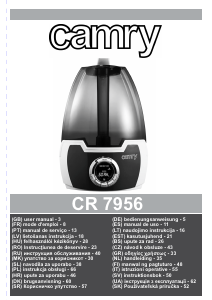
Mode d’emploi Camry CR 7956 Humidificateur

Produits connexes

Catégories associées

×
Download