Mode d’emploi intimus 175 CC3 Destructeur

Besoin d'un mode d’emploi pour votre intimus 175 CC3 Destructeur ? Ci-dessous, vous pouvez consulter et télécharger gratuitement le mode d’emploi PDF en français. Ce produit a actuellement 2 questions fréquemment posées, 0 commentaires et 0 votes. Si ce n'est pas le mode d’emploi que vous souhaitez, veuillez nous contacter.

Votre produit est défectueux et le mode d’emploi n’offre aucune solution ? Rendez-vous à un Repair Café pour obtenir des services de réparation gratuits.

Mode d’emploi

Loading…
Never feed the shredder with a
quantity of material exceeding the
maximum indicated. Refer to the
TECHNICAL DATA section!
S h o u l d th e ma c hi n e be c o m e
overloaded, follow the instructions under
“MATERIAL JAM IN MACHINE” under
“MALFUNCTIONS”.
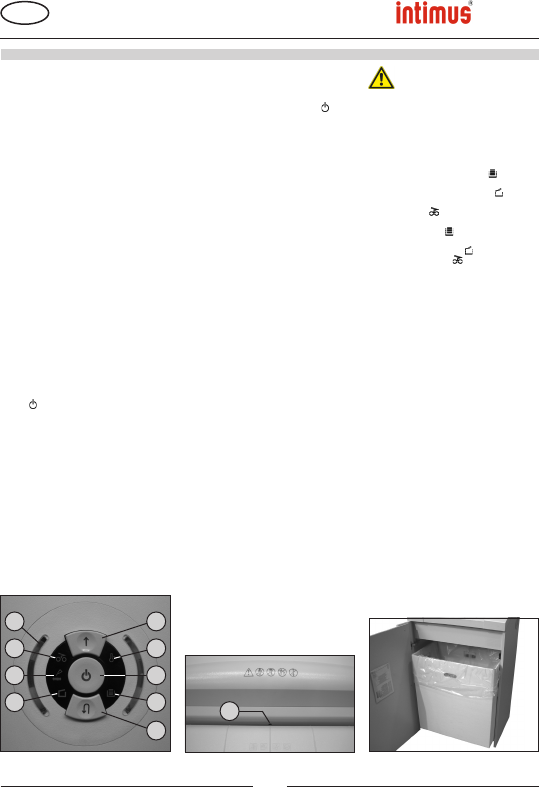
EMPTYING THE RECEPTACLE (Fig. 3):
When the receptacle is full, the machine turns off
automatically. The control display (10) comes
on. Empty the receptacle as follows:
- Open the door. The control display (8) comes
on. If there is still material in the feed slot, the
control display (6) also comes on.
- Remove the bag and dispose of the contents.
The control display (10) goes out.
- PLace empty sack into receptacle and close
door. The control display (8) goes out.
- If the control display (6) comes on, press
the forward button (2) briey. The remaining
material in the feed slot is shredded and the
display go out.
Note: The machine will only run if the door is
closed.
DYNAMIC LOAD DISPLAY:
To prevent a material jam and therefore ensure
continual and effective destruction of the data
storage media, the current load level of the
motor is displayed during the shredding process
by means of different colour lights on the control
display (5) (Fig. 1) next to the control buttons as
follows:
Green light: load < 50%
Yellow light: load 50 - 75%
Red light: load 75 - 100%
SWITCHING THE MACHINE ON:
Proceed as follows to switch the machine to
“Ready”:
- Press the function button (1) briey.
- The function button (1) LED display comes
on for “Ready”.
- The machine can be loaded.
FEEDING OF SINGLE SHEETS:
- Feed paper through the inlet guide to the cut-
ting system.
- Machine switches automatically to forward
and draws paper in. The machine switches off
automatically after shredding.
Note: For shredding transparent films, the
machine must be manually switched to forwards
running (press and hold the forwards button (2)
for approx. 2 secs.).
By briey pressing the function button (1) (Stop
function), the shredding process can be stopped
at any time. To continue, press and hold the
forwards button (2) for approx. 2 secs.
If the machine is not used for a period of approx.
5 mins., it automatically switches off.
Note: In order to always obtain a correct cutting
result in terms of particle size and thus achieve
the safety class according to DIN 32757 as
stated in the brochure, the material to be cut
must always be fed into the cutting mechanism
at a right angle to the cutting mechanism and in
appropriate quantities in the middle of the inlet
slot.
7 = Control display (Fig. 1)
“Oil cutters”
Comes on when the cutters in the cross
cut version must be oiled. The lubrication
procedure must be acknowledged on
the reverse button (4) (see description in
“CUTTER MAINTENANCE”).
8 = Control display (Fig. 1)
“Door open”/ “Door malfunction”
a) “Door open”
Comes on if the door on the lower part
of the machine is opened. The machine
switches off automatically and cannot
be started as long as the door remains
open.
b) “Electrical fault”
Flashes when there is an electrical
fault in the door sensor. The machine
switches off. Please contact your
dealer.
9 = Control display (Fig. 1)
“Motor overload” /
“Electrical fault”
To nd out what to do see the relevant
description under the “MALFUNCTION”
section.
a) “Motor protection”
Comes on when the motor has been
overloaded and has switched off. The
machine cannot be started while the
motor is cooling down.
b) “Electrical fault”
Flashes when there is an electrical fault
inside the control board. At the same
time the function button (1) LED display
ashes. The machine switches off.
Please contact your dealer.
10 = Control display
“Collection bin full” (Fig. 1)
Lit when the collection bin is full and needs
to be emptied.
The cutter is switched off.
175SC2
175CC3
175CC4
175CC5
175CC6
Fig. 3
Fig. 1
2
9
1
10
3
6
7
8
5
91238 3 03/13
Fig. 2
4
GB
Translation of the Original Operation Manual
Übersetzung der Originalbetriebsanleitung
OPERATION
6
Télécharger mode d’emploi en Français (PDF, 2.95 MB)
(Tenez compte de l’environnement et imprimez ce manuel uniquement si c’est vraiment nécessaire)

Loading…

Évaluation

Dites-nous ce que vous pensez du intimus 175 CC3 Destructeur en laissant une note de produit. Vous voulez partager vos expériences avec ce produit ou poser une question ? Veuillez laisser un commentaire au bas de la page.
Etes-vous satisfait du intimus 175 CC3 Destructeur ?
Oui Non
Soyez le premier à évaluer ce produit
0 évaluations

Joignez-vous à la conversation sur ce produit

Ici, vous pouvez partager ce que vous pensez du intimus 175 CC3 Destructeur. Si vous avez une question, lisez d’abord attentivement le mode d’emploi. La demande d’un mode d’emploi peut être effectuée en utilisant notre formulaire de contact.

En savoir plus sur ce mode d’emploi

Nous comprenons qu’il est agréable d’avoir un mode d’emploi papier pour vos intimus 175 CC3 Destructeur. Vous pouvez toujours télécharger le mode d’emploi depuis notre site Web et l’imprimer vous-même. Si vous souhaitez disposer d’un mode d’emploi original, nous vous recommandons de contacter intimus. Ils pourront peut-être fournir un mode d’emploi original. Recherchez-vous le mode d’emploi de votre intimus 175 CC3 Destructeur dans une autre langue ? Choisissez votre langue préférée sur notre page d’accueil et recherchez le numéro de modèle pour voir si nous l’avons disponible.

Caractéristiques

Marque intimus
Modèle 175 CC3
Catégorie Destructeurs
Type de fichier PDF
Taille du fichier 2.95 MB

Tous les modes d’emploi pour intimus Destructeurs
Plus de modes d’emploi de Destructeurs

Foire aux questions sur intimus 175 CC3 Destructeur

Notre équipe d’assistance recherche des informations utiles sur les produits et des réponses aux questions fréquemment posées. Si vous trouvez une inexactitude dans notre foire aux questions, veuillez nous le faire savoir en utilisant notre formulaire de contact.

Pourquoi ma déchiqueteuse s’arrête-t-elle après un certain temps ? Vérifié

Les déchiqueteuses de papier ont besoin de refroidir après un certain temps pour éviter la surchauffe. Le temps pendant lequel l’appareil peut fonctionner avant d’avoir besoin de refroidir varie selon les marques et les modèles.

Cela a été utile (911) En savoir plus

À quelle fréquence dois-je huiler ma déchiqueteuse à papier? Vérifié

En cas d'utilisation occasionnelle, il suffit de huiler le destructeur de papier une fois tous les deux mois. Avec une utilisation (très) régulière, vous remarquerez peut-être que la machine a des difficultés à déchiqueter ou que le papier se coince facilement. Ce sont des signes que la machine doit être huilée.

Cela a été utile (568) En savoir plus
Mode d’emploi intimus 175 CC3 Destructeur

Produits connexes

Catégories associées

×
Download