Mode d’emploi ION Power Play LP Platine

Besoin d'un mode d’emploi pour votre ION Power Play LP Platine ? Ci-dessous, vous pouvez consulter et télécharger gratuitement le mode d’emploi PDF en français. Ce produit a actuellement 1 de question fréquemment posée, 1 de commentaire et a 2 votes avec une note moyenne du produit de 0/100. Si ce n'est pas le mode d’emploi que vous souhaitez, veuillez nous contacter.

Votre produit est défectueux et le mode d’emploi n’offre aucune solution ? Rendez-vous à un Repair Café pour obtenir des services de réparation gratuits.

Mode d’emploi

Loading…
1
QUICKSTART GUIDE
o Make sure that the items listed below are included in the box:
POWER PLAY LP Turntable CD
USB Cable Quickstart Guide
45 RPM Adapter Safety Instructions & Warranty Information
o READ SAFETY INSTRUCTION BOOKLET BEFORE USING THE PRODUCT
o Go to http://www.ionaudio.com
for product registration.
INTRODUCTION
POWER PLAY LP connects directly to your computer to turn your treasured vinyl recordings into digital music. We have
included two software packages to aid you in converting your vinyl recordings. You should install one of the following
applications to take advantage of computer recording:
EZ Vinyl/Tape Converter (PC only) is the quickest and easiest way to turn your recordings into digital media. EZ
Vinyl/Tape Converter conveniently saves your recordings in your iTunes* library. Novice users may find this application
preferable. We have included a handy Software Quickstart Guide with step-by-step instructions on software installation
and operation.
EZ Audio Converter (Mac only) is a basic converter application for Mac OS X and is ideal for novice users. Please refer
to the included Software Quickstart Guide for step-by-step instructions on software installation and operation.
To install the software: simply insert the included CD into your computer and follow the on-screen instructions. After you finish
converting your vinyl, you can then burn to CD or load onto portable media devices.
Visit www.ionaudio.com/computer-optimization
for more information on optimizing your computer for audio.
* iTunes and iPod are trademarks of Apple, Inc., registered in the U.S.A. and other countries.
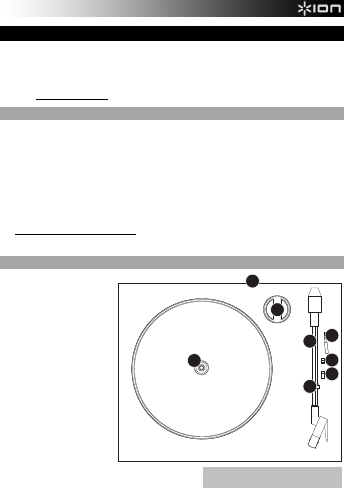
REAR PANEL FEATURES
1. USB Audio Output: Use the
included USB Cable to connect
your turntable to your computer.
The USB connection will provide
power to the turntable as well as
the audio from the turntable to
your computer. For transferring
your vinyl records to your
computer, we have provided two
different software packages on
the included CD. EZ Vinyl/Tape
Converter (PC) and EZ Audio
Converter (Mac) are the easiest
and quickest ways to transfer
your vinyl records and should be
used if you are a beginner.
2. Platter – Place your record here.
3. 45 RPM Adapter Holder – Holds
the included 45 RPM adapter.
When not using the adapter,
please place it in this holder.
4. Tonearm – POWER PLAY LP
comes with a ready to use pre-
balanced tonearm and cartridge.
The tonearm can be raised and
lowered by hand, or by pressing
the raise / lower lever. Please note that the tonearm needs to be
moved away from resting position (on the arm clip) for the
turntable motor to activate. When the tonearm is placed back in
its resting position, the turntable motor will deactivate.
5. Arm Clip – This specially designed arm clip secures the tonearm while at rest or when not in use. The arm clip has been
designed to remain in the up position while unlocked.
6. Raise / Lower Lever – Raises and lowers the tonearm.
7. Autostop – This switch activates or deactivates autostop, which stops the platter once the record has reached the end.
8. 33 / 45 / 78 RPM Switch – This switch controls the RPM of the turntable platter.
IMPORTANT: Remove the plastic cartridge cover
(
needle cover
)
before o
p
eratin
g
the turntable.
2
1
3
7
6
5
7
4
7
8
Télécharger mode d’emploi en Français (PDF, 0.22 MB)
(Tenez compte de l’environnement et imprimez ce manuel uniquement si c’est vraiment nécessaire)

Loading…

Évaluation

Dites-nous ce que vous pensez du ION Power Play LP Platine en laissant une note de produit. Vous voulez partager vos expériences avec ce produit ou poser une question ? Veuillez laisser un commentaire au bas de la page.
Etes-vous satisfait du ION Power Play LP Platine ?
Oui Non
0%
100%
2 évaluations

Joignez-vous à la conversation sur ce produit

Ici, vous pouvez partager ce que vous pensez du ION Power Play LP Platine. Si vous avez une question, lisez d’abord attentivement le mode d’emploi. La demande d’un mode d’emploi peut être effectuée en utilisant notre formulaire de contact.

Bernard Magné 28-03-2025
PB avec le bras de lecture.La course du bras s'arrête avant la fin du disque.

répondre | Cela a été utile (0)

En savoir plus sur ce mode d’emploi

Nous comprenons qu’il est agréable d’avoir un mode d’emploi papier pour vos ION Power Play LP Platine. Vous pouvez toujours télécharger le mode d’emploi depuis notre site Web et l’imprimer vous-même. Si vous souhaitez disposer d’un mode d’emploi original, nous vous recommandons de contacter ION. Ils pourront peut-être fournir un mode d’emploi original. Recherchez-vous le mode d’emploi de votre ION Power Play LP Platine dans une autre langue ? Choisissez votre langue préférée sur notre page d’accueil et recherchez le numéro de modèle pour voir si nous l’avons disponible.

Caractéristiques

Marque ION
Modèle Power Play LP
Catégorie Platines
Type de fichier PDF
Taille du fichier 0.22 MB

Tous les modes d’emploi pour ION Platines
Plus de modes d’emploi de Platines

Foire aux questions sur ION Power Play LP Platine

Notre équipe d’assistance recherche des informations utiles sur les produits et des réponses aux questions fréquemment posées. Si vous trouvez une inexactitude dans notre foire aux questions, veuillez nous le faire savoir en utilisant notre formulaire de contact.

Quand dois-je remplacer l’aiguille de mon tourne-disque ? Vérifié

En général, une aiguille a une durée de vie de 500 à 2 000 heures en lecture, en fonction de sa qualité. Si vous achetez un tourne-disque d’occasion, remplacez toujours l’aiguille par précaution. Le non-remplacement d’une aiguille à temps risquera d’endommager les disques.

Cela a été utile (336) En savoir plus
Mode d’emploi ION Power Play LP Platine

Produits connexes

Catégories associées

×
Download