Mode d’emploi JBL On Call 5310 Téléphone de conférence

Besoin d'un mode d’emploi pour votre JBL On Call 5310 Téléphone de conférence ? Ci-dessous, vous pouvez consulter et télécharger gratuitement le mode d’emploi PDF en français. Ce produit a actuellement 0 questions fréquemment posées, 0 commentaires et 0 votes. Si ce n'est pas le mode d’emploi que vous souhaitez, veuillez nous contacter.

Votre produit est défectueux et le mode d’emploi n’offre aucune solution ? Rendez-vous à un Repair Café pour obtenir des services de réparation gratuits.

Mode d’emploi

Loading…
3
Unpacking
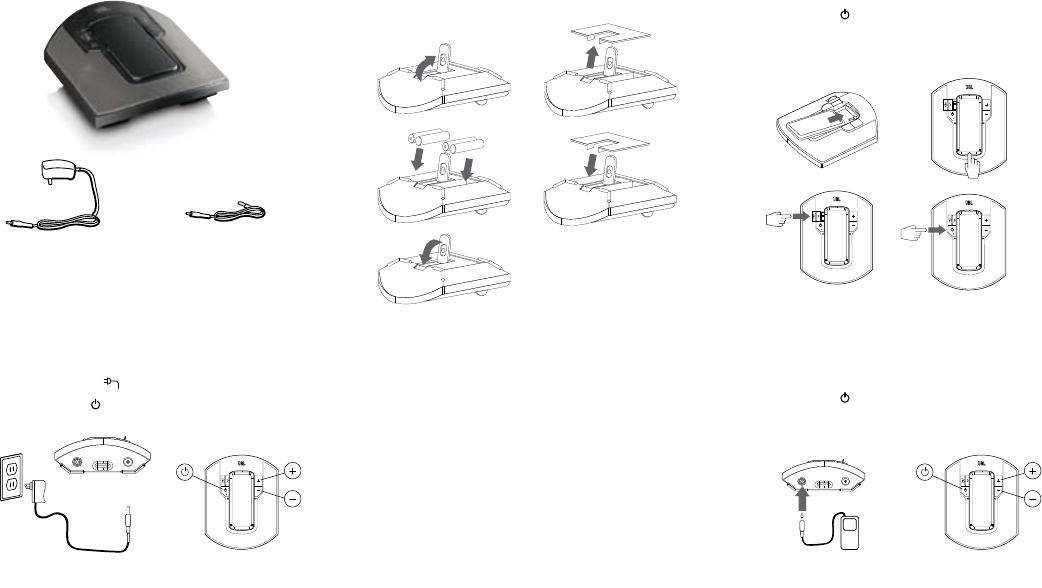
Carefully unpack your speaker system and identify all its components:
JBL On Call 5310 unit1.
Power supply 2.
Auxiliary audio cables3.
1.
2.
3.
Volume Control (on Base Unit)
Volume increase “+
Volume decrease “
General Setup
Unpack the JBL On Call 5310 and its power supply.
Plug adapter into the “1.
12V
por t in back of unit and then into a wall outlet.
Press thePower2.
button on the front of the JBL On Call 5310.
A green LED will indicate that the unit is on.
Battery Installation
Lift the kickstand.1.
Lift battery cover on the bottom of the JBL On Call 5310 and remove the 2.
battery cover.
Place (4) fresh AA batteries as shown.3.
Replace battery compartment cover.4.
Close the kickstand.5.
Note: System will not use battery power when using AC power.
DO NOT MIX BATTERY TYPES.
DO NOT MIX CHARGED AND PARTIALLY CHARGED BATTERIES.
BATTERIES WILL NOT RECHARGE WHILE IN JBL ON CALL 5310.
Battery Disposal
Alkaline batteries are considered nonhazardous and can be
disposed of in your regular household trash.
Rechargeable batteries (i.e., nickel cadmium, nickel metal-hydride,
lithium and lithium-ion) are considered hazardous household
materials and could pose an unnecessary health and safety risk.
Unwanted materials should be disposed of in an environmentally
sound manner. Contact your local waste management officials for
other information regarding the environmentally sound collection,
recycling and disposal of used batteries.
Listening to Music From the
Nokia 5310 Music Phone
Slide the Nokia 5310 music phone into the JBL On Call 5310 dock.1.
Hold down the bottom of the Nokia 5310 music phone.2.
Slide the JBL On Call 5310 charge connector into the Nokia 5310 3.
music phone.
Press the “Power” button on the front of the JBL On Call 5310. 4.
A green LED will indicate that the unit is on.
Control music playback through the Nokia 5310 music phone.5.
Adjust volume using the “+” and “–” buttons located on the front of the 6.
JBL On Call 5310.
Listening to Music From an Auxiliary Device
The JBL On Call 5310 speaker includes a 2.5mm mini jack and 3.5mm mini
jack cable for connection to any analog music player with either a 2.5mm
or 3.5mm output.
Connect the auxiliary device to the JBL On Call 5310 using the supplied 1.
audio cable.
Press the “Power” button on the front of the JBL On Call 5310. 2.
A green LED will indicate that the unit is on.
Control music playback through the auxiliary device.3.
Adjust volume using the “+” and “–” buttons located on the front of the 4.
JBL On Call 5310.
1. 2.
1. 2.
3. 4.
1. 2.
3. 4.
1. 2., 4.
5.
Télécharger mode d’emploi en Français (PDF, 5.86 MB)
(Tenez compte de l’environnement et imprimez ce manuel uniquement si c’est vraiment nécessaire)

Loading…

Évaluation

Dites-nous ce que vous pensez du JBL On Call 5310 Téléphone de conférence en laissant une note de produit. Vous voulez partager vos expériences avec ce produit ou poser une question ? Veuillez laisser un commentaire au bas de la page.
Etes-vous satisfait du JBL On Call 5310 Téléphone de conférence ?
Oui Non
Soyez le premier à évaluer ce produit
0 évaluations

Joignez-vous à la conversation sur ce produit

Ici, vous pouvez partager ce que vous pensez du JBL On Call 5310 Téléphone de conférence. Si vous avez une question, lisez d’abord attentivement le mode d’emploi. La demande d’un mode d’emploi peut être effectuée en utilisant notre formulaire de contact.

En savoir plus sur ce mode d’emploi

Nous comprenons qu’il est agréable d’avoir un mode d’emploi papier pour vos JBL On Call 5310 Téléphone de conférence. Vous pouvez toujours télécharger le mode d’emploi depuis notre site Web et l’imprimer vous-même. Si vous souhaitez disposer d’un mode d’emploi original, nous vous recommandons de contacter JBL. Ils pourront peut-être fournir un mode d’emploi original. Recherchez-vous le mode d’emploi de votre JBL On Call 5310 Téléphone de conférence dans une autre langue ? Choisissez votre langue préférée sur notre page d’accueil et recherchez le numéro de modèle pour voir si nous l’avons disponible.

Caractéristiques

Marque JBL
Modèle On Call 5310
Catégorie Téléphones de conférence
Type de fichier PDF
Taille du fichier 5.86 MB

Tous les modes d’emploi pour JBL Téléphones de conférence
Plus de modes d’emploi de Téléphones de conférence
Mode d’emploi JBL On Call 5310 Téléphone de conférence

Produits connexes

Catégories associées

×
Download