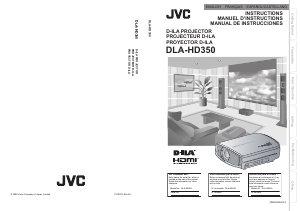
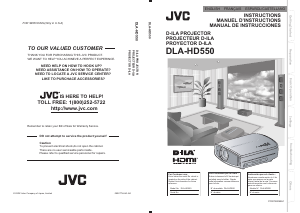
Mode d’emploi JVC DLA-HD100 Projecteur

Besoin d'un mode d’emploi pour votre JVC DLA-HD100 Projecteur ? Ci-dessous, vous pouvez consulter et télécharger gratuitement le mode d’emploi PDF en français. Ce produit a actuellement 3 questions fréquemment posées, 0 commentaires et 0 votes. Si ce n'est pas le mode d’emploi que vous souhaitez, veuillez nous contacter.

Votre produit est défectueux et le mode d’emploi n’offre aucune solution ? Rendez-vous à un Repair Café pour obtenir des services de réparation gratuits.

Mode d’emploi

Loading…
1
2
Getting Started
Safety Precautions
IMPORTANT INFORMATION
About the installation place
Do not install the projector in a place that cannot support
its weight securely.
If the installation place is not sturdy enough, the projector
could fall or overturn, possibly causing personal injury.
IMPORTANT SAFEGUARDS
Electrical energy can perform many useful functions. This
unit has been engineered and manufactured to assure
your personal safety. But IMPROPER USE CAN RESULT
IN POTENTIAL ELECTRICAL SHOCK OR FIRE
HAZARD. In order not to defeat the safeguards
incorporated into this product, observe the following basic
rules for its installation, use and service. Please read
these Important Safeguards carefully before use.
- All the safety and operating instructions should be read
before the product is operated.
- The safety and operating instructions should be retained
for future reference.
- All warnings on the product and in the operating
instructions should be adhered to.
- All operating instructions should be followed.
- Place the projector near a wall outlet where the plug can
be easily unplugged.
- Unplug this product from the wall outlet before cleaning.
Do not use liquid cleaners or aerosol cleaners. Use a
damp cloth for cleaning.
- Do not use attachments not recommended by the product
manufacturer as they may be hazardous.
- Do not use this product near water. Do not use
immediately after moving from a low temperature to high
temperature, as this causes condensation, which may
result in fire, electric shock, or other hazards.
- Do not place this product on an unstable cart, stand, or
table. The product may fall, causing serious injury to a
child or adult, and serious damage to the product. The
product should be mounted according to the
manufacturer’s instructions, and should use a mount
recommended by the manufacturer.
- When the product is used on a cart,
care should be taken to avoid quick
stops, excessive force, and uneven
surfaces which may cause the product
and cart to overturn, damaging
equipment or causing possible injury to
the operator.
- Slots and openings in the cabinet are
provided for ventilation. These ensure
reliable operation of the product and protect it from
overheating. These openings must not be blocked or
covered. (The openings should never be blocked by
placing the product on bed, sofa, rug, or similar surface. It
should not be placed in a built-in installation such as a
bookcase or rack unless proper ventilation is provided and
the manufacturer’s instructions have been adhered to.)
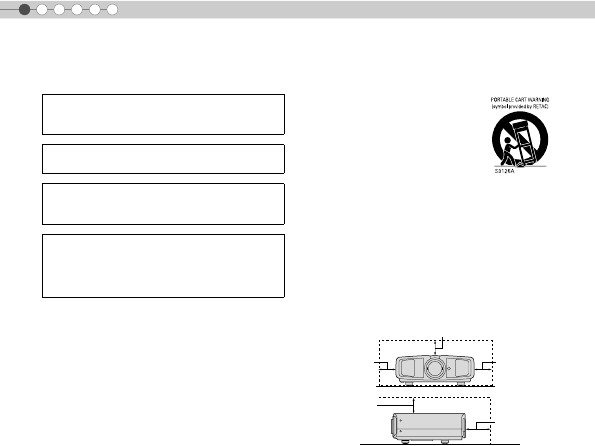
- To allow better heat dissipation, keep a clearance between
this unit and its surrounding as shown below. When this
unit is enclosed in a space of dimensions as shown below,
use an air-conditioner so that the internal and external
temperatures are the same.
- This product should be operated only with the type of
power source indicated on the label. If you are not sure of
the type of power supply to your home, consult your
product dealer or local power company.
- This product is equipped with a three-wire plug. This plug
will fit only into a grounded power outlet. If you are unable
to insert the plug into the outlet, contact your electrician to
install the proper outlet. Do not defeat the safety purpose
of the grounded plug.
- Power-supply cords should be routed so that they are not
likely to be walked on or pinched by items placed upon or
against them. Pay particular attention to cords at doors,
plugs, receptacles, and the point where they exit from the
product.
- For added protection of this product during a lightning
storm, or when it is left unattended and unused for long
periods of time, unplug it from the wall outlet and
disconnect the cable system. This will prevent damage to
the product due to lightning and power line surges.
- Do not overload wall outlets, extension cords, or
convenience receptacles on other equipment as this can
result in a risk of fire or electric shock.
- Never push objects of any kind into this product through
openings as they may touch dangerous voltage points or
short out parts that could result in a fire or electric shock.
Never spill liquid of any kind on the product.
- Do not attempt to service this product yourself as opening
or removing covers may expose you to dangerous
voltages and other hazards. Refer all service to qualified
service personnel.
WARNING:
TO PREVENT FIRE OR SHOCK HAZARDS, DO NOT
EXPOSE THIS APPLIANCE TO RAIN OR MOISTURE.
WARNING:
THIS APPARATUS MUST BE EARTHED.
CAUTION:
To reduce the risk of electric shock, do not remove
cover. Refer servicing to qualified service personnel.
MACHINE NOISE INFORMATION (Germany only)
Changes Machine Noise Information Ordinance 3.
GSGV, January 18, 1991: The sound pressure level at
the operator position is equal or less than 70 dB (A)
according to ISO 7779.
150 mm and above
300 mm
and above
150 mm
and above
300 mm
and above
200 mm
and above
DLA-HD100E_EN.book Page 2 Monday, February 25, 2008 4:32 PM
Télécharger mode d’emploi en Français (PDF, 14 MB)
(Tenez compte de l’environnement et imprimez ce manuel uniquement si c’est vraiment nécessaire)

Loading…

Évaluation

Dites-nous ce que vous pensez du JVC DLA-HD100 Projecteur en laissant une note de produit. Vous voulez partager vos expériences avec ce produit ou poser une question ? Veuillez laisser un commentaire au bas de la page.
Etes-vous satisfait du JVC DLA-HD100 Projecteur ?
Oui Non
Soyez le premier à évaluer ce produit
0 évaluations

Joignez-vous à la conversation sur ce produit

Ici, vous pouvez partager ce que vous pensez du JVC DLA-HD100 Projecteur. Si vous avez une question, lisez d’abord attentivement le mode d’emploi. La demande d’un mode d’emploi peut être effectuée en utilisant notre formulaire de contact.

En savoir plus sur ce mode d’emploi

Nous comprenons qu’il est agréable d’avoir un mode d’emploi papier pour vos JVC DLA-HD100 Projecteur. Vous pouvez toujours télécharger le mode d’emploi depuis notre site Web et l’imprimer vous-même. Si vous souhaitez disposer d’un mode d’emploi original, nous vous recommandons de contacter JVC. Ils pourront peut-être fournir un mode d’emploi original. Recherchez-vous le mode d’emploi de votre JVC DLA-HD100 Projecteur dans une autre langue ? Choisissez votre langue préférée sur notre page d’accueil et recherchez le numéro de modèle pour voir si nous l’avons disponible.

Caractéristiques

Marque JVC
Modèle DLA-HD100
Catégorie Projecteurs
Type de fichier PDF
Taille du fichier 14 MB

Tous les modes d’emploi pour JVC Projecteurs
Plus de modes d’emploi de Projecteurs

Foire aux questions sur JVC DLA-HD100 Projecteur

Notre équipe d’assistance recherche des informations utiles sur les produits et des réponses aux questions fréquemment posées. Si vous trouvez une inexactitude dans notre foire aux questions, veuillez nous le faire savoir en utilisant notre formulaire de contact.

Puis-je mettre mon projecteur immédiatement hors tension après utilisation ? Vérifié

Après avoir utilisé le projecteur, la lampe est encore très chaude. Il est préférable de laisser le projecteur après l’utilisation, pour donner au ventilateur interne de temps pour faire son travail et de refroidir la lampe. Cela permettra de prolonger la durée de vie de la lampe.

Cela a été utile (214) En savoir plus

Qu’est ce que la correction de trapèze ? Vérifié

Souvent, un projecteur ne peut pas être placé directement devant un écran ou un mur. L’image projetée peut être déformée à cause de cela. C’est l’effet trapèze. La correction de trapèze est une fonction qui corrige cette distorsion. Tous les projecteurs n’offrent pas la correction de trapèze.

Cela a été utile (158) En savoir plus

Quel est le rapport de contraste ? Vérifié

Le rapport de contraste indique la distance entre le blanc le plus blanc et le noir le plus noir. Un rapport de contraste de 400:1 par exemple signifie que le noir le plus noir à l’écran est 400 fois plus foncé que le blanc le plus blanc. Un rapport de contraste élevé contribue à la netteté de l’image.

Cela a été utile (103) En savoir plus
Mode d’emploi JVC DLA-HD100 Projecteur

Produits connexes

Catégories associées

×
Download