
Instruction manual Alarm clock Riqueza | KA6124
OPERATING INSTRUCTIONS
Thank you for your purchase of this LED Cuckoo Alarm Clock.
Please read the following instructions and warnings carefully
before use to ensure the safe and satisfactory operation of this
product.
INSTRUCTIONS FOR USE
FUNCTIONS
Time and Calendar (Year, Month, and Date)
Snooze Cuckoo Alarm
Temperature (in selectable °C/°F format)
Hourly Cuckoo Chime
CONNECTING THE CLOCK
Connect the cable to a 5V adaptor (not included) and the ‘Type C’
DC-5V (5) jack. The time will start from “12:00”.
SETTING THE TIME AND CALENDAR
In the normal time display, press the SET (1) button. The hour
digits will ash. Press the UP (6) or DOWN (7) button to set the
hour. Ensure that AM or PM is set correctly. When PM is selected
in 12-hour format, a ‘PM’ LED (on the top left corner of the time
display) will light up.
Press the SET (1) button again; the minute digits will ash. Press
UP (6) or DOWN (7) to set the minutes. Continue to set the values
in the following sequence: hour, minute, year, month date. Finally,
press SET (1) or MODE (2) to return to the time display.
SETTING THE ALARM
Press and hold the SET (1) button for 3 seconds; the hour digits
will ash. Press UP (6) or DOWN (7) to set the alarm hour, ensuring
AM/PM is correct.
Press SET (1); the minute digits will ash. Use UP (6) or DOWN (7)
to set the alarm minutes.
Press SET (1); “AL --” will ash. Press UP (6) or DOWN (7) to select
“AL on” or “AL --”. “AL on” activates the alarm; “AL --” turns it off.
Press SET (1) or MODE (2) to save the settings and return to the
time display.
TURNING THE SNOOZE ALARM ON/OFF
Press and hold the SET (1) button for 3 seconds, then press it
twice more until “AL --” ashes. Press UP (6) or DOWN (7) to
select “AL on”. Press SET (1) or MODE (2) to return to the time dis-
play. An alarm LED icon (above the colon) will light up to indicate
the alarm is activated. When the alarm sounds, the cuckoo sound
will play from the SPEAKER (8) and the bird will light up.
Press any button (except TEST) on the back of the clock to stop
the alarm temporarily. The alarm will sound again after the snooze
interval. After four snooze cycles, the snooze function will stop
automatically. The default snooze interval is 5 minutes.
If no button is pressed, the alarm sounds once for 14 seconds and
then stops.
OPERATING INSTRUCTIONS
Instrucons for use
1. Funcons
1) Time and Calendar (Year, Month, and Date)
2) Snooze Cuckoo Alarm
3) Temperature (in selectable C/F format)
4) Hourly Cuckoo Chime
2. Connect the cable to a 5V adapter (not included) and the ‘Type C’ DC-5V (5) jack. Time starts from “12:00” o’clock.
3. Set the me and calendar
1) In the normal display, press SET (1) buon, hour digits ash. Press UP (6) or DOWN (7) buon to set the
hour. Take care to set AM or PMcorrectly. When the PM me
is set under 12-hour format, a ‘PM’ LED
icon (on the top le corner of
2) Press SET (1) buon, minute digits ash. Press UP (6) or DOWN (7) buon to set the minute. Connue to set in
the sequence as: hour -> minute -> year -> month -> date. At last, press SET (1) or MODE (2)
ill return to the me display.
4. Set the alarm
1) Press and hold SET (1)UP (6) or DOWN (7)
2) Press SET (1)UP (6) or DOWN (7)
3) Press SET (1)UP (6) or DOWN (7)
4) Press SET (1) or MODE (2)
5. Turn the Snooze Alarm ON/OFF
Press and hold SET (1)UP (6) or
DOWN (7) SET (1) or MODE (2)
SPEAKER (8)
Thank you for your purchase of this LED Cuckoo Alarm Clock. Please read the folloing instrucons and arnings
carefully before use to ensure safe and sasfactory operaon of this product.
3) Press and hold SET (1)UP (6) or
DOWN (7), then press SET (1) or MODE (2)
6. Hourly Cuckoo Chime
UP (6)
at 7:00 am). Press UP (6) or DOWN (7)
MODE (2)
UP (6)SET (1)
UP (6) or DOWN (7) to select “HC --”. “HC on” means Hourly Chime sound is on, “HC --”
Press SET (1) or MODE (2)
7. Temerature Display
The display alternates beteen me and temperature.ress DOWN (7) buon to select
Celsius or Fahrenheit.
UP (6)
MODE (2)
MODE (2)
MODE (2)UP (6) or DOWN
(7)MODE (2)
12. Back-up Cell
CR2032 buon c
ell (not included) is a backeep me ongoing in the eent of blackout or other poer
failure.CELL
compartment (9)
13. TEST (4)
14. RESET hole (3)
If the clock is dead (the display does not moe) during seng or orking, please use a slim but blunt object (like ball
pen pointer, toothpick etc.) to press this hole, the clock ill return to the inialdisplay.
Warnings:
1. Keep this product aay from any liquids.
2. Please use a so cloth or a paper toel to clean the clock.
3. Do n
ot use any corrosie cleanser or chemical soluons on the clock.
4. Please keep the instrucons paper ell for future use.
5. This product is not a toy. Keep aay from children and animals.
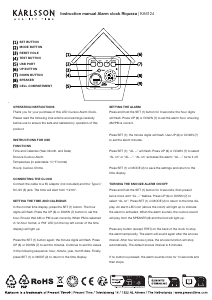
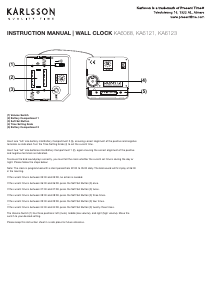
SET BUTTON
MODE BUTTON
RESET HOLE
TEST BUTTON
USB PORT
UP BUTTON
DOWN BUTTON
SPEAKER
CELL COMPARTMENT


Joignez-vous à la conversation sur ce produit
Ici, vous pouvez partager ce que vous pensez du Karlsson KA6124BK Horloge. Si vous avez une question, lisez d’abord attentivement le mode d’emploi. La demande d’un mode d’emploi peut être effectuée en utilisant notre formulaire de contact.