Mode d’emploi Kensington 72301EU Ci70 Souris

Besoin d'un mode d’emploi pour votre Kensington 72301EU Ci70 Souris ? Ci-dessous, vous pouvez consulter et télécharger gratuitement le mode d’emploi PDF en français. Ce produit a actuellement 4 questions fréquemment posées, 0 commentaires et 0 votes. Si ce n'est pas le mode d’emploi que vous souhaitez, veuillez nous contacter.

Votre produit est défectueux et le mode d’emploi n’offre aucune solution ? Rendez-vous à un Repair Café pour obtenir des services de réparation gratuits.

Mode d’emploi

Loading…
Common Troubleshooting Steps
1. Un-plug and re-plug the receiver.
2. Install fresh batteries in the mouse
3. Test the device on another USB port or computer.
4. Some surfaces may “trick” the sensor, such as reflective surfaces like glass or mirrors. As a result
this product will not work well on glass or mirror surfaces. The sensor should perform well on all
other surfaces.
5. Use the enclosed extension cable to reposition the USB receiver and decrease the distance
between the USB receiver and mouse.
Important: Computer User Health Information
In recent years, medical attention on occupational injuries has identified normal, seemingly harmless
activities as a potential cause of a wide range of problems collectively known as Repetitive Stress
Injuries (RSI) or Cumulative Trauma Disorders (CTD). It is now recognized that any repetitive motion
may contribute to these health problems. As a computer user, you might also be at risk.
By paying attention to the way you perform your work, use your computer and phone, play sports, and
work around the house, you can identify the behaviors that may be putting you at risk. If you experi-
ence pain, swelling, numbness, or weakness in your wrists or hands (especially during sleep), see your
physician immediately. These symptoms could mean that you are developing a repetitive stress injury
that requires prompt medical attention. For more detailed information, consult your doctor.
Technical Support
Technical support is available to all registered users of Kensington products. There is no charge for
technical support except the cost of the phone call, and long distance charges where applicable.
Technical Support Contact information can be found on the back page of this manual.
Technical Support Tips
You may find the answer to your problem in the Frequently Asked Questions (FAQ) section of the
Support area on the Kensington Website: www.support.kensington.com.
Call from a phone where you have access to your computer
Be prepared to provide the following information:
- Name, address, and telephone number
- The name of the Kensington product
- Make and model of your computer
- Your system software and version
- Symptoms of the problem and what led to them
Five-Year Limited Warranty
KENSINGTON COMPUTER PRODUCTS GROUP ("KENSINGTON") warrants this product against defects
in material and workmanship under normal use and service for five years from the original date of
purchase. KENSINGTON, at its option, shall repair or replace the defective unit covered by this warranty.
Please retain the dated sales receipt as evidence of the date of purchase. You will need it for any
warranty service. In order to keep this limited warranty in effect, the product must have been handled
and used as prescribed in the instructions accompanying this warranty. This limited warranty does not
cover any damage due to accident, misuse, abuse or negligence. This limited warranty is valid only if
the product is used with the equipment specified on the product box. Please check product box for
details or call KENSINGTON technical support.
DISCLAIMER OF WARRANTY
EXCEPT FOR THE LIMITED WARRANTY PROVIDED HEREIN, TO THE EXTENT PERMITTED BY LAW,
KENSINGTON DISCLAIMS ALL WARRANTIES, EXPRESS OR IMPLIED, INCLUDING ALL WARRANTIES OF
MERCHANTABILITY AND/OR FITNESS FOR A PARTICULAR PURPOSE. TO THE EXTENT THAT ANY IMPLIED
WARRANTIES MAY NONETHELESS EXIST BY OPERATION OF LAW, ANY SUCH WARRANTIES ARE LIMITED
TO THE FIVE-YEAR DURATION OF THIS WARRANTY.
SOME STATES/PROVINCES DO NOT ALLOW LIMITATIONS ON HOW LONG AN IMPLIED WARRANTY LASTS,
SO THE ABOVE LIMITATIONS MAY NOT APPLY TO YOU.
LIMITATION OF LIABILITY
REPAIR OR REPLACEMENT OF THIS PRODUCT, AS PROVIDED HEREIN, IS YOUR EXCLUSIVE REMEDY.
KENSINGTON SHALL NOT BE LIABLE FOR ANY SPECIAL, INCIDENTAL OR CONSEQUENTIAL DAMAGES,
INCLUDING, BUT NOT LIMITED TO, LOST REVENUES, LOST PROFITS, LOSS OF USE OF SOFTWARE, LOSS
OR RECOVERY OF DATA, RENTAL OF REPLACEMENT EQUIPMENT, DOWNTIME, DAMAGE TO PROPERTY,
AND THIRD-PARTY CLAIMS, ARISING OUT OF ANY THEORY OF RECOVERY, INCLUDING WARRANTY,
CONTRACT, STATUTORY OR TORT. NOTWITHSTANDING THE TERM OF ANY LIMITED WARRANTY OR ANY
WARRANTY IMPLIED BY LAW, OR IN THE EVENT THAT ANY LIMITED WARRANTY FAILS OF ITS ESSENTIAL
PURPOSE, IN NO EVENT WILL KENSINGTON’S ENTIRE LIABILITY EXCEED THE PURCHASE PRICE OF THIS
PRODUCT. SOME STATES/COUNTIES DO NOT ALLOW THE EXCLUSION OR LIMITATION OF INCIDENTAL OR
3
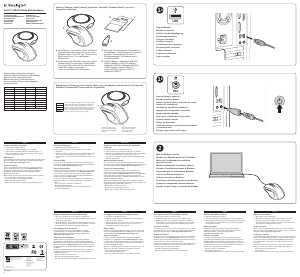
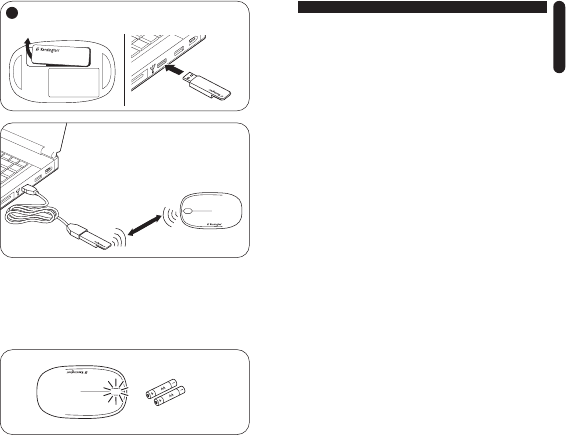
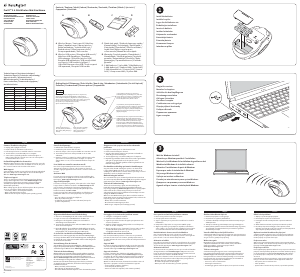
Your mouse is designed to automatically turn off when you store the wireless USB receiver in its body.
Votre souris est conçue pour se mettre automatiquement hors tension lorsque vous y insérez le récep-
teur USB sans fil.
Die Maus ist so konstruiert, dass Sie sich automatisch ausschaltet, wenn der kabellose USB-Empfänger
im Inneren der Maus verstaut wird.
De muis is dusdanig ontworpen dat deze automatisch wordt uitgeschakeld wanneer u de draadloze
USB-ontvanger opbergt in de daarvoor bestemde ruimte.
Il mouse è programmato per la disattivazione automatica quando viene inserito il ricevitore
USB wireless al suo interno.
Su ratón está diseñado para apagarse de forma automática cuando almacena el receptor
USB inalámbrico en su carcasa.
2
2
Plug in the USB reciever / Branchez le récepteur USB
Stecken Sie den USB-Empfänger ein / Sluit de USB-ontvanger aan
Collegare il ricevitore USB / Conexión del receptor USB
5’ or
1,5m max.
< 10%=
The wireless connection is made automatically.
La connexion sans fil s’établit automatiquement.
Die kabellose Verbindung wird automatisch hergestellt.
De draadloze verbinding wordt automatisch tot stand gebracht.
La connessione wireless verrà stabilita automaticamente.
La conexión inalámbrica se efectúa de forma automática.
ENGLISH
ENGLISH
Télécharger mode d’emploi en Français (PDF, 0.25 MB)
(Tenez compte de l’environnement et imprimez ce manuel uniquement si c’est vraiment nécessaire)

Loading…

Évaluation

Dites-nous ce que vous pensez du Kensington 72301EU Ci70 Souris en laissant une note de produit. Vous voulez partager vos expériences avec ce produit ou poser une question ? Veuillez laisser un commentaire au bas de la page.
Etes-vous satisfait du Kensington 72301EU Ci70 Souris ?
Oui Non
Soyez le premier à évaluer ce produit
0 évaluations

Joignez-vous à la conversation sur ce produit

Ici, vous pouvez partager ce que vous pensez du Kensington 72301EU Ci70 Souris. Si vous avez une question, lisez d’abord attentivement le mode d’emploi. La demande d’un mode d’emploi peut être effectuée en utilisant notre formulaire de contact.

En savoir plus sur ce mode d’emploi

Nous comprenons qu’il est agréable d’avoir un mode d’emploi papier pour vos Kensington 72301EU Ci70 Souris. Vous pouvez toujours télécharger le mode d’emploi depuis notre site Web et l’imprimer vous-même. Si vous souhaitez disposer d’un mode d’emploi original, nous vous recommandons de contacter Kensington. Ils pourront peut-être fournir un mode d’emploi original. Recherchez-vous le mode d’emploi de votre Kensington 72301EU Ci70 Souris dans une autre langue ? Choisissez votre langue préférée sur notre page d’accueil et recherchez le numéro de modèle pour voir si nous l’avons disponible.

Caractéristiques

Marque Kensington
Modèle 72301EU Ci70
Catégorie Souris
Type de fichier PDF
Taille du fichier 0.25 MB

Tous les modes d’emploi pour Kensington Souris
Plus de modes d’emploi de Souris

Foire aux questions sur Kensington 72301EU Ci70 Souris

Notre équipe d’assistance recherche des informations utiles sur les produits et des réponses aux questions fréquemment posées. Si vous trouvez une inexactitude dans notre foire aux questions, veuillez nous le faire savoir en utilisant notre formulaire de contact.

Quelle est la meilleure surface pour utiliser une souris ? Vérifié

Une souris à boule traditionnelle fonctionne mieux sur une surface rembourrée, comme un tapis de souris. Une souris optique fonctionne sur la plupart des surfaces plates, à l’exception des surfaces transparentes ou réfléchissantes. Les surfaces dotées de motifs imprimés peuvent perturber le fonctionnement de la souris.

Cela a été utile (127) En savoir plus

Qu'est-ce qu'une souris ergonomique ? Vérifié

L'utilisation quotidienne d'une souris ordinaire sur une période de temps relativement longue peut causer des douleurs au niveau du bras et du poignet. On appelle cela également des microtraumatismes répétés. Une souris ergonomique est conçue pour réduire ces problèmes ou les prévenir.

Cela a été utile (59) En savoir plus

Quelle est la différence entre une souris normale et une souris de jeu ? Vérifié

Chaque souris de jeu peut être utilisée comme une souris ordinaire. Cependant, une souris de jeu possède souvent des boutons supplémentaires à des endroits spécifiques pour faciliter les jeux. Il y a même des souris de jeu qui ont des boutons destinés à mieux jouer des jeux spécifiques.

Cela a été utile (58) En savoir plus

Quelle est la taille de souris qui convient le mieux à ma main ? Vérifié

Cela dépend en partie de vos préférences et de vos besoins personnels, mais en général, une souris devrait avoir environ 60 % de la taille de votre main. C’est le plus confortable et le plus ergonomique.

Cela a été utile (54) En savoir plus
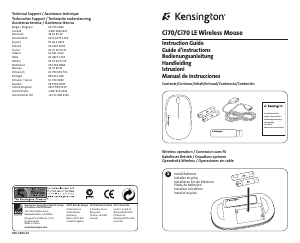
Mode d’emploi Kensington 72301EU Ci70 Souris

Produits connexes

Catégories associées

×
Download