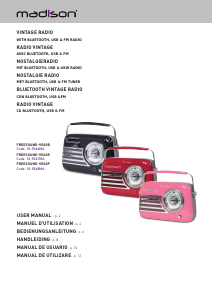
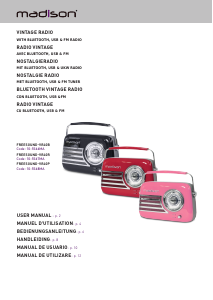
Mode d’emploi Madison FREESOUND-VR40B Radio

Besoin d'un mode d’emploi pour votre Madison FREESOUND-VR40B Radio ? Ci-dessous, vous pouvez consulter et télécharger gratuitement le mode d’emploi PDF en français. Ce produit a actuellement 2 questions fréquemment posées, 0 commentaires et 0 votes. Si ce n'est pas le mode d’emploi que vous souhaitez, veuillez nous contacter.

Votre produit est défectueux et le mode d’emploi n’offre aucune solution ? Rendez-vous à un Repair Café pour obtenir des services de réparation gratuits.

Mode d’emploi

Loading…

ENGLISH
2
© Copyright LOTRONIC 2022
RECHARGEABLE VINTAGE RADIO WITH BLUETOOTH, USB & FM RADIO 30W
INSTRUCTION MANUAL
Please read the manual carefully and keep it for future reference.
Accordance with the requirements of CE standard
The product is for indoor use only
Important Safety instructions and danger warnings
All safety instructions and warnings must be adhered to. They are part of the manual and must be kept with
the manual.
The appliance is approved for operation in dry, closed rooms only . Do not operate the device nearby wa-
ter, such as in bathrooms or nearby swimming pools.
The appliance may not be exposed to extreme temperatures (< +5°C / > +35°C) in operation.
The appliance may not be subjected to strong vibrations or heavy mechanical strain.
The appliance may not be exposed to excessive moisture (due to dripping or sprayed water, for example).
Do not place any recipients 󰊟lled with liquids, such as glasses or vases, on top of or directly next to the
appliance. They could fall over, causing water to enter the appliance. Never pour out liquids above the ap
-
pliance. Do not place any small objects, such as coins or paper clips, on the appliance since they could fall
inside the appliance.
Never place the appliance on an unstable or movable surface. Persons could be injured or the appliance da-
maged by it falling down.
Do not place any naked 󰊠ames such as those of burning candles on or next to the appliance.
Only use the appliance in a moderate climate, not in tropical environments.
Contents of the carton
1x vintage radio
1x USB charger lead
1x 3.5mm AUX lead
1x manual
RECOMMENDATIONS FOR BATTERIES
This symbol indicates that used batteries should not be disposed of with household waste but deposited in separate
collection points for recycling.
WARNING
Danger of explosion if battery is incorrectly placed. Only replace by the same or equivalent type.
Keep new and old batteries out of the reach of children.
If the battery compartment doesn't close properly, stop using the product and keep it out of the reach of children.
BEFORE FIRST USE CHARGE THE BATTERY
Plug the mini-USB connector of the USB charging lead into the 5V DC socket on the rear panel of the radio and
the other end into a suitable USB port or a mains adaptor.
NOTE: Please shut down the power switch after you have 󰊟nished using the system.
IMPORTANT NOTE ON LITHIUM-ION BATTERIES
1. PRIOR to using the unit for the 󰅰rst time, please charge fully the battery
2. Charge the battery regularly after each use. Don’t wait until it is discharged!
3. DON’T allow the battery to discharge completely, otherwise it will lose 20% of its capacity or even be totally damaged!
If the voltage becomes too low, the internal circuits are not powered anymore and it will become impossible to recharge the
battery!
4. If you don’t use the unit for a longer period of time, it is recommended to charge it at 40% of its capacity and check/
charge it once per month.
** BATTERIES ARE NOT COVERED BY THE WARRANTY **
We cannot be held responsible for damaged batteries further to the non-observance of these basic rules.
Pairing the speaker with a Bluetooth enabled device
Keep the speaker and the Bluetooth device within 1m of each other during the pairing process. Press the power
button (1) to turn on, a sound will be heard to indicate that the speaker is on. Press the power button (1) to turn
the radio o󰊞. The Bluetooth LED indicator will 󰊠ash quickly in blue. Set your mobile phone or other Bluetooth
enabled device to search for Bluetooth devices. When the Bluetooth device 󰊟nds the device, select “FREE-
SOUND-VR40 ". After successful pairing, a tone will be heard and the Bluetooth LED indicator will slowly 󰊠ash
blue. If a previously paired device is within the range when the speaker is turned ON, the speaker will connect
to it automatically.
Télécharger mode d’emploi en Français (PDF, 2.72 MB)
(Tenez compte de l’environnement et imprimez ce manuel uniquement si c’est vraiment nécessaire)

Loading…

Évaluation

Dites-nous ce que vous pensez du Madison FREESOUND-VR40B Radio en laissant une note de produit. Vous voulez partager vos expériences avec ce produit ou poser une question ? Veuillez laisser un commentaire au bas de la page.
Etes-vous satisfait du Madison FREESOUND-VR40B Radio ?
Oui Non
Soyez le premier à évaluer ce produit
0 évaluations

Joignez-vous à la conversation sur ce produit

Ici, vous pouvez partager ce que vous pensez du Madison FREESOUND-VR40B Radio. Si vous avez une question, lisez d’abord attentivement le mode d’emploi. La demande d’un mode d’emploi peut être effectuée en utilisant notre formulaire de contact.

En savoir plus sur ce mode d’emploi

Nous comprenons qu’il est agréable d’avoir un mode d’emploi papier pour vos Madison FREESOUND-VR40B Radio. Vous pouvez toujours télécharger le mode d’emploi depuis notre site Web et l’imprimer vous-même. Si vous souhaitez disposer d’un mode d’emploi original, nous vous recommandons de contacter Madison. Ils pourront peut-être fournir un mode d’emploi original. Recherchez-vous le mode d’emploi de votre Madison FREESOUND-VR40B Radio dans une autre langue ? Choisissez votre langue préférée sur notre page d’accueil et recherchez le numéro de modèle pour voir si nous l’avons disponible.

Caractéristiques

Marque Madison
Modèle FREESOUND-VR40B
Catégorie Radios
Type de fichier PDF
Taille du fichier 2.72 MB

Tous les modes d’emploi pour Madison Radios
Plus de modes d’emploi de Radios

Foire aux questions sur Madison FREESOUND-VR40B Radio

Notre équipe d’assistance recherche des informations utiles sur les produits et des réponses aux questions fréquemment posées. Si vous trouvez une inexactitude dans notre foire aux questions, veuillez nous le faire savoir en utilisant notre formulaire de contact.

Qu’est-ce que DAB+ ? Vérifié

DAB+ est le successeur du signal FM et signifie « Digital Audio Broadcasting. » (radiodiffusion sonore numérique). Il s’agit d'un signal numérique autorisant plusieurs chaînes dans la même bande passante et permettant un changement plus facile entre les chaînes.

Cela a été utile (302) En savoir plus

Quelle est la différence entre FM et AM ? Vérifié

FM et AM sont deux formes de modulation utilisées pour transmettre un signal. FM signifie « Frequency Modulation » (modulation de fréquence) et « AM » signifie « Amplitude Modulation » (modulation d’amplitude. AM est la plus ancienne forme de modulation. La plus grande différence réside dans le fait que le signal FM est bien plus fort que le signal AM.

Cela a été utile (243) En savoir plus
Mode d’emploi Madison FREESOUND-VR40B Radio

Produits connexes

Catégories associées

×
Download