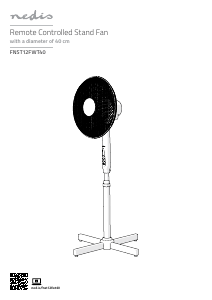
Mode d’emploi Nedis FNST12FWT40 Ventilateur

Besoin d'un mode d’emploi pour votre Nedis FNST12FWT40 Ventilateur ? Ci-dessous, vous pouvez consulter et télécharger gratuitement le mode d’emploi PDF en français. Ce produit a actuellement 2 questions fréquemment posées, 1 commentaire et a 1 vote avec une note moyenne du produit de 0/100. Si ce n'est pas le mode d’emploi que vous souhaitez, veuillez nous contacter.

Votre produit est défectueux et le mode d’emploi n’offre aucune solution ? Rendez-vous à un Repair Café pour obtenir des services de réparation gratuits.

Mode d’emploi

Loading…
4
a
Quick start guide
Remote Controlled
Stand Fan
FNST12FWT40
For more information see the extended manual
online: ned.is/fnst12fwt40
Intended use
This product is exclusively intended as a fan for indoor use only.
This product is intended for normal household use only. This product
is not intended for: shops, light industry or on farms.
The FNST12FWT40 is a fan with 3 dierent speeds.
Any modication of the product may have consequences for safety,
warranty and proper functioning.
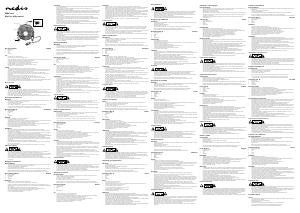
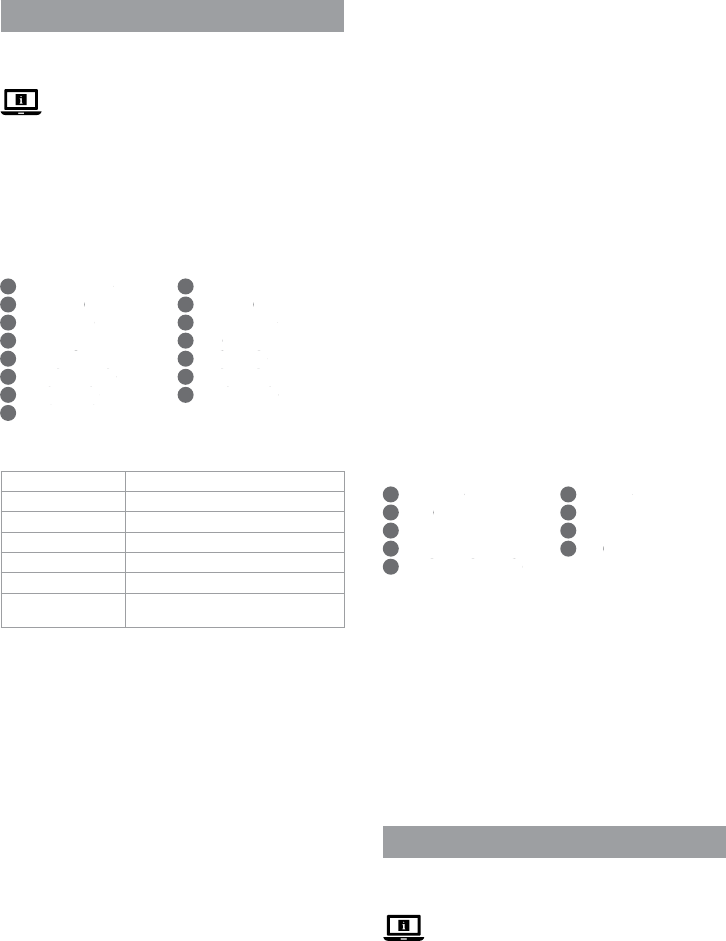
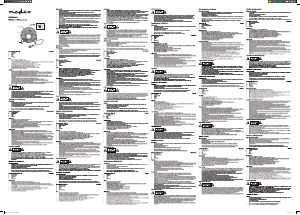
Main parts (image A)
Oscillation button
Fan housing
Locking screw
Base stand
Power cable
On / Speed button
Timer indicator
Power indicator
Fan speed indicator

O button

Mode indicator

IR in

Mode button

Timer button

Remote control
Specications
Product Remote Controlled Stand Fan
Article number FNST12FWT40
Dimensions (l x w x h) 60 x 60 x 125 cm
Weight 2.4 kg
Input voltage 230 VAC ~ 50 Hz
Power 45 W
Remote control
battery type
2x 1.5 V AAA (not included)
Safety instructions
-
WARNING
Only use the product as described in this manual.
Read the manual carefully before use. Keep the manual for future
reference.
Do not use the product if a part is damaged or defective. Replace
a damaged or defective device immediately.
Do not expose the product to direct sunlight, naked ames or
heat.
Do not expose the product to water or moisture.
Do not drop the product and avoid bumping.
Do not open the product.
Keep the product out of reach from children.
Do not insert a hand or other objects in the fan blades when the
fan is switched on.
Children of less than 3 years should be kept away unless
continuously supervised.
Do not use a damaged product.
Children aged from 3 years and less than 8 years shall only switch
on/o the product provided that it has been placed or installed
in its intended normal operating position and they have been
given supervision or instruction concerning use of the product in
a safe way and understand the hazards involved. Children aged
from 3 years and less than 8 years shall not plug in, regulate and
clean the product or perform user maintenance.
This product can be used by children aged from 8 years and
above and persons with reduced physical, sensory or mental
capabilities or lack of experience and knowledge if they have
been given supervision or instruction concerning use of the
product in a safe way and understand the hazards involved.
Children shall not play with the product. Cleaning and user
maintenance shall not be done by children without supervision.
Do not cover the product.
Do not splash water onto the product.
Do not let water enter the product.
Do not place the product on moving vehicles or somewhere easy
to be tipped over.
Do not move the product during operation.
Keep the product far away from loose products (e.g. curtains,
plastic bags, paper) that can cover the air inlet easily.
Unplug the power cord when the product is not in use for a long
time.
When using an extension cord, use one which is as short as
possible and fully extended.
Do not use the product using an on/o timer or other equipment
which can automatically switch the device on.
Do not locate the product immediately below a power outlet.
This product may only be serviced by a qualied technician for
maintenance to reduce the risk of electric shock.
Do not unplug the product by pulling on the cable. Always grasp
the plug and pull.
Do not use the product in rooms where ammable liquids or
gases are used or stored.
Installing the product (image B)
Motor shaft
Latch
Nut
Rear grill
Rear grill mounting nut
Fan blade
Fan blade nut
Front grill
Bolt
1. Follow the instructions (see image B).
-
Make sure to tighten the locking screw A
3
.
2. Assemble B
45678
to the motor shaft B
1
.
-
Make sure to tighten the fan blade nut B
7
.
3. Close the 4 latches B
2
.
4. Fasten the front grill B
8
to the rear grill B
4
with the bolt B
9
and nut B
3
.
Using the product
Connect the power cable A5 to a power outlet.
You can control the fan using the buttons on the stand, or using the
included remote control A
y.
c
Kurzanleitung
Ferngesteuerter
Standventilator
FNST12FWT40
Weitere Informationen nden Sie in
der erweiterten Anleitung online:
ned.is/fnst12fwt40
Bestimmungsgemäße Verwendung
Dieses Produkt ist exklusiv zur Verwendung als Ventilator innerhalb
von Gebäuden gedacht.
Dieses Produkt ist nur für den Hausgebrauch bestimmt. Dieses
Produkt ist nicht gedacht für: Geschäfte, Beleuchtungsindustrie oder
Bauernhöfen.
Télécharger mode d’emploi en Français (PDF, 1.9 MB)
(Tenez compte de l’environnement et imprimez ce manuel uniquement si c’est vraiment nécessaire)

Loading…

Évaluation

Dites-nous ce que vous pensez du Nedis FNST12FWT40 Ventilateur en laissant une note de produit. Vous voulez partager vos expériences avec ce produit ou poser une question ? Veuillez laisser un commentaire au bas de la page.
Etes-vous satisfait du Nedis FNST12FWT40 Ventilateur ?
Oui Non
0%
100%
1 évaluation

Joignez-vous à la conversation sur ce produit

Ici, vous pouvez partager ce que vous pensez du Nedis FNST12FWT40 Ventilateur. Si vous avez une question, lisez d’abord attentivement le mode d’emploi. La demande d’un mode d’emploi peut être effectuée en utilisant notre formulaire de contact.

Olislagers 27-06-2022
Ce ventilateur Nedis ne fonctionne pas en mode SL. Il exécute exactement le même programme qu'en mode NA et ce n'est pas possible. Il serait donc (selon le service après-vente Nedis en position SL-mode un silencieux et silencieux effectuer un programme de soufflage, (donc plus silencieux qu'en position 1 -des trois positions normales, 1-2-3. puis-je obtenir une réponse à cela?

répondre | Cela a été utile (0) (Traduit par google)

En savoir plus sur ce mode d’emploi

Nous comprenons qu’il est agréable d’avoir un mode d’emploi papier pour vos Nedis FNST12FWT40 Ventilateur. Vous pouvez toujours télécharger le mode d’emploi depuis notre site Web et l’imprimer vous-même. Si vous souhaitez disposer d’un mode d’emploi original, nous vous recommandons de contacter Nedis. Ils pourront peut-être fournir un mode d’emploi original. Recherchez-vous le mode d’emploi de votre Nedis FNST12FWT40 Ventilateur dans une autre langue ? Choisissez votre langue préférée sur notre page d’accueil et recherchez le numéro de modèle pour voir si nous l’avons disponible.

Caractéristiques

Marque Nedis
Modèle FNST12FWT40
Catégorie Ventilateurs
Type de fichier PDF
Taille du fichier 1.9 MB

Tous les modes d’emploi pour Nedis Ventilateurs
Plus de modes d’emploi de Ventilateurs

Foire aux questions sur Nedis FNST12FWT40 Ventilateur

Notre équipe d’assistance recherche des informations utiles sur les produits et des réponses aux questions fréquemment posées. Si vous trouvez une inexactitude dans notre foire aux questions, veuillez nous le faire savoir en utilisant notre formulaire de contact.

Quel est le meilleur endroit pour un placer un ventilateur ? Vérifié

S'il y a une source d'air froid, comme un climatiseur, vous pouvez utiliser un ventilateur pour mieux et davantage distribuer cet air froid. Si seul le ventilateur est utilisé, il est conseillé de l'installer à hauteur de la tête. La tête est l’une des parties du corps qui transpire le plus et l’air en mouvement aide à dissiper la chaleur. Cela procure un effet de refroidissement maximal.

Cela a été utile (229) En savoir plus

Un ventilateur peut-il influencer la température de la pièce ? Vérifié

Non, un ventilateur ne fait que déplacer l'air, ce qui assure un effet de refroidissement sur la peau.

Cela a été utile (229) En savoir plus
Mode d’emploi Nedis FNST12FWT40 Ventilateur

Produits connexes

Catégories associées

×
Download