Mode d’emploi Olympus DS-7000 Enregistreur numérique

Besoin d'un mode d’emploi pour votre Olympus DS-7000 Enregistreur numérique ? Ci-dessous, vous pouvez consulter et télécharger gratuitement le mode d’emploi PDF en français. Ce produit a actuellement 0 questions fréquemment posées, 0 commentaires et 0 votes. Si ce n'est pas le mode d’emploi que vous souhaitez, veuillez nous contacter.

Votre produit est défectueux et le mode d’emploi n’offre aucune solution ? Rendez-vous à un Repair Café pour obtenir des services de réparation gratuits.

Mode d’emploi

Loading…
4
EN CS DA DE ES FR NL PL RU SV
f Caution:
• Unplug the AC adapter or power
cord from the docking station
and AC outlet when not using for
extended periods of time. If this
precaution is not followed and the
docking station is damaged then
fire may occur.
AC adapter
f Danger:
• Be sure to use the AC adapter with
the proper voltage (AC 100 - 240
V). Using it with other voltage
levels may cause fire, explosion,
overheating, electric shock or injury.
• For safety, be sure to unplug
the AC adapter from the outlet
before performing maintenance
or cleaning. Also, never plug in or
disconnect the power plug with a
wet hand. This may cause electric
shock or injury.
f Warning:
• Do not attempt to disassemble,
repair or modify the AC adapter in
any way.
• Keep foreign objects including
water, metal, or flammable
substances from getting inside the
product.
• Do not moisten the AC adapter or
touch it with a wet hand.
• Do not use the AC adapter in the
vicinity of flammable gas (including
gasoline, benzine and lacquer
thinner).
• Always stop recording before
connecting or disconnecting the
power supply plug.
• When the AC adapter is not in use,
disconnect the power supply plug
from the power outlet.
• Use only power supply of the
correct voltage, as indicated on the
adapter.
In case:
• ... the internal parts of the AC
adapter are exposed because it
has been dropped or otherwise
damaged:
• ... the AC adapter is dropped in
water, or if water, metal flammable
substances or other foreign objects
get inside it:
• ... you notice anything unusual
when using the AC adapter such as
abnormal noise, heat, smoke, or a
burning odor:
1 do not touch any of the exposed
parts;
2 immediately disconnect the
power supply plug from the
power outlet, and;
3 call your dealer or local Olympus
representative for servicing.
Continued use of the AC adapter
under these circumstances could
result in electric shock, fire or
injury.
f Caution:
• Do not use the AC adapter if the
power plug is damaged or the
plug is not completely connected
to the outlet. This may cause fire,
overheating, electric shock, short
circuit or damage.
• Unplug the AC Adapter from
AC outlet when not using. If this
precaution is not followed, fire,
overheating or electric shock may
occur.
• Make sure to hold the plug when
removing the power plug from
the outlet. Do not bend the cord
excessively or put heavy objects on
it. This may cause fire, overheating,
electric shock or damage.
LCD monitor
• The LCD used for the monitor
is made with high-precision
technology. However, black spots
or bright spots of light may appear
on the LCD Monitor. Due to its
characteristics or the angle at which
you are viewing the monitor,
the spot may not be uniform in
color and brightness. This is not a
malfunction.
Memory Card
f Warning:
• Do not touch the card contacts. This
may damage the card.
• Do not place the card in locations
with static electricity.
• Store the card in a location that is
out of the reach of children. In case
of accidental ingestion, consult a
physician immediately.
Getting started
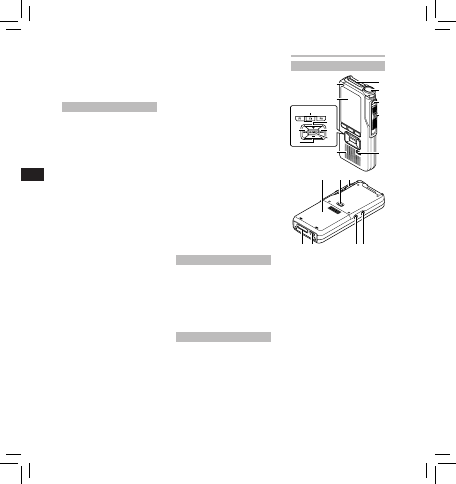
Identification of parts
6
7
$
1
2
3
4
!
8
9
5
@
0
)
(*
&
^%
-
#
1 SD card slot
2 Built-in microphone
3
NEW
button
4 Slide (
REC
/
STOP
/
PLAY
/
REV
)
switch
5
ERASE
button
6 Record indicator light
7 Display (LCD panel)
8
+
(Volume) button
9 Fast Forward ( 9 ) button
0
OK/MENU
button
! Programmable smart
(
F1
,
F2
,
F3
) buttons
@ Rewind ( 0 ) button
#
(Volume) button
$ Built-in speaker
% Battery cover
^ Battery cover release
button
Télécharger mode d’emploi en Français (PDF, 2.99 MB)
(Tenez compte de l’environnement et imprimez ce manuel uniquement si c’est vraiment nécessaire)

Loading…

Évaluation

Dites-nous ce que vous pensez du Olympus DS-7000 Enregistreur numérique en laissant une note de produit. Vous voulez partager vos expériences avec ce produit ou poser une question ? Veuillez laisser un commentaire au bas de la page.
Etes-vous satisfait du Olympus DS-7000 Enregistreur numérique ?
Oui Non
Soyez le premier à évaluer ce produit
0 évaluations

Joignez-vous à la conversation sur ce produit

Ici, vous pouvez partager ce que vous pensez du Olympus DS-7000 Enregistreur numérique. Si vous avez une question, lisez d’abord attentivement le mode d’emploi. La demande d’un mode d’emploi peut être effectuée en utilisant notre formulaire de contact.

En savoir plus sur ce mode d’emploi

Nous comprenons qu’il est agréable d’avoir un mode d’emploi papier pour vos Olympus DS-7000 Enregistreur numérique. Vous pouvez toujours télécharger le mode d’emploi depuis notre site Web et l’imprimer vous-même. Si vous souhaitez disposer d’un mode d’emploi original, nous vous recommandons de contacter Olympus. Ils pourront peut-être fournir un mode d’emploi original. Recherchez-vous le mode d’emploi de votre Olympus DS-7000 Enregistreur numérique dans une autre langue ? Choisissez votre langue préférée sur notre page d’accueil et recherchez le numéro de modèle pour voir si nous l’avons disponible.

Caractéristiques

Marque Olympus
Modèle DS-7000
Catégorie Enregistreurs numériques
Type de fichier PDF
Taille du fichier 2.99 MB

Tous les modes d’emploi pour Olympus Enregistreurs numériques
Plus de modes d’emploi de Enregistreurs numériques
Mode d’emploi Olympus DS-7000 Enregistreur numérique

Produits connexes

Catégories associées

×
Download