6
EN
8
6
1 2
7
9
1
2
3
p
1
4
5
5
1
342
3
6
1
1
• This manual is a basic version. Please
refer to the complete advanced
manual either from the stored data
in the [OL_MANUAL] folder of the
recorder or download the data from
the OLYMPUS website.
• The contents of this document
may be changed in the future
without advanced notice. Contact
our Customer Support Center for
the latest information relating
to product names and model
numbers.
• The utmost care has been taken to
ensure the integrity of the contents
of this document. In the unlikely
event that a questionable item,
error, or omission is found, please
contact our Customer Support
Center.
• Any liability for passive damages or
damage of any kind occurred due to
data loss incurred by a defect of the
product, repair performed by the
third party other than Olympus or an
Olympus authorized service station,
or any other reason is excluded.
Trademarks and registered trademarks:
• Microsoft, Windows
and Windows Media
are registered
trademarks of
Microsoft Corporation.
• Macintosh is the trademark of Apple
Inc.
Safe and Proper Usage
Before using your new recorder,
read this manual carefully to ensure
that you know how to operate it
safely and correctly. Keep this
manual in an easily accessible
location for future reference.
• The warning symbols indicate
important safety related
information. To protect yourself
and others from personal injury or
damage to property, it is essential
that you always read the warnings
and information provided.
Getting Started
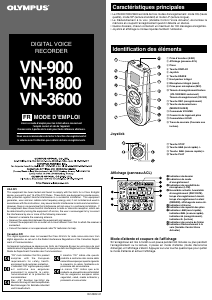
Identification of Parts
1 Built-in Microphone
2
MIC
(Microphone) jack
3
HOLD
switch
4 USB terminal
5
STOP
(4 ) button
6
PLAY
/
OK
(`) button
7 0 (Rewind) button
8 Battery cover
9
FOLDER
/
INDEX
button
0
EAR
(Earphone) jack
! Display (LCD panel)
@ Record/play indicator light
#
REC
(s ) button
$
+
button
% 9 (Fast Forward) button
^
–
button
&
DISP
/
MENU
button
*
ERASE
(s ) button
( Strap hole
• Strap is not supplied. Use the
optional accessory.
Display (LCD panel):
1 Folder indicator
2 [
] Microphone sensitivity
indicator
[
] LowCut filter indicator *
[
] Variable Control Voice
Actuator indicator
[
] Record mode indicator
[K] Fast playback indicator
[J] Slow playback indicator
[
] Segment repeat playback
indicator*
3 Guide indicator
4 Character information display
Recording level meter
5 Battery indicator
6 Erase lock indicator
7 Current file number
*
For VN-6500PC only.
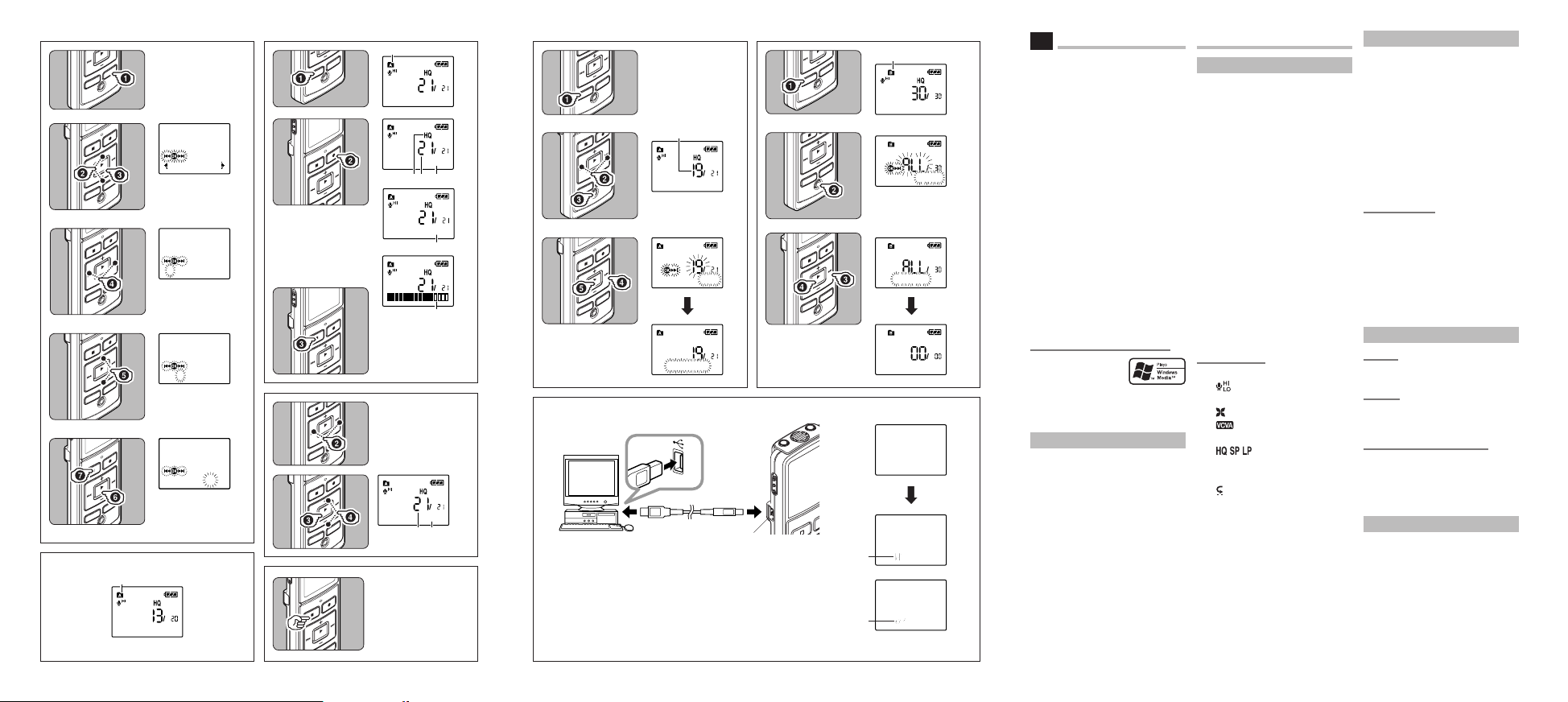
Inserting Batteries (Fig. 1)
1 Lightly press down on the arrow and
slide the battery cover open.
2 Insert two size-AAA alkaline batter-
ies, observing the correct polarity.
3 Close the battery cover completely.
• When the HOLD switch is set to
the direction of the arrow, the
display is turned off after [HOLD]
is displayed. Follow the next step
without regard to it.
An optional Ni-MH Rechargeable
Battery (BR401) from Olympus can
be used for the recorder.
Replacing Batteries:
When [N] appears on the display,
replace the batteries as soon as
possible. Size-AAA alkaline batteries
are recommended. When the batteries
are depleted, [O] appears on the
display, and the recorder shuts off.
• To replace the battery, make sure
that you set the HOLD switch to
the opposite direction of the arrow
before replacing.
Power Supply (Fig. 2)
Power on:
Slide the
HOLD
switch in the direction op-
posite that indicated by the arrow.
Power off:
Slide the
HOLD
switch in the direction
indicated by the arrow while the recorder is
not in operation.
Standby Mode and Display Shut Off:
If the recorder is stopped for 5 minutes
or longer during recording or playing,
it goes into Standby (power-save)
mode, and the display shuts off. To exit
Standby mode and turn on the display,
press any button.
Setting Time and Date [TIME] (Fig.
3
)
When you install batteries for
the first time or each time you
replace the batteries, the “Month”
indication will flash. In such a case,
be sure to set the time and date
by following steps 4 through 6
described below.
1 Press and hold the
DISP
/
MENU
button for 1 second or longer to the
main menu.
2 Press the 9 or 0 button to
select [
Sub Menu
].
Introduction
EN


Joignez-vous à la conversation sur ce produit
Ici, vous pouvez partager ce que vous pensez du Olympus VN-5500PC Enregistreur numérique. Si vous avez une question, lisez d’abord attentivement le mode d’emploi. La demande d’un mode d’emploi peut être effectuée en utilisant notre formulaire de contact.
répondre | Cela a été utile (1)