NL
L
N
RED
BLUE
BROWN
PROXIMITY SWITCH PROXIMAT
USAGE INSTRUCTIONS
DESCRIPTION
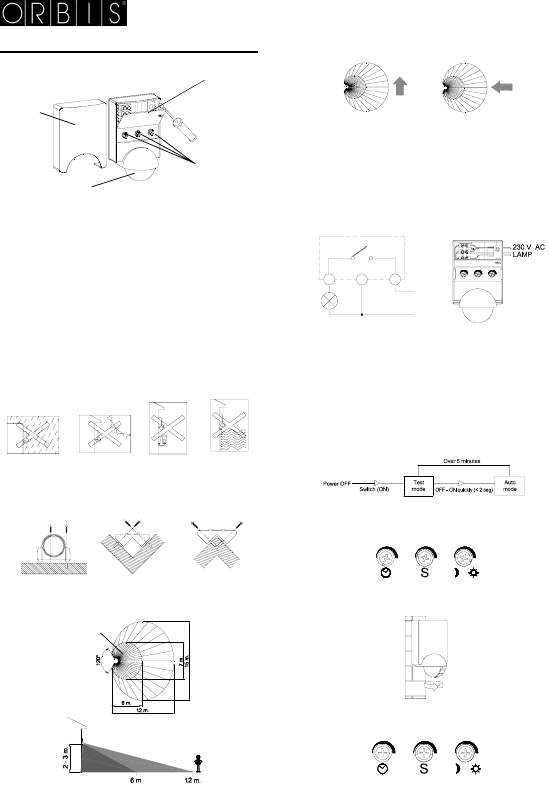
The PROXIMAT proximity switch captures invisible infrared light from
people or other heat sources, but without emitting any type of radiation.
When a heat source moves in front of a PROXIMAT proximity switch, its
output circuit will be activated and once it no longer captures this
movement it will be deactivated after an adjustable time delay.
The PROXIMAT proximity switch will only react in this way when the
environmental light conditions are below a pre-established level.
INSTALLATION
WARNING: The assembly and installation of the electrical equipment
must only be carried out by an authorised installer.
THE POWER SUPPLY MUST BE SWITCHED OFF BEFORE
COMMENCING THE INSTALLATION.
The unit is internally protected by a safety circuit against interference.
However, very strong magnetic fields can modify its operation. It should
not, therefore, be installed close to inductive loads, such as motors,
transformers and telephony antennas etc.
MOUNTING
On a wall, taking care to avoid highly reflective surfaces, such as liquids
and marble etc, elements that are subject to sharp changes in
temperature (heating, air conditioning or any possible air currents) or
light sources.
Includes fastening accessory for inner and outer corners.
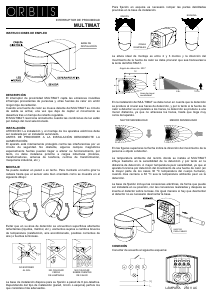
The ideal mounting height is between two and three metres and the heat
source movement should be transversal to the PROXIMAT lens.
The PROXIMAT proximity switch installation should take into account
that detection is produced by the crossing of the detection beams, and
therefor, if the heat source to be detected is parallel to be beams, the
detection will be produced at a closer distance because it can come
much closer before being detected since it does not cross the beams.
In the above figures, the arrows show the direction of the person or
object to be detected.
The ambient temperature where the PROXIMAT is installed can
significantly affect detection sensitivity and hence, the detection
distance. Higher temperatures means reduced sensitivity because the
apparatus operates by detecting the movement of a heat source (in most
cases, this temperature is 36 ºC, that of the human body), the closer the
ambient temperature is to 36 ºC, the poorer the detection.
CONNECTION
The unit should be connected as shown below
PUTTING INTO OPERATION. ADJUSTMENTS
Read this carefully before putting the PROXIMAT proximity switch into
service.
When connecting for the first time, or after prolonged period of switch off,
the unit will enter the TEST mode.
In this mode, the unit will independently detect the adjusted light level
and always with ten seconds timing, which will facilitate detection field
adjustment.
After five minutes, the unit will automatically pass to AUTO mode and
allow the time and light level to be adjusted.
AUTO can be entered after the five minutes by quickly switching off and
on (less than two seconds).
Then slowly rotate to the right until the lighting is switched on.
The front of the PROXIMAT proximity switch contains the selectors: “”
for delay time adjustment, “S” for detection sensitivity and “ ☼” for
luminosity adjustment.
ADJUSTING THE DETECTION FIELD
The head can be rotated through 180º moving the detection zone as
shown in the figure:
The following steps are required for detection field adjustment:
- Turn selector “S” to the maximum position.
- Turn the selector “ ☼” to the “☼” position.
- Set selector “” to minimum.
Check coverage by moving within the detection field limits.
ADJUSTMENT
BUTTONS
CONNECTION COVER
LENS
PROTECTIVE
COVER
PROTECT
FROM RAIN
DO NOT
EXPOSE TO
SUNLIGHT
DO NOT
INSTALL
CLOSE TO
LAMPS
DO NOT INSTALL
OVER HEAT
SOURCES
GREATER SENSITIVITY LESS SENSITIVITY
AREA OF GREATEST
SENSITIVITY




Joignez-vous à la conversation sur ce produit
Ici, vous pouvez partager ce que vous pensez du Orbis Proximat Détecteur de mouvement. Si vous avez une question, lisez d’abord attentivement le mode d’emploi. La demande d’un mode d’emploi peut être effectuée en utilisant notre formulaire de contact.