Mode d’emploi Panasonic WH-SXF12D6E5-1 Pompe à chaleur

Besoin d'un mode d’emploi pour votre Panasonic WH-SXF12D6E5-1 Pompe à chaleur ? Ci-dessous, vous pouvez consulter et télécharger gratuitement le mode d’emploi PDF en français. Ce produit a actuellement 0 questions fréquemment posées, 0 commentaires et 0 votes. Si ce n'est pas le mode d’emploi que vous souhaitez, veuillez nous contacter.

Votre produit est défectueux et le mode d’emploi n’offre aucune solution ? Rendez-vous à un Repair Café pour obtenir des services de réparation gratuits.

Mode d’emploi

Loading…
6
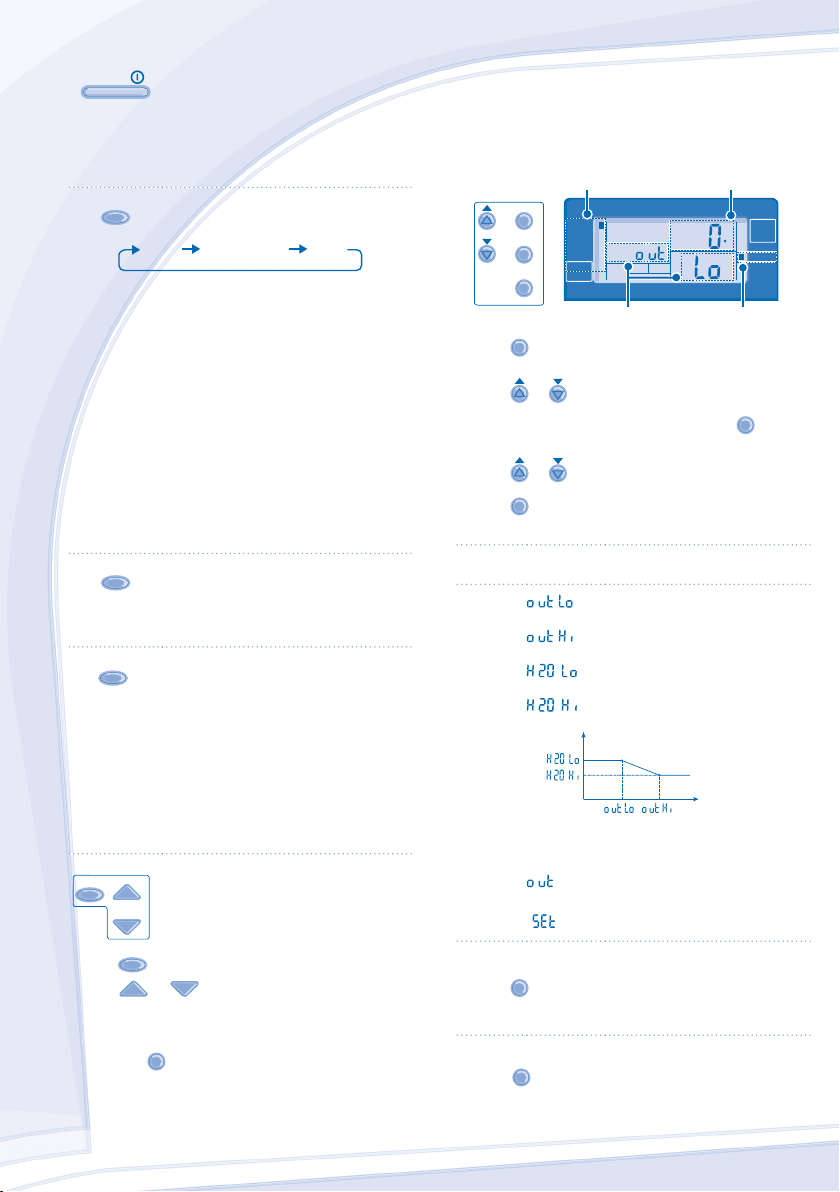
BASIC OPERATION
OFF
/
ON
TO TURN ON OR OFF THE UNIT
When unit is ON, operation LED is lit and the actual
temperature for water outlet and outdoor ambient are
shown on the control panel display.
MODE
TO SELECT OPERATION MODE
HEAT HEAT+TANK TANK
HEAT MODE
- To turn ON or OFF the panel/ oor heating operation.
- In this mode, the outdoor unit will provide heating
capacity to the indoor unit.
HEAT + TANK MODE
- In this mode, the outdoor unit will provide heating
capacity to the sanitary tank and indoor unit.
- This operation is not used when the sanitary water
tank is not installed.
TANK MODE
- To turn ON or OFF the sanitary tank operation.
- In this mode, the outdoor unit will provide heating
capacity to the sanitary tank.
QUIET
TO ENJOY QUIET ENVIRONMENT
This operation reduces outdoor unit noise. In this
condition, it may cause decrease in heating capacity.
HEATER
TO ENABLE THE BACKUP
HEATER
The backup heater provides extra heating capacity
during cold outdoor temperature and only can operated
at heat mode operation for indoor unit when he was
enabled by pushing this button.
The backup heater will automatically turn ON when the
setting conditions is ful lled.
To disabled the Heater operation manually, press the
respective button again.
STATUS
SEARCH
CHECK
SYSTEM STATUS CHECK MODE
1. Press
CHECK
for 5 seconds to enter STATUS mode.
2. Press or to check the Water Inlet
Temperature, Tank Temperature, Compressor Running
Frequency or Error History.
• Press
C
AN
C
E
L
to exit STATUS mode.
Once STATUS mode is entered, “STATUS”
indicator is ON.
STATUS mode cannot be activated when the
“SETTING” indicator is ON.
It is strongly recommended to contact the nearest
authorized dealer to change the water temperature range.
Using the control panel could set the temperature
range for water outlet temperature and outdoor ambient
temperature.
SYSTEM SETTING MODE
SET
SELECT
CANCEL
SETTING
TIMER OUTDOOR
HEAT
SETTING
STATUS
SERVICE
BOOSTER
DEFROST
QUIET
TANK
WATER OUTLET
C
HEATER
OPERATION
FORCE
HEATER
ACTUAL
ON
Operation Mode Temperature display
SETTING indicator
Parameter *
1. Press
SET
for 5 seconds to enter “SETTING” mode.
“SETTING” indicator is ON.
2. Press
or to choose a parameter.
3. After selecting the desired parameter, press
SELECT
to enter
the parameter.
4. Press
or to set the desired temperature.
5. Press
SET
again to con rm the setting.
Repeat steps 2 to 5 to set other parameters.
Operation
Mode
Parameter * Description
HEAT
Low outdoor ambient set temperature
(-15°C ~ 15°C).
HEAT
High outdoor ambient set temperature
(-15°C ~ 15°C).
HEAT
Water outlet set temperature at low outdoor
ambient temperature (25°C ~ 55°C).
HEAT
Water outlet set temperature at high outdoor
ambient temperature (25°C ~ 55°C).
Water Temperature
Outdoor Temperature
HEAT
OFF
Set temperature for turning OFF heating
operation (5°C ~ 35°C).
HEATER
ON
Outdoor ambient set temperature for turning
ON heater operation (-15°C ~ 20°C).
TANK
Sanitary tank set temperature
(40°C ~ 75°C).
WATER TEMPERATURE THERMO SHIFT SETTING
1. Press
SET
within 5 seconds.
Repeat steps 3 to 5 to set the desired shift temperature
(-5°C ~ 5°C).
Notes:
• Press
C
AN
C
E
L
or wait 30 seconds to exit “SETTING” mode.
The setting temperature will be stored in the system once
con rm.
“SETTING” mode cannot be activated when the
“SERVICE” and “STATUS” indicator is ON.
ADVANCE OPERATION
F568562_YS0112-0.indb 6F568562_YS0112-0.indb 6 16-Mar-12 9:42:07 AM16-Mar-12 9:42:07 AM
Process CyanProcess CyanProcess MagentaProcess MagentaProcess YellowProcess YellowProcess BlackProcess BlackPANTONE 293 CPANTONE 293 C
Télécharger mode d’emploi en Français (PDF, 2.94 MB)
(Tenez compte de l’environnement et imprimez ce manuel uniquement si c’est vraiment nécessaire)

Loading…

Évaluation

Dites-nous ce que vous pensez du Panasonic WH-SXF12D6E5-1 Pompe à chaleur en laissant une note de produit. Vous voulez partager vos expériences avec ce produit ou poser une question ? Veuillez laisser un commentaire au bas de la page.
Etes-vous satisfait du Panasonic WH-SXF12D6E5-1 Pompe à chaleur ?
Oui Non
Soyez le premier à évaluer ce produit
0 évaluations

Joignez-vous à la conversation sur ce produit

Ici, vous pouvez partager ce que vous pensez du Panasonic WH-SXF12D6E5-1 Pompe à chaleur. Si vous avez une question, lisez d’abord attentivement le mode d’emploi. La demande d’un mode d’emploi peut être effectuée en utilisant notre formulaire de contact.

En savoir plus sur ce mode d’emploi

Nous comprenons qu’il est agréable d’avoir un mode d’emploi papier pour vos Panasonic WH-SXF12D6E5-1 Pompe à chaleur. Vous pouvez toujours télécharger le mode d’emploi depuis notre site Web et l’imprimer vous-même. Si vous souhaitez disposer d’un mode d’emploi original, nous vous recommandons de contacter Panasonic. Ils pourront peut-être fournir un mode d’emploi original. Recherchez-vous le mode d’emploi de votre Panasonic WH-SXF12D6E5-1 Pompe à chaleur dans une autre langue ? Choisissez votre langue préférée sur notre page d’accueil et recherchez le numéro de modèle pour voir si nous l’avons disponible.

Caractéristiques

Marque Panasonic
Modèle WH-SXF12D6E5-1
Catégorie Pompes à chaleur
Type de fichier PDF
Taille du fichier 2.94 MB

Tous les modes d’emploi pour Panasonic Pompes à chaleur
Plus de modes d’emploi de Pompes à chaleur
Mode d’emploi Panasonic WH-SXF12D6E5-1 Pompe à chaleur

Produits connexes

Catégories associées

×
Download