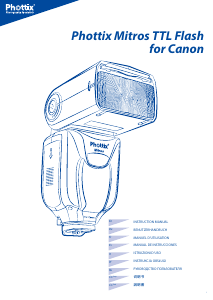
Mode d’emploi Phottix Mitros TTL (Sony) Flash

Besoin d'un mode d’emploi pour votre Phottix Mitros TTL (Sony) Flash ? Ci-dessous, vous pouvez consulter et télécharger gratuitement le mode d’emploi PDF en français. Ce produit a actuellement 1 de question fréquemment posée, 0 de commentaires et 0 votes. Si ce n'est pas le mode d’emploi que vous souhaitez, veuillez nous contacter.

Votre produit est défectueux et le mode d’emploi n’offre aucune solution ? Rendez-vous à un Repair Café pour obtenir des services de réparation gratuits.

Mode d’emploi

Loading…
3
En
INSTRUCTION MANUAL
Please note:
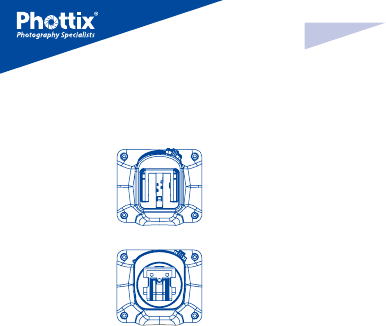
There are 2 types of hot shoe for Mitros for Sony ash. Please make sure to
choose the right one for your camera.
Type 1 = Older Style Minolta Hot Shoe
Type 2 = New Style ISO Hot Shoe
This instruction assumes:
1. Both the ash and camera are switched on.
2. The ash and camera are set to the same settings.
3. Camera menu and ash custom functions menu are set to default values.
4. The ash is being used with a compatible Sony DSLR.
Installing batteries
1. Press the battery cover in while pushing it towards the bottom of the ash.
The battery cover will open and raise.
2. Insert AA batteries as shown by the diagram inside the battery compartment.
3. Lower the battery cover and push back towards the top of the ash, locking
it in place.
Please note:
- Please use four standard high-quality batteries of the same brand. Make
sure all batteries are at similar powers levels.
- Batteries can get hot when the ash is being used. Use caution when chang-
ing batteries.
- If you do not use the ash for an extended period of time, store with bat-
teries removed.
Attaching the ash to a camera
Turn o both the camera and ash
1. Align the ash hot shoe with the camera hot shoe.
2. Slide the ash into the camera hot shoe until fully inserted.
3. Lock the ash in position by pushing the locking lever to the right until the
lock engages with a click.
4. To Unlock, press the locking release button on the locking lever and slide to
the left.
Turning the Flash On / O
1. To power on the ash move the power switch to the on position.
2. To power o the ash move the power switch to the o position.
Battery Level Indicator
The Battery Level Indicator on the LCD (see below) will display an approximate
indication of how much power remains in the batteries in the ash. Use this as
a rough guide as to when a battery change is needed. If ash recycling time has
become very long (30 seconds) change the batteries.
Raising and Rotating the Flash Head
1. The ash head will elevate from -7 to 90 degrees with stops at -7, 0, 45, 60, 75
and 90 degrees. Gently raise or lower the ash head into the required position.
2. The ash head will rotate 180 degrees in either direction with stops at 60, 75,
90, 120, 150 and 180 degrees. Gently rotate the ash head into the required
position.
3. When the ash head is raised or rotated from the 0 degree standard forward
position the ash zoom will set itself to 50mm. “- -” will be displayed on the LCD.
Flash zoom when the head is raised or rotated can be changed in MZoom mode
(see below).
4. At -7 degrees the ash zoom will act the same as 0 degree – it will not change
any settings.
Using the Bounce Card or Wide Angle Diuser
The Phottix Mitros Flash comes equipped with a white bounce card and wide
angle diuser panel in the ash head.
1. The wide angle diuser panel will cause the ash to spread light to a 14mm
equivalent.
2. The white bounce card can be used when the ash head is in a raised position
to bounce light forward to assist with catch lights in a subject’s eyes.
To use:
1. Gently pull the diuser panel and bounce card from the ash head using
the ridge on the bottom of the diuser panel.
2. If using the diuser panel it will drop into position over the ash head. Gen-
tly push the bounce card back into the ash head if not needed.
3. If using the bounce card only gently push the diuser panel back into the
ash head.
Using the Flash Head Diuser
The Phottix Mitros TTL Flash comes with an attachable diuser that can be add-
ed to the front of the ash head when needed. It is good for softening light,
reducing hot spots and shadows and better coverage for macro photography.
To use:
1. Align the diuser with the ash head, with the “UP” mark on the diuser
facing up.
Télécharger mode d’emploi en Français (PDF, 10.33 MB)
(Tenez compte de l’environnement et imprimez ce manuel uniquement si c’est vraiment nécessaire)

Loading…

Évaluation

Dites-nous ce que vous pensez du Phottix Mitros TTL (Sony) Flash en laissant une note de produit. Vous voulez partager vos expériences avec ce produit ou poser une question ? Veuillez laisser un commentaire au bas de la page.
Etes-vous satisfait du Phottix Mitros TTL (Sony) Flash ?
Oui Non
Soyez le premier à évaluer ce produit
0 évaluations

Joignez-vous à la conversation sur ce produit

Ici, vous pouvez partager ce que vous pensez du Phottix Mitros TTL (Sony) Flash. Si vous avez une question, lisez d’abord attentivement le mode d’emploi. La demande d’un mode d’emploi peut être effectuée en utilisant notre formulaire de contact.

En savoir plus sur ce mode d’emploi

Nous comprenons qu’il est agréable d’avoir un mode d’emploi papier pour vos Phottix Mitros TTL (Sony) Flash. Vous pouvez toujours télécharger le mode d’emploi depuis notre site Web et l’imprimer vous-même. Si vous souhaitez disposer d’un mode d’emploi original, nous vous recommandons de contacter Phottix. Ils pourront peut-être fournir un mode d’emploi original. Recherchez-vous le mode d’emploi de votre Phottix Mitros TTL (Sony) Flash dans une autre langue ? Choisissez votre langue préférée sur notre page d’accueil et recherchez le numéro de modèle pour voir si nous l’avons disponible.

Caractéristiques

Marque Phottix
Modèle Mitros TTL (Sony)
Catégorie Flash
Type de fichier PDF
Taille du fichier 10.33 MB

Tous les modes d’emploi pour Phottix Flash
Plus de modes d’emploi de Flash

Foire aux questions sur Phottix Mitros TTL (Sony) Flash

Notre équipe d’assistance recherche des informations utiles sur les produits et des réponses aux questions fréquemment posées. Si vous trouvez une inexactitude dans notre foire aux questions, veuillez nous le faire savoir en utilisant notre formulaire de contact.

Qu’est-ce le nombre-guide ? Vérifié

Le nombre-guide indique le nombre maximal de flashs que le flash peut produire. Un nombre plus élevé signifie que l’objet peut être illuminé à partir d'une distance plus grande.

Cela a été utile (158) En savoir plus
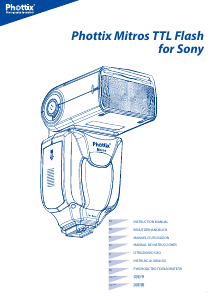
Mode d’emploi Phottix Mitros TTL (Sony) Flash

Produits connexes

Catégories associées

×
Download