English 3
|
01 Safety Information
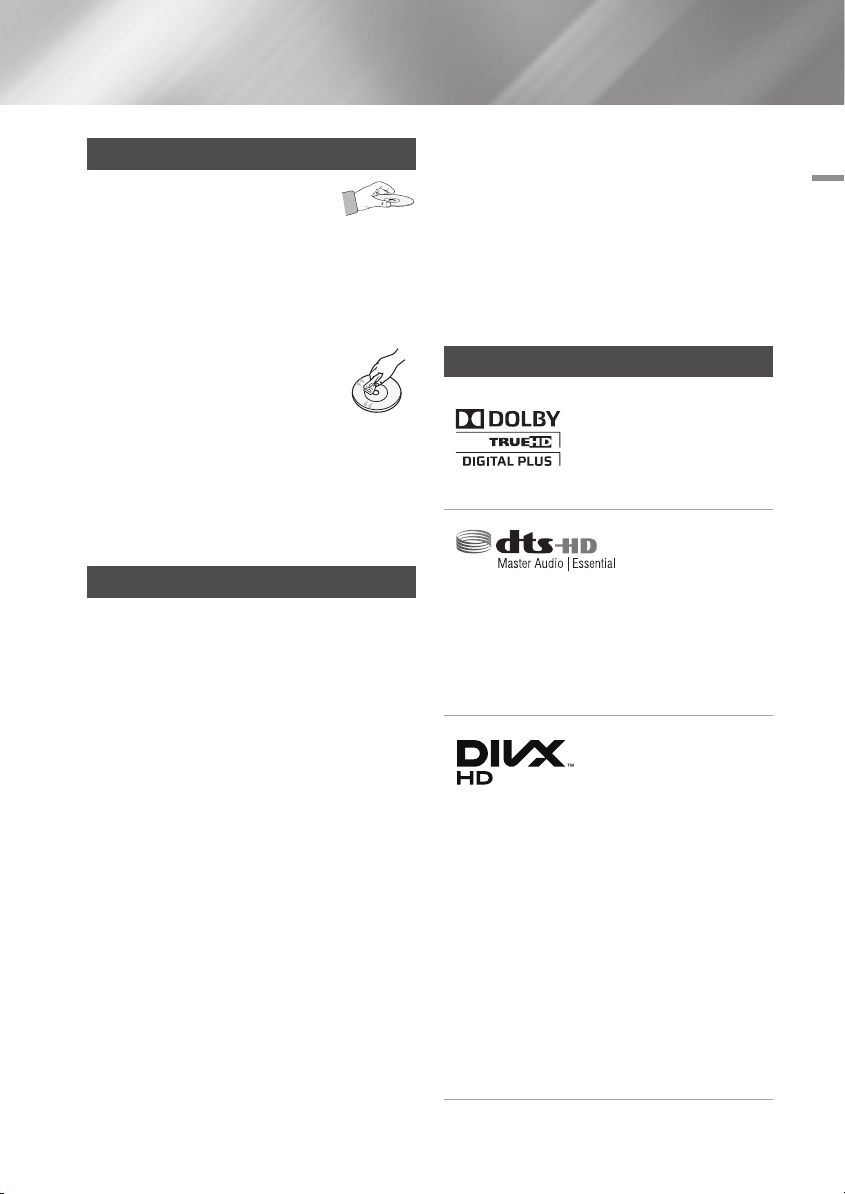
Disc Storage & Management
• Holding Discs
- Fingerprints or scratches on
a disc may reduce sound and picture
quality or cause skipping.
- Avoid touching the surface of a disc where data has
been recorded.
- Hold the disc by the edges so that fingerprints will
not get on the surface.
- Do not stick paper or tape on the disc.
• Cleaning Discs
- If you get fingerprints or dirt on a disc,
clean it with a mild detergent diluted in
water and wipe with a soft cloth.
- When cleaning, wipe gently from the
inside to the outside of the disc.
- Disc Storage
`
Do not keep in direct sunlight.
`
Keep in a cool ventilated area.
`
Keep in a clean protection jacket and store
vertically.
Handling Cautions
• Do not expose this apparatus to dripping or splashing.
Do not put objects filled with liquids, such as vases, on
the apparatus.
• To turn this apparatus off completely, you must pull the
power plug out of the wall socket. Consequently, the
power plug must be easily and readily accessible at all
times.
• Do not touch the power plug with a wet hand.
It can cause an electric shock.
• Do not plug multiple electric devices into the same wall
socket. Overloading a socket can cause it to overheat,
resulting in a fire.
• Maintenace of the Cabinet
- Before connecting other components to this
product, be sure to turn them off.
- If you move your product suddenly from a cold place
to a warm place, condensation may occur on the
operating parts and lens and cause abnormal disc
playback. If this occurs, unplug the product, wait for
two hours, and then connect the plug to the power
outlet. Then, insert the disc, and try to play back
again.
• If the product makes an abnormal noise or produces
a burning smell or smoke, turn off the power switch
immediately and disconnect the power plug from
the wall outlet. Then, contact the nearest customer
service centre for technical assistance. Do not use the
product. Using the product as it is may cause a fire or
an electric shock.
• To turn this apparatus off completely, you must pull the
power plug out of the wall socket. Consequently, the
power plug must be easily and readily accessible at all
times.
Licence
Manufactured under licence
from Dolby Laboratories.
Dolby, Pro Logic, and
the double-D symbol are
trademarks of Dolby Laboratories.
Manufactured
under licence under
U.S. Patent Nos:
5,956,674; 5,974,380;
6,226,616; 6,487,535; 7,392,195; 7,272,567;
7,333,929; 7,212,872 & other U.S. and worldwide
patents issued & pending. DTS-HD, the Symbol,
& DTS-HD and the Symbol together are registered
trademarks & DTS-HD Master Audio | Essential is a
trademark of DTS, Inc. Product includes software.
© DTS, Inc. All Rights Reserved.
ABOUT DIVX VIDEO: DivX® is
a digital video format created
by DivX, LLC, a subsidiary of
Rovi Corporation. This is an
official DivX Certified® device that plays DivX video.
Visit divx.com for more information and software tools
to convert your files into DivX videos.
ABOUT DIVX VIDEO-ON-DEMAND: This DivX
Certified® device must be registered in order to play
purchased DivX Video-on-Demand (VOD) movies. To
obtain your registration code, locate the DivX VOD
section in your device setup menu. Go to vod.divx.
com for more information on how to complete your
registration.
DivX Certified® to play DivX® video up to HD 1080p,
including premium content.
DivX®, DivX Certified® and associated logos are
trademarks of Rovi Corporation or its subsidiaries and
are used under licence.
Covered by one or more of the following U.S. patents
: 7,295,673; 7,460,668; 7,515,710; 7,519,274


Joignez-vous à la conversation sur ce produit
Ici, vous pouvez partager ce que vous pensez du Samsung HT-H4200R Système home cinéma. Si vous avez une question, lisez d’abord attentivement le mode d’emploi. La demande d’un mode d’emploi peut être effectuée en utilisant notre formulaire de contact.