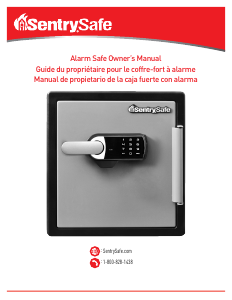
Mode d’emploi SentrySafe OA3810 Coffre-fort

Besoin d'un mode d’emploi pour votre SentrySafe OA3810 Coffre-fort ? Ci-dessous, vous pouvez consulter et télécharger gratuitement le mode d’emploi PDF en français. Ce produit a actuellement 3 questions fréquemment posées, 3 commentaires et a 1 vote avec une note moyenne du produit de 100/100. Si ce n'est pas le mode d’emploi que vous souhaitez, veuillez nous contacter.

Votre produit est défectueux et le mode d’emploi n’offre aucune solution ? Rendez-vous à un Repair Café pour obtenir des services de réparation gratuits.

Mode d’emploi

Loading…
2-English
Opening your safe for the fi rst time (keep
door open during setup):
1. Remove and discard the screw (if equipped) at
the base of the lock case.
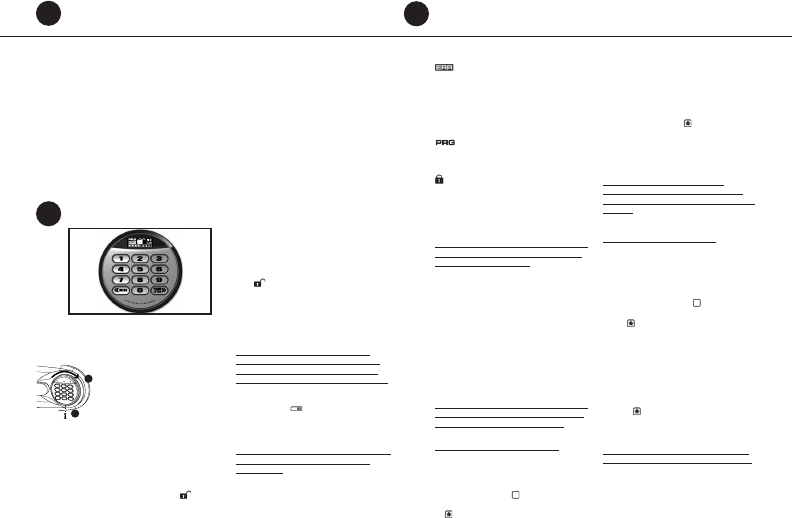
2. Turn the electronic lock case to the
right (clockwise), from 12 o’clock to
2 o’clock, and remove.
• Insert 4 new AA batteries (not
included) to power this lock.
• Replace the electronic lock case and
turn to the left (to 12 o’clock) to reassemble.
3. Turn the key (if your safe is equipped with a key
lock) to the right so that the lock cylinder pops
out.
4. Enter the factory code (printed on the fi rst page
of this guide), then press the Prog/Enter key.
When the unlocked padlock icon (
) appears,
you have four seconds to turn the handle down
to open. Try this several times before proceeding
to the next step.
To unlock safe:
Enter the 5-digit factory code, a pre-programmed
manager code, or a pre-programmed user code
(programming instructions to follow), then press
the Prog/Enter key. When the unlocked padlock
icon (
) appears, you have four seconds to turn
the handle down to open.
To lock safe:
Close the door and return the handle to the
horizontal position. For greatest security, depress
the key lock (if equipped) with your fi nger.
NOTE: If your unit is equipped with a water-
resistant gasket. Additional pressure to the left
corner of the door may be required before the
handle can be returned to the horizontal position.
Battery replacement
The battery icon (
) will light when the
batteries need to be replaced. No codes are erased
when old batteries are removed for replacement.
See “Opening your safe for the fi rst time”.
NOTE: If your safe does not appear to be working,
please check batteries before calling Sentry
Customer Care.
Gain entry with basic electronic lock cont.
2
1
2
Gain entry with advanced electronic lock
3
Gain entry with advanced electronic lock cont.
3
Signals
Your electronic-lock safe communicates by means
of several audio/visual signals.
Red (Error) LED + three beeps indicates
one of the following:
1. You have pressed Program key out of sequence.
2. You have entered an invalid code or user pin.
3. You have let 5 seconds or more elapse between
key presses.
4. Lights after three consecutive invalid codes are
input (2-minute delay mode).
Green LED only:
1. Comes ON after you enter a valid code and
remains lit during the 4-second period in which
the safe can be opened.
2. Comes ON in the Programming mode and
remains lit until you have fi nished entering
a 5-digit code.
Yellow LED only:
1. Comes ON when the batteries need to be
replaced.
Icon identifi cation
(Error) indicates one of the following:
1. You have pressed Program key out of sequence.
2. You have entered an invalid code.
3. You have let 5 seconds or more elapse between
key presses.
4. You have pressed a key while in delay mode.
(Program) Lights after pressing the Program
key and stays lit while programming a manager or
user code.
(Delay Mode) Lights after three consecutive
invalid codes are input and stays lit during the
2-minute delay mode.
Access codes
There are 3 possible ways to unlock and access
the safe:
NOTE: Maintain a record of the factory code, user,
and manager codes, and store them in a secure
location other than in this safe.
1. Factory code
(Found on the fi rst page of this guide) You can
always open the safe by entering the pre-set 5-digit
factory code. This code cannot be deleted.
2. Manager code
If you prefer to employ your own code, you can
program the safe to open to a 4-8 digit manager
code of your choice.
3. User code
If you wish to give someone else temporary access
to the safe, you can program a 4-8 digit user code
that can later be erased.
NOTE: Remember, once you have decided on your
access codes, open the unit fi rst then test it with
the door open. All zeros is an invalid code.
Programming the manager code
NOTE: One (1) manager code is allowed.
To add:
1. Press the Prog/Enter key , then enter the 5-digit
factory code and then press the Prog/Enter key .
2. An empty lit box icon (
) means no manager
code is programmed. A boxed lighted * icon
(
) means a manager code is programmed.
3. Enter a 4 to 8 digit code and press the Prog/
Enter key to fi nish programming the code into
the unit.
To delete:
1. Press the Prog/Enter key, then enter the 5-digit
factory code and then press the Prog/Enter key.
2. A boxed lighted * icon (
) indicates there is a
code programmed and can be deleted.
3. Press 0, 0, 0, 0, then the Prog/Enter key to
delete the manager code. (0, 0, 0, 0, Prog/
Enter).
NOTE: To return to the beginning when
programming a manager or user code, wait 5
seconds and the lock will time-out. You may then
start over.
Programming user code
NOTE: Six (6) user codes are allowed.
To add:
1. Press the Prog/Enter key 2 times, enter the
manager code and then press the Prog/Enter
key.
2. Use the << or >> to scroll between the lighted
boxes. An empty box icon (
) means it is
available for a code entry; a boxed lighted *
icon (
) means it is being used.
3. Enter a 4 to 8 digit code in the selected position
and press the Prog/Enter key to fi nish.
To delete:
1. Press the Prog/Enter key 2 times, enter the
manager code and then press the Prog/Enter
key.
2. Use the << or >> to scroll to the boxed lighted
* icon (
) to be removed.
3. Press 0, 0, 0, 0, then the Prog/Enter key to
delete the selected user. (0, 0, 0, 0, Prog/Enter).
NOTE: To turn the beeper on or off, press the 0
key and then the Prog/Enter key. (0, Prog/Enter).
Télécharger mode d’emploi en Français (PDF, 0.42 MB)
(Tenez compte de l’environnement et imprimez ce manuel uniquement si c’est vraiment nécessaire)

Loading…

Évaluation

Dites-nous ce que vous pensez du SentrySafe OA3810 Coffre-fort en laissant une note de produit. Vous voulez partager vos expériences avec ce produit ou poser une question ? Veuillez laisser un commentaire au bas de la page.
Etes-vous satisfait du SentrySafe OA3810 Coffre-fort ?
Oui Non
100%
0%
1 évaluation

Joignez-vous à la conversation sur ce produit

Ici, vous pouvez partager ce que vous pensez du SentrySafe OA3810 Coffre-fort. Si vous avez une question, lisez d’abord attentivement le mode d’emploi. La demande d’un mode d’emploi peut être effectuée en utilisant notre formulaire de contact.

LeaAnne Janssen 17-03-2020
Combien pèse le coffre-fort ? (Modèle OA3810) J'essaie de l'intégrer et j'ai besoin de savoir de quel support il aura besoin en dessous.

répondre | Cela a été utile (4) (Traduit par google)
Stephanie Wildeman 20-10-2020
Pouvez-vous me dire le prix d'un coffre-fort sentinelle A3810

répondre | Cela a été utile (2) (Traduit par google)
Alain Nadeau 04-06-2022
Changer les batterie ne peut ouvrir

répondre | Cela a été utile (1)

En savoir plus sur ce mode d’emploi

Nous comprenons qu’il est agréable d’avoir un mode d’emploi papier pour vos SentrySafe OA3810 Coffre-fort. Vous pouvez toujours télécharger le mode d’emploi depuis notre site Web et l’imprimer vous-même. Si vous souhaitez disposer d’un mode d’emploi original, nous vous recommandons de contacter SentrySafe. Ils pourront peut-être fournir un mode d’emploi original. Recherchez-vous le mode d’emploi de votre SentrySafe OA3810 Coffre-fort dans une autre langue ? Choisissez votre langue préférée sur notre page d’accueil et recherchez le numéro de modèle pour voir si nous l’avons disponible.

Caractéristiques

Marque SentrySafe
Modèle OA3810
Catégorie Coffres-forts
Type de fichier PDF
Taille du fichier 0.42 MB

Tous les modes d’emploi pour SentrySafe Coffres-forts
Plus de modes d’emploi de Coffres-forts

Foire aux questions sur SentrySafe OA3810 Coffre-fort

Notre équipe d’assistance recherche des informations utiles sur les produits et des réponses aux questions fréquemment posées. Si vous trouvez une inexactitude dans notre foire aux questions, veuillez nous le faire savoir en utilisant notre formulaire de contact.

Le verrou de mon coffre électronique ne s'ouvre pas. Je suis pourtant sûr d’avoir saisi le bon code. Que faire ? Vérifié

Cela peut se produire lorsque les piles sont trop faibles. Cela peut être causé par des piles trop bon marché ou presque vides. Remplacez les piles et réessayez. Contactez le fabricant si cela ne résout pas le problème.

Cela a été utile (1500) En savoir plus

J'ai perdu la combinaison de mon coffre-fort, que puis-je faire ? Vérifié

Dans le cas d'un coffre-fort avec serrure électronique, celui-ci comprend souvent une clé d'urgence qui permet toujours d'ouvrir le coffre-fort. Si aucune clé d'urgence ou autre solution n'est disponible, des entreprises spécialisées peuvent vous aider. Cependant, dans le cas d'un petit coffre-fort, le coût d'un spécialiste est parfois plus élevé que l'achat d'un nouveau coffre-fort. Dans ce cas, la dernière option consiste à ouvrir le coffre-fort.

Cela a été utile (723) En savoir plus

Quand sécuriser mon coffre-fort ? Vérifié

En général, il vaut mieux sécuriser des coffres de 1 000 kg ou moins. Cela évitera qu’un voleur ne vole tout le coffre. Il est également possible qu’une compagnie d’assurance demande qu’un coffre soit sécurisé. Faites toujours sécuriser votre coffre par un spécialiste.

Cela a été utile (204) En savoir plus
Mode d’emploi SentrySafe OA3810 Coffre-fort

Produits connexes

Catégories associées

×
Download