Mode d’emploi Stiebel Eltron CWM 2000 U Chauffage

Besoin d'un mode d’emploi pour votre Stiebel Eltron CWM 2000 U Chauffage ? Ci-dessous, vous pouvez consulter et télécharger gratuitement le mode d’emploi PDF en français. Ce produit a actuellement 2 questions fréquemment posées, 0 commentaires et 0 votes. Si ce n'est pas le mode d’emploi que vous souhaitez, veuillez nous contacter.

Votre produit est défectueux et le mode d’emploi n’offre aucune solution ? Rendez-vous à un Repair Café pour obtenir des services de réparation gratuits.

Mode d’emploi

Loading…
OPERATION
Operation
ENGLISH
www.stiebel-eltron.com CWM P | CWM U | 5
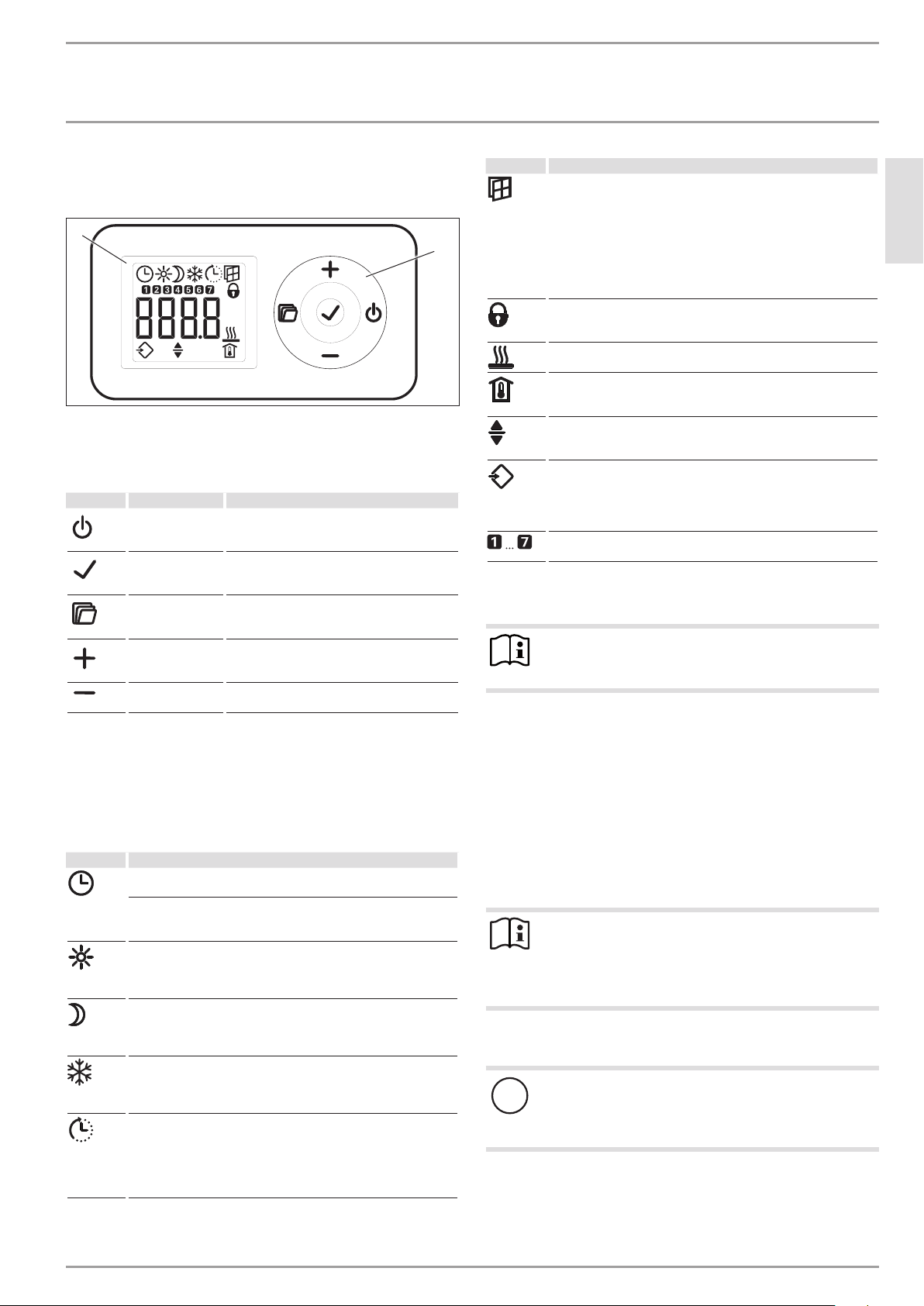
4.1 Programming unit
The programming unit is located at the top right of the appliance.
D0000068106
2
1
1 Display
2 User interface
4.1.1 User interface
Button Designation Description
"Standby" key
Switch on the programming unit;
Put programming unit and heating appliance
into standby mode
"OK" button
Selection;
Confirm settings
"Menu" key
Call up and exit menu
"+" key
Call up menu items;
Change settings
"–" key Call up menu items;
Change settings
4.1.2 Display
If no user action occurs for 20seconds, the backlight switches
off. Press any button to switch the background lighting on again.
Symbols
Symbol Description
Time display:
Indication of the current time or a programmed start time
Timer mode:
The appliance heats in accordance with the enabled time pro-
gram.
Comfort mode:
The appliance maintains the set comfort temperature.
Standard setting: 21.0°C. Use this setting for comfortable room
temperatures when someone is present.
Setback mode:
The appliance maintains the set setback temperature.
Standard setting: 18.0°C. Use this setting e.g. at night or when
absent for several hours.
Frost protection:
The frost protection symbol is displayed if the set room tempera-
ture is set to 7.0°C.
Use this setting to protect an unused room from frost damage.
Adaptive start:
In timer mode, the heating appliance switching times are adjust-
ed to ensure that, at the programmed start time, the respective
set room temperature is already reached.
Conditions: The "adaptive start" function is enabled (see chapter
"Settings/ Standard menu").
Symbol Description
Window open detection:
To avoid unnecessary energy consumption while venting, the
appliance automatically switches to frost protection mode for
one hour when a window is open. The "window open detection"
symbol flashes. After venting, frost protection mode can be termi-
nated manually by pressing "+". The appliance then heats to the
set room temperature again.
Conditions: Window open detection is enabled (see chapter "Set-
tings/ Standard menu").
User interface lock:
To lock or unlock the user interface, press and hold "+" and "–"
simultaneously for 5seconds.
Heating enabled:
The appliance is heating to maintain the set room temperature.
Room temperature display
Editable parameter:
The parameter shown can be changed using "+" and "–".
External input (FP):
CWMU series appliances can be connected to an external control
unit. Depending on the control unit settings, the appliance heats
at specific times of the day in comfort, setback or frost protection
mode, or does not heat at all.
Days of the week:
1=Monday, 2=Tuesday … 7=Sunday
4.2 Switching the appliance on and off
Note
For a short time after initial start-up and after longer
breaks in use, a smell may develop.
The appliance is ready for operation as soon as it has been fixed
to the wall and plugged into the mains.
f Switch the appliance on or off using the ON/OFF switch on
the right-hand side of the appliance.
f Switch the appliance off when not in use for longer periods
(e.g. during the summer months).
All settings remain intact after switching off or after an interrup-
tion to the power supply. This appliance is equipped with a power
reserve that ensures the day of the week and the time are saved
for several hours.
Note
If the appliance was in timer mode before being switched
off for a longer period of time, you will be prompted to set
the day and time after switching it on. Until this setting
is made, the appliance will operate in comfort mode.
4.3 Standby mode
!
Material losses
In standby mode, the appliance will not switch on heating
under any circumstances. There will be no frost protec-
tion.
f To switch on the programming unit, press "Standby". The
standard display appears.
f To put the programming unit and the heating appliance into
standby mode, press "Standby". The display shows "- - - -".
Télécharger mode d’emploi en Français (PDF, 10.89 MB)
(Tenez compte de l’environnement et imprimez ce manuel uniquement si c’est vraiment nécessaire)

Loading…

Évaluation

Dites-nous ce que vous pensez du Stiebel Eltron CWM 2000 U Chauffage en laissant une note de produit. Vous voulez partager vos expériences avec ce produit ou poser une question ? Veuillez laisser un commentaire au bas de la page.
Etes-vous satisfait du Stiebel Eltron CWM 2000 U Chauffage ?
Oui Non
Soyez le premier à évaluer ce produit
0 évaluations

Joignez-vous à la conversation sur ce produit

Ici, vous pouvez partager ce que vous pensez du Stiebel Eltron CWM 2000 U Chauffage. Si vous avez une question, lisez d’abord attentivement le mode d’emploi. La demande d’un mode d’emploi peut être effectuée en utilisant notre formulaire de contact.

En savoir plus sur ce mode d’emploi

Nous comprenons qu’il est agréable d’avoir un mode d’emploi papier pour vos Stiebel Eltron CWM 2000 U Chauffage. Vous pouvez toujours télécharger le mode d’emploi depuis notre site Web et l’imprimer vous-même. Si vous souhaitez disposer d’un mode d’emploi original, nous vous recommandons de contacter Stiebel Eltron. Ils pourront peut-être fournir un mode d’emploi original. Recherchez-vous le mode d’emploi de votre Stiebel Eltron CWM 2000 U Chauffage dans une autre langue ? Choisissez votre langue préférée sur notre page d’accueil et recherchez le numéro de modèle pour voir si nous l’avons disponible.

Caractéristiques

Marque Stiebel Eltron
Modèle CWM 2000 U
Catégorie Chauffages
Type de fichier PDF
Taille du fichier 10.89 MB

Tous les modes d’emploi pour Stiebel Eltron Chauffages
Plus de modes d’emploi de Chauffages

Foire aux questions sur Stiebel Eltron CWM 2000 U Chauffage

Notre équipe d’assistance recherche des informations utiles sur les produits et des réponses aux questions fréquemment posées. Si vous trouvez une inexactitude dans notre foire aux questions, veuillez nous le faire savoir en utilisant notre formulaire de contact.

Comment la poussière affecte-t-elle l'efficacité d'un radiateur ? Vérifié

La poussière peut s'accumuler sur les éléments chauffants et dans les filtres à air d'un appareil de chauffage, réduisant ainsi son efficacité. Cela peut amener le radiateur à travailler plus fort pour produire la même quantité de chaleur, ce qui entraîne une augmentation de la consommation d'énergie et des factures d'électricité plus élevées. Pour maintenir l'efficacité de votre appareil de chauffage, assurez-vous de le nettoyer régulièrement et de remplacer le filtre à air au besoin.

Cela a été utile (208) En savoir plus

Comment puis-je déterminer la taille de l'appareil de chauffage dont j'ai besoin pour une pièce ? Vérifié

La taille de l'appareil de chauffage dont vous avez besoin pour une pièce dépend de la taille de la pièce et de l'isolation de l'espace. Une règle générale consiste à utiliser 60 watts par mètre carré d'espace. Par exemple, si une pièce mesure 14 mètres carrés, un radiateur de 840 watts serait approprié.

Cela a été utile (174) En savoir plus
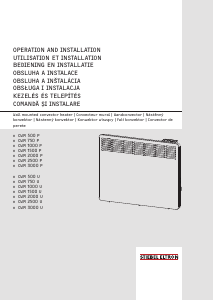
Mode d’emploi Stiebel Eltron CWM 2000 U Chauffage

Produits connexes

Catégories associées

×
Download