Mode d’emploi Thomson CT390 Radio-réveil

Besoin d'un mode d’emploi pour votre Thomson CT390 Radio-réveil ? Ci-dessous, vous pouvez consulter et télécharger gratuitement le mode d’emploi PDF en français. Ce produit a actuellement 3 questions fréquemment posées, 0 commentaires et a 2 votes avec une note moyenne du produit de 0/100. Si ce n'est pas le mode d’emploi que vous souhaitez, veuillez nous contacter.

Votre produit est défectueux et le mode d’emploi n’offre aucune solution ? Rendez-vous à un Repair Café pour obtenir des services de réparation gratuits.

Mode d’emploi

Loading…
EN
CLOCK RADIO
CT390
INSTALLATION
• Plug the mains adaptor into the socket.
• Insert the mains adaptor plug in the power connector at
the back of the device.
• Only use the adaptor provided. If you wish to
use another adaptor, ensure that it has the same
specications and complies with current standards.
SETTING THE TIME AND DATE
Automatic conguration:
After connecting the device, the radio is off; press SYNC
TIME to automatically congure the clock using RDS
frequencies. If this is not possible due to poor frequency
reception, you can congure the clock manually.
Manual conguration:
• Press SET: the hours display ashes the (clock set).
• Turn the TUNING/ADJUST wheel to set the hours.
• Press MODE to set the minutes.
• Turn the TUNING/ADJUST wheel to set the minutes.
• Press MODE to change the date.
• Turn the TUNING/ADJUST wheel to set the current
year.
• Press MODE to change the month.
• Turn the TUNING/ADJUST wheel to set the month.
• Press MODE to change the day.
• Turn the TUNING/ADJUST wheel to set the day.
• The settings will be conrmed in 10 seconds.
ALARM 1 AND ALARM 2 SETTINGS
The device has 2 different alarms that can be set on different
modes (BUZZ, RADIO, WEEK and WEEKEND).
• Press SET twice: the alarm time display ashes (Alarm1
set).
• Turn the TUNING/ADJUST wheel to set the hours.
• Press MODE to change the minutes.
• Turn the TUNING/ADJUST wheel to set the minutes.
• Press SET: the alarm time display ashes (Alarm2 set).
• Turn the TUNING/ADJUST wheel to set the hours.
• Press MODE to change the minutes.
• Turn the TUNING/ADJUST wheel to set the minutes.
• Press SET to exit the alarm settings.
ACTIVATING AND SELECTING ALARM1 OR ALARM2
MODE
• Press / repeatedly to select the type of alarm
function:
BUZZ WEEK: the alarm rings every day of the week.
BUZZ WEEKEND: the alarm rings every day of the
week, except on weekends.
RADIO WEEK: the alarm starts the radio every day of
the week.
RADIO WEEKEND: the alarm starts the radio every day
of the week, except on weekends.
USE
DEACTIVATING THE ALARM
• To deactivate alarm 1 or alarm 2, press or
repeatedly until the alarm lights turn off.
ALARM REPEAT (SNOOZE)
• Touch or pass your hand over the SNOOZE SENSOR
proximity sensor to stop the alarm. The alarm will
sound every 9 minutes. The word SNOOZE ashes
intermittently until the alarm sounds again.
SWITCHING OFF THE ALARM
• Press / to turn off the alarm. It will ring again the
next day (after 24 hours).
USING THE RADIO
The reception of RDS signals depends on the physical
location of the device. An obstacle between the FM
transmitter and the device can affect radio reception
(furniture, high voltage power cable, etc.).
• Press RADIO to switch on the radio and the LCD screen
will display the FM frequency.
• Turn the TUNING/ADJUST wheel to search for the
frequency. The frequency steps are of 0.05 MHz.
• Turn the VOLUME wheel to adjust the volume.
• While the radio is playing, press the SET button
repeatedly to display the programme service (PS),
programme type (PTY) and radio text (RT). The
information is available if the RDS is active and there is
adequate signal strength.
• Press RADIO to put the device on standby.
Note: use and position the wire aerial to improve reception
of FM signals.
SAVING YOUR FAVOURITE RADIO STATIONS
• Turn the TUNING/ADJUST wheel quickly to set the
closest radio station. The search automatically stops
once a transmitted radio station is correctly identied.
• To save a station, press and hold the MODE button
for 2 seconds. Repeat these steps to pre-set up to 20
stations.
ACCESSING THE MEMORISED STATIONS
When the radio is switched on:
• Press the MODE button repeatedly to go from one
saved station to another (P01 to P20).
INDOOR AND OUTDOOR THERMOMETER
Measuring the indoor temperature:
• The device’s built-in probe measures the indoor room
temperature. It is permanently displayed at the bottom
of the small LCD screen.
Measuring the outdoor temperature:
• Remove the battery compartment cover of the external
probe.
• Insert 2 LR03 1.5 V batteries, ensuring that the polarity
is as indicated.
• Set the external probe switch to I: this will switch on the
red light.
• Replace the battery compartment cover of the external
probe.
• Press SYNC TEMP at the back of the device to start
synchronisation. The two dashes at the bottom of the
screen ash.
• The synchronisation is nished when the temperature
is displayed.
• The temperature of the probe is detected every minute.
Note: the external probe has a maximum range of 20
metres.
ADJUSTING THE BRIGHTNESS OF THE DISPLAY
• Press DIMMER to adjust the backlight intensity of the
two LCD screens.
USB CHARGER SOCKET
• Allows you to charge your Smartphone or MP3 player
battery.
AUXILIARY IN
Allows you to play music from an external audio source on
the radio speakers.
• Use a male/male 3.5 mm jack cable (not provided).
• Insert one of the male jack plugs into the MP3 player or
Smartphone device.
• Insert the other male jack plug into the AUX IN input at
the back of the device.
• Switch the radio on.
• The music being played on the external audio source is
played on the radio.
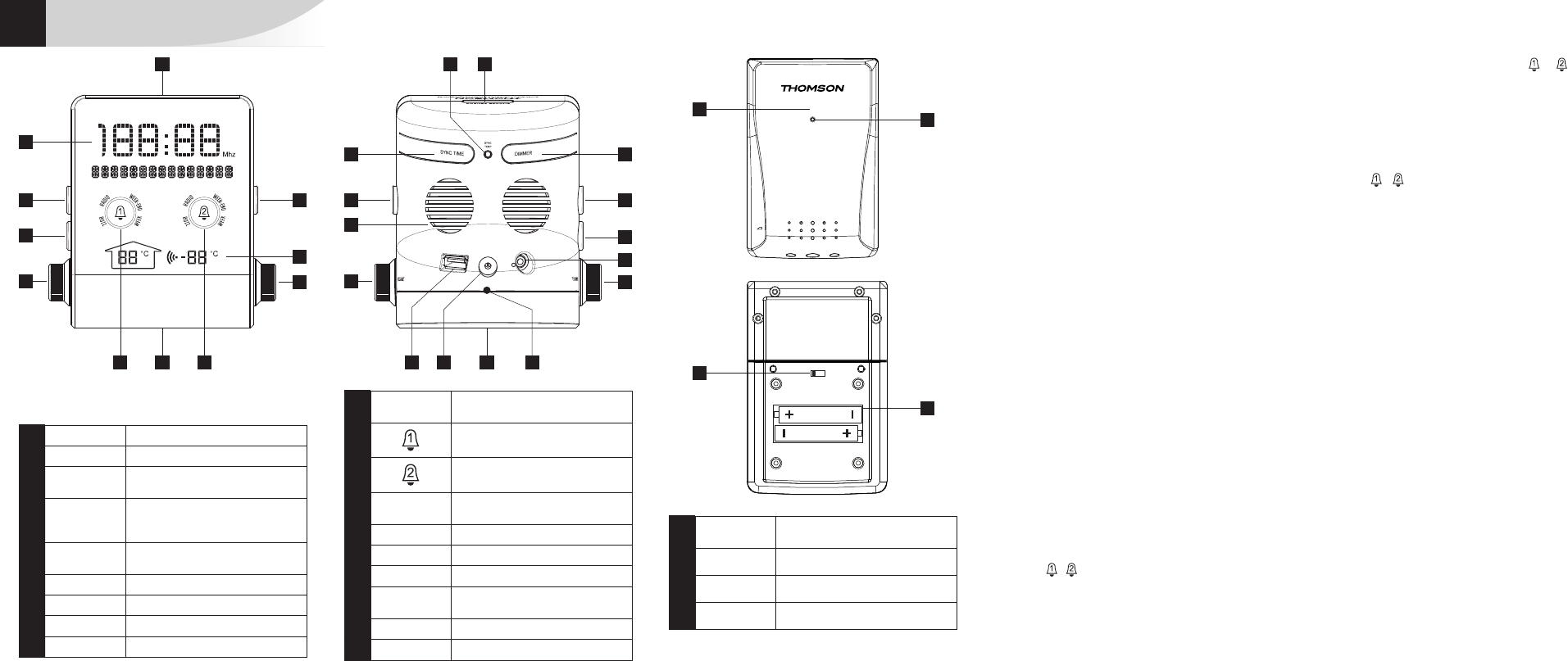
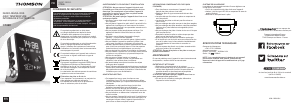
DESCRIPTION OF THE PRODUCT
4
1
8
19
13 33
16 18151214 1411
7 6
5
10 9
9 10
17
8
2
4
5
20
22
23
21
ON OFF
1 Main LCD display
2 Temperature LCD display
3
SNOOZE
SENSOR
Alarm repeat
4 SET
Time, date and alarm settings/ (in
radio mode) details of the RDS
function
5 MODE
Settings mode/radio station
storage
6 DIMMER Backlight intensity settings
7 SYNC TIME Time synchronisation using RDS
8 RADIO Switching on/off the radio
9 VOLUME Volume settings
10
TUNING
ADJUST
Radio frequency settings/changing
the settings
11 Function selector for alarm 1
12 Function selector for alarm 2
13 SYNC TEMP
Synchronisation of the external
probe
14 Battery compartment
15 USB socket: USB charger
16 Power outlet
17
MP3 Connect
Auxiliaire IN
Auxiliary audio source input
18 FM antenna
19 Loudspeaker
20
External temperature thermal
sensor
21 Indicator light
22 I/O (On/Off)
23 Battery compartment
Télécharger mode d’emploi en Français (PDF, 5.86 MB)
(Tenez compte de l’environnement et imprimez ce manuel uniquement si c’est vraiment nécessaire)

Loading…

Évaluation

Dites-nous ce que vous pensez du Thomson CT390 Radio-réveil en laissant une note de produit. Vous voulez partager vos expériences avec ce produit ou poser une question ? Veuillez laisser un commentaire au bas de la page.
Etes-vous satisfait du Thomson CT390 Radio-réveil ?
Oui Non
0%
100%
2 évaluations

Joignez-vous à la conversation sur ce produit

Ici, vous pouvez partager ce que vous pensez du Thomson CT390 Radio-réveil. Si vous avez une question, lisez d’abord attentivement le mode d’emploi. La demande d’un mode d’emploi peut être effectuée en utilisant notre formulaire de contact.

En savoir plus sur ce mode d’emploi

Nous comprenons qu’il est agréable d’avoir un mode d’emploi papier pour vos Thomson CT390 Radio-réveil. Vous pouvez toujours télécharger le mode d’emploi depuis notre site Web et l’imprimer vous-même. Si vous souhaitez disposer d’un mode d’emploi original, nous vous recommandons de contacter Thomson. Ils pourront peut-être fournir un mode d’emploi original. Recherchez-vous le mode d’emploi de votre Thomson CT390 Radio-réveil dans une autre langue ? Choisissez votre langue préférée sur notre page d’accueil et recherchez le numéro de modèle pour voir si nous l’avons disponible.

Caractéristiques

Marque Thomson
Modèle CT390
Catégorie Radios-réveil
Type de fichier PDF
Taille du fichier 5.86 MB

Tous les modes d’emploi pour Thomson Radios-réveil
Plus de modes d’emploi de Radios-réveil

Foire aux questions sur Thomson CT390 Radio-réveil

Notre équipe d’assistance recherche des informations utiles sur les produits et des réponses aux questions fréquemment posées. Si vous trouvez une inexactitude dans notre foire aux questions, veuillez nous le faire savoir en utilisant notre formulaire de contact.

Que signifient AM et PM ? Vérifié

AM signifie Ante Meridiem et indique l’heure avant la mi-journée. PM est l'acronyme de Post Meridiem et indique l’heure après la mi-journée.

Cela a été utile (293) En savoir plus

Que signifie « GMT » ? Vérifié

« GMT » signifie « Greenwich Mean Time » (temps moyen de Greenwich) et est parfois appelé « UTC » pour « Coordinated Universal Time » (temps universel coordonné). Il s’agit du temps correspondant à la longitude 0 passant par Greenwich près de Londres.

Cela a été utile (168) En savoir plus

Quelle est la différence entre FM et AM ? Vérifié

FM et AM sont deux formes de modulation utilisées pour transmettre un signal. FM signifie « Frequency Modulation » (modulation de fréquence) et « AM » signifie « Amplitude Modulation » (modulation d’amplitude. AM est la plus ancienne forme de modulation. La plus grande différence réside dans le fait que le signal FM est bien plus fort que le signal AM.

Cela a été utile (167) En savoir plus
Mode d’emploi Thomson CT390 Radio-réveil

Produits connexes

Catégories associées

×
Download