Mode d’emploi Timex TW2Y18500 Classic Design Inspired by our Heritage. Montre

Besoin d'un mode d’emploi pour votre Timex TW2Y18500 Classic Design Inspired by our Heritage. Montre ? Ci-dessous, vous pouvez consulter et télécharger gratuitement le mode d’emploi PDF en français. Ce produit a actuellement 6 questions fréquemment posées, 0 commentaires et 0 votes. Si ce n'est pas le mode d’emploi que vous souhaitez, veuillez nous contacter.

Votre produit est défectueux et le mode d’emploi n’offre aucune solution ? Rendez-vous à un Repair Café pour obtenir des services de réparation gratuits.

Mode d’emploi

Loading…
3
ENGLISH
TO SET DAILY ALARM
1. PRESS pusher “A” to bring up DAILY ALARM display: “ALARM” will appear
for 3 seconds followed by the current alarm setting time and time zone. The
ALARM mode symbol “AL” and the applicable time zone symbol “T1” or “T2”
alternate to give complete information.
2. PRESS pusher “D” to let time zone flash.
3. PRESS pusher “C” to select time zone.
4. PRESS pusher “A” to let hour flash.
5. PRESS pusher “C” to advance hour.
6. PRESS pusher “A” and “C” as above to adjust tens of minutes and minute.
7. PRESS pusher “D” to complete setting.
8. Alarm is automatically activated after setting
S is displayed.
NOTE:
When the alarm sounds, it will beep for 20 seconds.
To stop the alarm beep, PRESS any pusher.
PRESS and HOLD pusher “C” for 2 seconds in setting mode, to activate
fast advance.
TO SET DAILY ALARM OR CHIME ON/OFF
1. PRESS pusher “A” to bring up DAILY ALARM display.
2. PRESS pusher “C” to activate or deactivate daily alarm and chime
accordingly.
NOTE:
a or C will appear or disappear according to daily alarm activation or
deactivation.
N orBwill appear or disappear according to chime activation or deactivation.
The alarm coordinates with the digital time not analog time.
The alarm will sound only if the digital time zone (T1 or T2) selected in the
Alarm set mode is currently displayed, as confirmed by the alarm symbol a
or C.
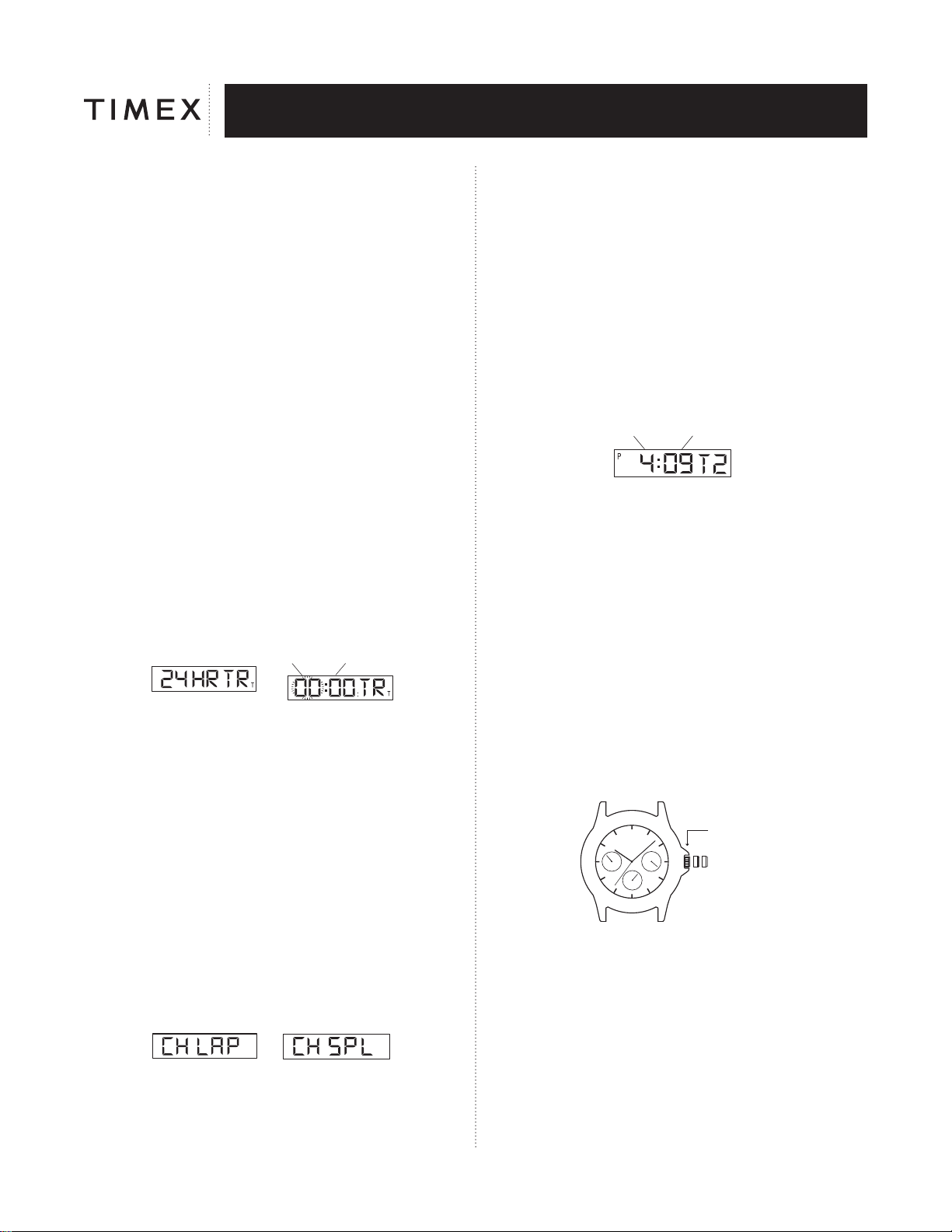
TO USE COUNTDOWN TIMER
SETTING MODE
HOUR MINUTE
1. PRESS pusher “A” to bring up COUNTDOWN TIMER display. “24 HR TR”
will appear.
2. PRESS pusher “D” to let hour flash.
3. PRESS pusher “C” to advance hour.
4. PRESS pusher “A” to set tens of minutes.
5. PRESS pusher “C” to advance tens of minutes.
6. PRESS pusher “A” and “C” as above to adjust minute.
7. PRESS pusher “D” to complete setting.
8. PRESS pusher “C” to start the timer.
9. PRESS pusher “D” to stop the timer.
10. PRESS pusher “D” again to resume timer to the preset time.
NOTE: When the timer counts down to zero it will beep for 20 seconds.
To stop the timer beep, PRESS any pusher.
“T” will appear to designate that the countdown timer is running.
Countdown time up to 24 hours.
PRESS and HOLD pusher “C” for 2 seconds in setting mode, to activate fast
advance.
TO USE CHRONOGRAPH FOR STANDARD MEASUREMENT:
OR
1. PRESS pusher “A” to bring up CHRONOGRAPH display; “CH LAP” or “CH
SPL” will appear.
2. PRESS pusher “C” to start timing.
3. PRESS pusher “D” to stop timing.
4. PRESS pusher “D” to reset.
TO USE CHRONOGRAPH FOR LAP OR SPLIT TIME MEASUREMENT:
1. PRESS pusher “A” to bring up CHRONOGRAPH display; “CH LAP” or
“CH SPL” will appear.
2. PRESS pusher “D” to select LAP or SPLIT.
3. PRESS pusher “C” to start timing.
4. PRESS pusher “C” to record the first Lap or Split time; digits will be frozen for
15 seconds; “L” or “S” will flash to indicate that the next Lap or Split time is
being recorded in the background.
5. PRESS pusher “A” to view the running display while the display is frozen.
6. PRESS pusher “C” to take another Lap or Split.
7. PRESS pusher “D” to stop.
8. PRESS pusher “D” again to reset.
NOTE: CHRONOGRAPH must be reset to zero to switch between LAP and
SPLIT.
Records time up to 24 hours and shows 1/100 of seconds for the first hour.
TO SET DUAL TIME:
HOUR MINUTE
1. PRESS pusher “A” to bring up DUAL TIME display. “T2” will appear beside
the dual time.
2. PRESS and HOLD pusher “D”; “Hold” will display until hour flashes.
3. PRESS pusher “C” to advance hour.
4. PRESS pusher “A” to let month flash.
5. PRESS pusher “C” to advance month.
6. PRESS pusher “A” and “C” as above to adjust date, day, and to set
12 / 24 hour format.
7. PRESS pusher “D” to complete setting.
NOTE: PRESS and hold pusher “C” for 2 seconds in setting mode to activate
fast advance.
NOTE:
1. While in setting of any mode, if no pusher is pressed for 90 seconds the
display will automatically return to TIME / CALENDAR mode.
2. While in any mode other than TIME / CALENDAR mode, whenever pusher
“C” or “D” is pressed, the next press of pusher “A” will automatically return
the display to TIME / CALENDAR mode.
MULTI-FUNCTION MODELS
CB
A
CROWN POSITION
NORMAL POSITION
Your watch has a normal large face display and three small faces displaying
date, day and 24-hour time.
TO SET THE DAY
1. Pull crown all the way out and turn CLOCKWISE until correct day appears.
2. Push crown in to restart.
NOTE: You must set day before setting time.
TO SET THE TIME
1. Pull crown all the way out and turn to correct time.
2. Push crown in to restart.
NOTE: 24-hour display will set automatically.
Télécharger mode d’emploi en Français (PDF, 8.49 MB)
(Tenez compte de l’environnement et imprimez ce manuel uniquement si c’est vraiment nécessaire)

Loading…

Évaluation

Dites-nous ce que vous pensez du Timex TW2Y18500 Classic Design Inspired by our Heritage. Montre en laissant une note de produit. Vous voulez partager vos expériences avec ce produit ou poser une question ? Veuillez laisser un commentaire au bas de la page.
Etes-vous satisfait du Timex TW2Y18500 Classic Design Inspired by our Heritage. Montre ?
Oui Non
Soyez le premier à évaluer ce produit
0 évaluations

Joignez-vous à la conversation sur ce produit

Ici, vous pouvez partager ce que vous pensez du Timex TW2Y18500 Classic Design Inspired by our Heritage. Montre. Si vous avez une question, lisez d’abord attentivement le mode d’emploi. La demande d’un mode d’emploi peut être effectuée en utilisant notre formulaire de contact.

En savoir plus sur ce mode d’emploi

Nous comprenons qu’il est agréable d’avoir un mode d’emploi papier pour vos Timex TW2Y18500 Classic Design Inspired by our Heritage. Montre. Vous pouvez toujours télécharger le mode d’emploi depuis notre site Web et l’imprimer vous-même. Si vous souhaitez disposer d’un mode d’emploi original, nous vous recommandons de contacter Timex. Ils pourront peut-être fournir un mode d’emploi original. Recherchez-vous le mode d’emploi de votre Timex TW2Y18500 Classic Design Inspired by our Heritage. Montre dans une autre langue ? Choisissez votre langue préférée sur notre page d’accueil et recherchez le numéro de modèle pour voir si nous l’avons disponible.

Caractéristiques

Marque Timex
Modèle TW2Y18500 Classic Design Inspired by our Heritage.
Catégorie Montres
Type de fichier PDF
Taille du fichier 8.49 MB

Tous les modes d’emploi pour Timex Montres
Plus de modes d’emploi de Montres

Foire aux questions sur Timex TW2Y18500 Classic Design Inspired by our Heritage. Montre

Notre équipe d’assistance recherche des informations utiles sur les produits et des réponses aux questions fréquemment posées. Si vous trouvez une inexactitude dans notre foire aux questions, veuillez nous le faire savoir en utilisant notre formulaire de contact.

Une pile de mon appareil est oxydée, puis-je quand même l’utiliser en toute sécurité ? Vérifié

Oui, l’appareil peut toujours être utilisé en toute sécurité. Tout d’abord, retirez la batterie oxydée. N’utilisez jamais les mains nues pour ce faire. Nettoyez ensuite le compartiment de batterie avec un coton-tige trempé dans du vinaigre ou du jus de citron. Laissez sécher et insérez des piles neuves.

Cela a été utile (942) En savoir plus

Que faire si ma montre mécanique avance trop vite ? Vérifié

Cela peut être causé par une exposition à un champ magnétique. Le problème peut être résolu par un processus de démagnétisation réalisé par un horloger professionnel.

Cela a été utile (880) En savoir plus

Que signifient AM et PM ? Vérifié

AM signifie Ante Meridiem et indique l’heure avant la mi-journée. PM est l'acronyme de Post Meridiem et indique l’heure après la mi-journée.

Cela a été utile (756) En savoir plus

Qu’est-ce qu’un « chronographe » ? Vérifié

Un « Chronographe » est littéralement un « écrivain du temps ». Le terme est utilisé pour décrire les horloges et les montres qui indiquent l’heure du jour ainsi que pour mesurer une certaine période de temps, comme un chronomètre.

Cela a été utile (660) En savoir plus

Que signifie « GMT » ? Vérifié

« GMT » signifie « Greenwich Mean Time » (temps moyen de Greenwich) et est parfois appelé « UTC » pour « Coordinated Universal Time » (temps universel coordonné). Il s’agit du temps correspondant à la longitude 0 passant par Greenwich près de Londres.

Cela a été utile (501) En savoir plus

Qu’est-ce qu’un mouvement à quartz ? Vérifié

Les montres et horloges à quartz sont actionnées par une pile. Cela envoie un courant électrique à travers des cristaux de quartz qui vont vibrer. Ces vibrations sont transmises au mouvement. Parce que les vibrations ont une fréquence fixe, les montres et horloges à quartz sont extrêmement précises.

Cela a été utile (483) En savoir plus
Mode d’emploi Timex TW2Y18500 Classic Design Inspired by our Heritage. Montre

Produits connexes

Catégories associées

×
Download