Mode d’emploi Topcom Deskmaster 122 Téléphone

Besoin d'un mode d’emploi pour votre Topcom Deskmaster 122 Téléphone ? Ci-dessous, vous pouvez consulter et télécharger gratuitement le mode d’emploi PDF en français. Ce produit a actuellement 0 questions fréquemment posées, 0 commentaires et 0 votes. Si ce n'est pas le mode d’emploi que vous souhaitez, veuillez nous contacter.

Votre produit est défectueux et le mode d’emploi n’offre aucune solution ? Rendez-vous à un Repair Café pour obtenir des services de réparation gratuits.

Mode d’emploi

Loading…
Deskmaster 122
6
Deskmaster 122
5
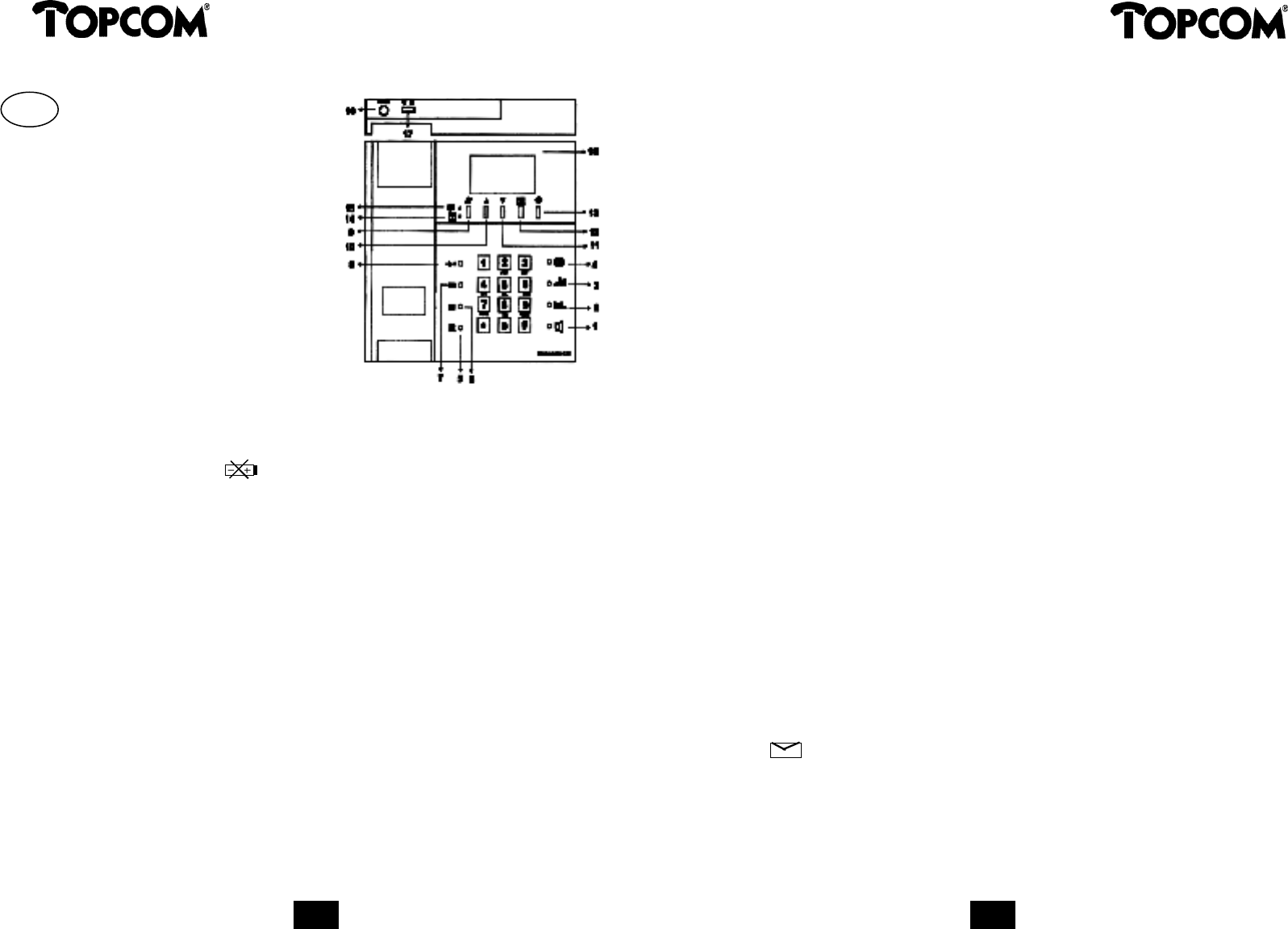
1 Handsfree button
2 Volume control - (minus)
3 Volume control + (plus)
4 Redial button
5 Flash button
6 Direct Memory Key M1
7 Direct Memory Key M2
8 Memory recall button
9 Delete button
10 Up button
11 Down button
12 Call back button
13 Store button
14 “New call” LED indicator
15 “Speaker Phone” LED indicator
16 Adaptor DC 9V
17 Ringer switch
18 Battery compartment
1 Installation
Open the battery cover under the unit and insert a 9V battery. Connect the line cord to the line
socket and the telephone set. The LCD display is functioning.
When the battery low icon appears on the display, make sure you replace the battery or
the memory numbers and settings will get lost.
2 Set the area Code
The area code will be removed from the incoming number . This way the Call Back button will
operate in countries where you are not allowed to dial your own area code for a number inside
the area.
Press and hold the UP button .
The display will show ‘AREA CODE’.
Enter your area code on the keypath (to delete press the Delete button)
After entering your complete area code press the Call Back button to confirm, you will enter
the date/time setting.
3 Date and time settings
Enter the month, day, hour and minutes on the keypath.
When the clock settings are completed, press Call Back button to fix the correct time. You will
now enter the Plus area code settings.
4 Plus area code
The plus area code digits will be added to the incoming number and can be used to add pabx
prefix or operator prefix.
Enter the Plus Area code on the keypath and confirm with the Call Back button.
5 Memory numbers
a) One touch memory (M1,M2)
Press the Store button
Enter the telephone number
Press M1 or M2.
Pick up the handset and replace it.
b) Two touch memory (0..9)
Press the Store button
Enter the telephone number
Press the memory recall button
Press a numeric key (0..9).
Pick up the handset and replace it.
6 Memory dial
a) One touch memory (M1,M2)
Pick up the handset or press the Handsfree button. Listen for a dial tone and press M1 or M2.
b) Two touch memory (0..9)
Pick up the handset or press the Handsfree button. Listen for the dial tone.
Press the memory recall button, followed by one of the numeric keys (0..9).
7 Caller ID list
The Caller ID list maintains the data of the last 60 incoming calls. If the list contains already 60
numbers and a new call comes in, the oldest call will be erased automatically and the new call
will be stored.
a) To erase one stored number
Press UP or DOWN to select the number you want to erase
Press the Delete button twice, the displayed number will be erased.
b) To erase the entire list
Press and hold the Delete button for more than 3 seconds, the entire list is erased.
8 Caller ID dial
Press UP or DOWN to select the number you wish to dial.
Pick up the handset or press the Handsfree button.
Press the Call Back button; the displayed number will be dialled out.
9 Visual message waiting service (voice mail)
This feature will be used to indicate there is a message on your anwsering machine in the net
work and can only be used if supported by your telephone company.
The icon appears on the display which means that a message is waiting to be retrieved.
Please contact your telephone company to find out how to retrieve this message.
GB
Télécharger mode d’emploi en Français (PDF, 0.09 MB)
(Tenez compte de l’environnement et imprimez ce manuel uniquement si c’est vraiment nécessaire)

Loading…

Évaluation

Dites-nous ce que vous pensez du Topcom Deskmaster 122 Téléphone en laissant une note de produit. Vous voulez partager vos expériences avec ce produit ou poser une question ? Veuillez laisser un commentaire au bas de la page.
Etes-vous satisfait du Topcom Deskmaster 122 Téléphone ?
Oui Non
Soyez le premier à évaluer ce produit
0 évaluations

Joignez-vous à la conversation sur ce produit

Ici, vous pouvez partager ce que vous pensez du Topcom Deskmaster 122 Téléphone. Si vous avez une question, lisez d’abord attentivement le mode d’emploi. La demande d’un mode d’emploi peut être effectuée en utilisant notre formulaire de contact.

En savoir plus sur ce mode d’emploi

Nous comprenons qu’il est agréable d’avoir un mode d’emploi papier pour vos Topcom Deskmaster 122 Téléphone. Vous pouvez toujours télécharger le mode d’emploi depuis notre site Web et l’imprimer vous-même. Si vous souhaitez disposer d’un mode d’emploi original, nous vous recommandons de contacter Topcom. Ils pourront peut-être fournir un mode d’emploi original. Recherchez-vous le mode d’emploi de votre Topcom Deskmaster 122 Téléphone dans une autre langue ? Choisissez votre langue préférée sur notre page d’accueil et recherchez le numéro de modèle pour voir si nous l’avons disponible.

Caractéristiques

Marque Topcom
Modèle Deskmaster 122
Catégorie Téléphones
Type de fichier PDF
Taille du fichier 0.09 MB

Tous les modes d’emploi pour Topcom Téléphones
Plus de modes d’emploi de Téléphones
Mode d’emploi Topcom Deskmaster 122 Téléphone

Produits connexes

Catégories associées

×
Download