Mode d’emploi Umidigi Upods Casque

Besoin d'un mode d’emploi pour votre Umidigi Upods Casque ? Ci-dessous, vous pouvez consulter et télécharger gratuitement le mode d’emploi PDF en français. Ce produit a actuellement 6 questions fréquemment posées, 0 commentaires et 0 votes. Si ce n'est pas le mode d’emploi que vous souhaitez, veuillez nous contacter.

Votre produit est défectueux et le mode d’emploi n’offre aucune solution ? Rendez-vous à un Repair Café pour obtenir des services de réparation gratuits.

Mode d’emploi

Loading…

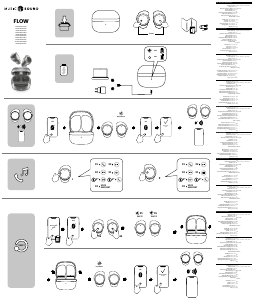
Product introduction
Earbuds
User Manual
Charging Indicator
Charging Pin
Charging Case
Charging Port
Large Ear Cap
Multi-function Button
Earbuds Indicator
Microphone
Medium Ear Cap
Charging Touch point
Small Ear Cap
Warm Tips:
These earbuds are equipped with a medium ear cap. We are recommend-
ed to replace the large or small ear cap If you feel unwell.
Wear Earbuds
Gently insert the earbuds tilt down into the ear canal, ensure that the
headphone does not shake when you gently shake your head.
Charging
Before starting to use, please tear off the isolation film at the charging touch
point of the earbuds, and charge the charging case and earbuds fully.
Plug in the charging cable can charge both the earbuds and the charging case
at the same time.
When the charging case is not fully charged, the top one of the indicators will
flash, and the four charging indicator will keep light up when fully charged.
During the charging of the earbuds, the red charging indicator will keep light up.
When the earbuds are fully charged, and the white indicator of the earbuds will
light up 1 minute and then goes out.
Turn on
If the earbuds are in the charging case, will be automatically booted when it is
removed from the charging case.
If the earbuds are not in the charging case and are shut down, press and hold
the multi-function button for about 2S (white indicator flashes)
Turn off
Put earbuds into the charging case, the earbuds will automatically shut down.
In the power-on state, long press the multi-function button for about 5S (red
indicator will long bright 2S)
Long press about 5S
Red light long bright 2S
Use the earbuds
Automatic connection: Take earbuds out of the charging case at the same time.
Wait for the 2-3S earbuds to automatically boot. When the white indicator of the
left and right earbuds flashes slowly, open the device Wireless search "Upods"
and connect.
If the connection fails, put the earbuds back in the charging case and repeat
the above operation.
After the first connection, the earbuds when automatically connect to the last
paired device when turned on(Wireless on).
Single ear is used in the same way as both ears
Note: The earbuds have been initialized when produced and can be taken out
directed for related operations.
Earbuds Indicator
Product name: Upods TWS Wireless
Earbuds
Model: Upods
Upods Basic Parameters
Product size: 26.5*15.3*21.5mm
Single Upods weight:4g
Communication distance:10m
Battery capacity:43mAh
Charging time: About 1.5h
Music playtime: About 4h
Standby time:200h
Input parameters:5V---100Ma
Battery type: Lithium ion polymer battery
Wireless connection5.0
Wireless protocol: HFP/A2DP/HSP/
AVRCP
Product Specification
Charging case parameters:
Product size:68*41*31mm
Input parameters:5V---500Ma
Output parameters:5V—150Ma
Charging time:2h
Standby time: About 2 months
Battery capacity:600mAh
Battery type: Lithium ion polymer
battery
Charging case parameters:
Product size:68*41*31mm
Input parameters:5V---500Ma
Output parameters:5V—150Ma
Charging time:2h
Standby time: About 2 months
Battery capacity:600mAh
Battery type: Lithium ion polymer
battery
1.Answer/hang up the phone
Press the multi-function button to answer/hand up the call;
2.Reject the call
When calling, long press the multi-function button for about 1 second to reject
the call.
Long press about 1 second
Earbuds reset
Function
The following functions can be operated on both left and right ears
3. Play/pause music
In standby mode, short press the multi-function button to pause/play music.
Note: The music player background needs to be running.
4. Turn on the voice assistant
In standby or music playback mode, press the multi-function button twice to
turn on the voice assistant (if you need to turn off the voice assistant, you can
press the multi-function button again).
Note: The device needs to support voice and turn on the fast wake-up setting.
5. Answer the second call and switch the call
When the mobile phone calls, short press the multi-function button to answer
the call; when there is a new phone call, short press the multi-function button to
hold the current call and answer the second call; Long press the multi-function
button to switch two calls.
Note:
1. If the product has not been used for more than two weeks, it is recommend-
ed to charge the product ;
2. It is necessary to select a charger that has been produced by a regular
manufacturer and has passed the certification of the local state;
3. Continuous use of headphones for a long time is detrimental to hearing
health, please control the use time and volume reasonably;
4. Using headphones will reduce the perception of external sounds, please do
not use headphones in environments that may threaten safety.
Warranty
1. The warranty period is 1 year since the acquisition date.
2. During the warranty period, if there are any problems or malfunction about
this product in the case of normal use and maintenance, after verification, we
will provide free repair and component replacement.
1 2
3 4 5
If the headset cannot be connected properly, please reset the headset as
follows: Take the headset out of the charging box, and then turn off the two
headset multi-function keys for 10 seconds, respectively, and release and put it
when the red and white lights are on. Return to the charging box, delete the
connection record on the device, re-automatically pair and connect the device.
Télécharger mode d’emploi en Français (PDF, 2.11 MB)
(Tenez compte de l’environnement et imprimez ce manuel uniquement si c’est vraiment nécessaire)

Loading…

Évaluation

Dites-nous ce que vous pensez du Umidigi Upods Casque en laissant une note de produit. Vous voulez partager vos expériences avec ce produit ou poser une question ? Veuillez laisser un commentaire au bas de la page.
Etes-vous satisfait du Umidigi Upods Casque ?
Oui Non
Soyez le premier à évaluer ce produit
0 évaluations

Joignez-vous à la conversation sur ce produit

Ici, vous pouvez partager ce que vous pensez du Umidigi Upods Casque. Si vous avez une question, lisez d’abord attentivement le mode d’emploi. La demande d’un mode d’emploi peut être effectuée en utilisant notre formulaire de contact.

En savoir plus sur ce mode d’emploi

Nous comprenons qu’il est agréable d’avoir un mode d’emploi papier pour vos Umidigi Upods Casque. Vous pouvez toujours télécharger le mode d’emploi depuis notre site Web et l’imprimer vous-même. Si vous souhaitez disposer d’un mode d’emploi original, nous vous recommandons de contacter Umidigi. Ils pourront peut-être fournir un mode d’emploi original. Recherchez-vous le mode d’emploi de votre Umidigi Upods Casque dans une autre langue ? Choisissez votre langue préférée sur notre page d’accueil et recherchez le numéro de modèle pour voir si nous l’avons disponible.

Caractéristiques

Marque Umidigi
Modèle Upods
Catégorie Casques
Type de fichier PDF
Taille du fichier 2.11 MB

Tous les modes d’emploi pour Umidigi Casques
Plus de modes d’emploi de Casques

Foire aux questions sur Umidigi Upods Casque

Notre équipe d’assistance recherche des informations utiles sur les produits et des réponses aux questions fréquemment posées. Si vous trouvez une inexactitude dans notre foire aux questions, veuillez nous le faire savoir en utilisant notre formulaire de contact.

Lorsque je connecte un casque à mon appareil, il ne fonctionne pas correctement, que puis-je faire ? Vérifié

Il est possible que de la poussière se soit accumulée dans l'ouverture pour connecter le casque, l'empêchant ainsi d'établir un contact correct. La meilleure façon de nettoyer est de recourir à de l'air comprimé. En cas de doute, veuillez confier cette tâche à un professionnel.

Cela a été utile (1159) En savoir plus

Quand la musique est-elle trop forte ? Vérifié

Les sons supérieurs à 80 décibels (dB) peuvent commencer à endommager l'audition. Les sons supérieurs à 120 décibels endommagent immédiatement l’audition. La gravité du dommage dépend de la fréquence et de la durée pendant lesquelles le son est présent.

Cela a été utile (1048) En savoir plus

Qu'est-ce que la suppression du bruit ? Vérifié

La suppression du bruit est une technique principalement utilisée dans des écouteurs. Le contrôle actif du bruit est utilisé pour réduire ou éliminer l'influence du bruit ambiant.

Cela a été utile (639) En savoir plus

Est-ce que le Bluetooth fonctionne à travers les murs et les plafonds ? Vérifié

Un signal Bluetooth fonctionnera à travers les murs et le plafond, à moins qu’ils ne soient en métal. Selon l’épaisseur et le matériau de la paroi, le signal peut perdre en intensité.

Cela a été utile (251) En savoir plus

Jusqu’à quel niveau de bruit est-ce sans danger pour les enfants ? Vérifié

Les enfants ont leur audition endommagée plus rapidement que les adultes. Il est donc important de ne jamais exposer les enfants à un bruit supérieur à 85 dB. Dans le cas des écouteurs, il existe des modèles spéciaux pour les enfants. Dans le cas de haut-parleurs ou d’autres situations, vous devez faire attention à ce que le bruit ne dépasse pas ce niveau.

Cela a été utile (181) En savoir plus

Puis-je enrouler le cordon autour de l'appareil après utilisation ? Vérifié

Il vaut mieux ne pas le faire, car cela peut endommager le cordon. La meilleure chose à faire est d'enrouler le cordon comme il l'était lorsque le produit a été emballé.

Cela a été utile (181) En savoir plus

Mode d’emploi Umidigi Upods Casque

Produits connexes

Catégories associées

×
Download