Mode d’emploi intimus 175 CC3 Destructeur

Besoin d'un mode d’emploi pour votre intimus 175 CC3 Destructeur ? Ci-dessous, vous pouvez consulter et télécharger gratuitement le mode d’emploi PDF en français. Ce produit a actuellement 2 questions fréquemment posées, 0 commentaires et 0 votes. Si ce n'est pas le mode d’emploi que vous souhaitez, veuillez nous contacter.

Votre produit est défectueux et le mode d’emploi n’offre aucune solution ? Rendez-vous à un Repair Café pour obtenir des services de réparation gratuits.

Mode d’emploi

Loading…
<< The machine may not be operated by more
than one person at any given time!
The machine was designed for safe operation
by “one person only”.
<< During the shredding process no other
work may be performed on the machine
(for example cleaning, etc.)!
<< The machine is not a toy, and is not suitable
for use by children!
The overall technical safety concept of
this machine (dimensions, feed openings,
emergency shutdown devices etc.) does not
provide for any guarantee regarding hazard-
free operation by children.
<< Danger of injury! Keep all
loose articles of clothing, ties,
jewelery, long hair or other loose
objects away from opening!
<< Danger of injury! Never insert ngers into
opening!
<< In case of danger switch the machine off
with the mains switch, or with the emer-
gency switch, or unplug the machine!
<< Always unplug the machine from the
mains power supply before opening the
machine!
Repairs may only be performed by trained
personnel!
IMPORTANT SAFETY NOTES
SCOPE OF APPLICATION:
The document shredder intimus 175SC2/CC3/
CC4/CC5/CC6 is a machine for the destruction
of common written material.
The machine may only be used to
shred paper!
Shredding of other types of data carriers
and also of staples and paper clips with
the models with cutting width 0.8x12 mm
(CC5) or 0.8x4.5 mm (CC6) may lead to
injuries (for example due to splintering of
hard materials etc.) and damage to the
machine (for example destruction of the
cutter etc.).
Exception: Single CD’s or 3.5” computer dis-
kettes can also be shredded with 3.8mm, 5.8mm,
4x46mm, 1.9x15mm models.
INSTALLATION:
- Unpack and set machine upright.
- Place plastic sack into the receptacle.
- Plug in the machine (for instructions for the
necessary precautions see „TECHNICAL
DATA“.
The air vents in the housing are ne-
cessary for cooling and may not be
covered or closed!
The mains connection at the machine
must be freely accessible!
Only operate the machine in enclosed
rooms at temperatures between 10°C
and 25°C!
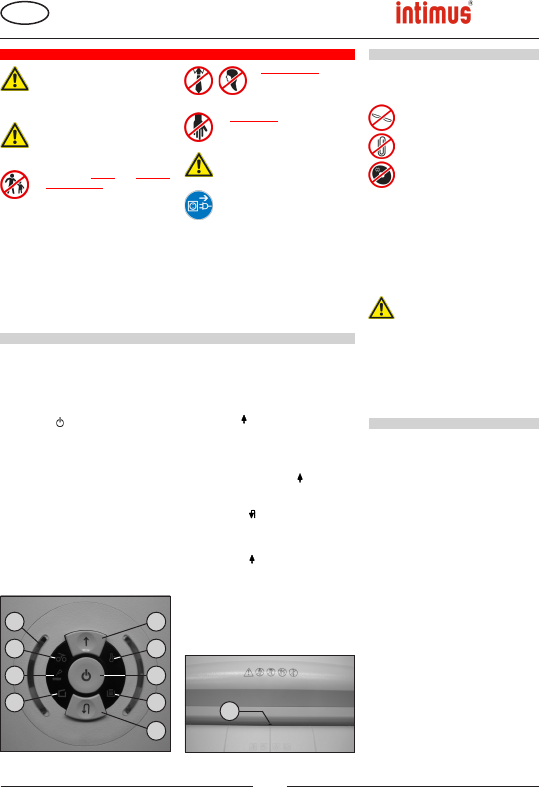
Fig. 2
4
Fig. 1
2
9
1
10
3
6
7
8
5
175SC2
175CC3
175CC4
175CC5
175CC6
91238 3 03/13
GB
Translation of the Original Operation Manual
Übersetzung der Originalbetriebsanleitung
OPERATION
INITIATION
OPERATION
5
5 = Control display (Fig. 1)
“Load level of the motor”
Displays the current load level of the motor
during the shredding process via different
colour lights (see description under “DY-
NAMIC LOAD DISPLAY”).
6 = Controldisplay(g.1)
“Material jam in machine”/ “Light barrier
covered when door opens or when
machine turned on”
For the procedures see the relevant
description under the “MALFUNCTION”
section.
a) “Material jam in machine”
Comes on when too much material has
been fed into the cutters.
The cutters jam, then run in reverse for a
short time and stop. The motor switches
off.
b) “Light barrier covered
when door open”
Comes on when there is still material in
the feed slot when the door is opened.
The cutters stop. The motor switches
off.
c) “Light barrier covered
when machine turned on”
Comes on when there is still material
in the feed slot when the machine is
switched on.
BEDIENUNGSELEMENTE:
1 = Functionbutton(g.1)
“Ready”/ “Off” / “Stop“
This button has three functions:
a) “Ready”
The machine changes to “Ready” if you
press this button briey.
At the same time the integral LED
display comes on.
b) “Off”
The machine switches off if it is in the
“Ready” mode and the button is held
down for about 3 seconds.
Note: The machine switches off
automatically if it is not used for about 5
minutes.
c) “Stop”
If you press this button briey when the
cutters are running they switch off and
stop.
2 = Forwardsbutton(g.1)
This button has two functions:
a) If this button is pressed briey, the
cutting mechanism runs forwards for a
few seconds, e.g. to remove remaining
material from the cutting mechanism.
At the same time the integrated LED
display lights up.
b) If this button is pressed and held
for approx. two secs., the cutting
mechanism runs forwards continually
and materials to be shredded can be fed
into the machine. At the same time the
integrated LED display lights up.
3 = Reversebutton(g.1)
If you press this button the cutters run
backwards. At the same time the integral
LED display comes on.
4 = Lightbarrier(Forwardmotion)(g.3)
The shredding procedure starts as soon as
material is fed into the feed slot.
At the same time the integral forward button
LED display comes on.
Télécharger mode d’emploi en Français (PDF, 2.95 MB)
(Tenez compte de l’environnement et imprimez ce manuel uniquement si c’est vraiment nécessaire)

Loading…

Évaluation

Dites-nous ce que vous pensez du intimus 175 CC3 Destructeur en laissant une note de produit. Vous voulez partager vos expériences avec ce produit ou poser une question ? Veuillez laisser un commentaire au bas de la page.
Etes-vous satisfait du intimus 175 CC3 Destructeur ?
Oui Non
Soyez le premier à évaluer ce produit
0 évaluations

Joignez-vous à la conversation sur ce produit

Ici, vous pouvez partager ce que vous pensez du intimus 175 CC3 Destructeur. Si vous avez une question, lisez d’abord attentivement le mode d’emploi. La demande d’un mode d’emploi peut être effectuée en utilisant notre formulaire de contact.

En savoir plus sur ce mode d’emploi

Nous comprenons qu’il est agréable d’avoir un mode d’emploi papier pour vos intimus 175 CC3 Destructeur. Vous pouvez toujours télécharger le mode d’emploi depuis notre site Web et l’imprimer vous-même. Si vous souhaitez disposer d’un mode d’emploi original, nous vous recommandons de contacter intimus. Ils pourront peut-être fournir un mode d’emploi original. Recherchez-vous le mode d’emploi de votre intimus 175 CC3 Destructeur dans une autre langue ? Choisissez votre langue préférée sur notre page d’accueil et recherchez le numéro de modèle pour voir si nous l’avons disponible.

Caractéristiques

Marque intimus
Modèle 175 CC3
Catégorie Destructeurs
Type de fichier PDF
Taille du fichier 2.95 MB

Tous les modes d’emploi pour intimus Destructeurs
Plus de modes d’emploi de Destructeurs

Foire aux questions sur intimus 175 CC3 Destructeur

Notre équipe d’assistance recherche des informations utiles sur les produits et des réponses aux questions fréquemment posées. Si vous trouvez une inexactitude dans notre foire aux questions, veuillez nous le faire savoir en utilisant notre formulaire de contact.

Pourquoi ma déchiqueteuse s’arrête-t-elle après un certain temps ? Vérifié

Les déchiqueteuses de papier ont besoin de refroidir après un certain temps pour éviter la surchauffe. Le temps pendant lequel l’appareil peut fonctionner avant d’avoir besoin de refroidir varie selon les marques et les modèles.

Cela a été utile (911) En savoir plus

À quelle fréquence dois-je huiler ma déchiqueteuse à papier? Vérifié

En cas d'utilisation occasionnelle, il suffit de huiler le destructeur de papier une fois tous les deux mois. Avec une utilisation (très) régulière, vous remarquerez peut-être que la machine a des difficultés à déchiqueter ou que le papier se coince facilement. Ce sont des signes que la machine doit être huilée.

Cela a été utile (568) En savoir plus
Mode d’emploi intimus 175 CC3 Destructeur

Produits connexes

Catégories associées

×
Download