Mode d’emploi Mpman PDVS7013 Lecteur DVD

Besoin d'un mode d’emploi pour votre Mpman PDVS7013 Lecteur DVD ? Ci-dessous, vous pouvez consulter et télécharger gratuitement le mode d’emploi PDF en français. Ce produit a actuellement 2 questions fréquemment posées, 0 commentaires et 0 votes. Si ce n'est pas le mode d’emploi que vous souhaitez, veuillez nous contacter.

Votre produit est défectueux et le mode d’emploi n’offre aucune solution ? Rendez-vous à un Repair Café pour obtenir des services de réparation gratuits.

Mode d’emploi

Loading…
GB-2
CONNECT DVD PLAYER TO OTHER
APPLIANCES
It is recommended you connect the player to a
multi-system TV.
Ensure that this player and other appliances (TV set
and amplifier) that will be connected to the player
are set to OFF mode and that the AC/DC adapter is
disconnected from the wall outlet.
Avoid blocking ventilation holes of the connected
appliances and make sure air around there can
circulate freely.
Read carefully and follow the instructions before
connecting other appliances.
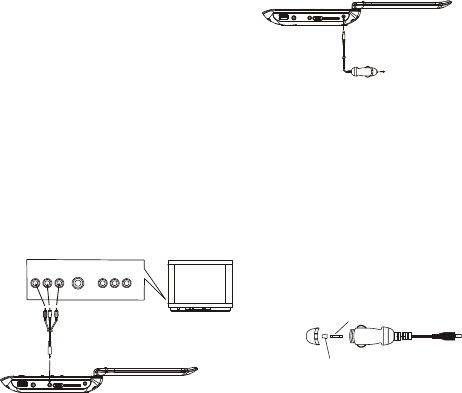
Observe the color coding when connecting audio
and video cables, for instance connect yellow plug
to the yellow jack, the red plug to the red jack and
so on. If the RCA adapter is supplied only, the
audio/video RCA cable is required. Plug one end of
the RCA adapter to the unit. Then connect the
audio/video RCA cable to the RCA adapter and the
television.
AUDIO R
AUDIO L
VIDEO IN
S-VIDEO
YUV INPUT
AV AUDIO/VIDEO INPUT
CHARGE THE BUILT-IN BATTERY
The player is with a rechargeable lithium battery.
Before using the battery, please make sure it is
charged. If not, charge it first. Slide the power switch
to OFF position and then connect one end of the
supplied adapter to the wall outlet and the other end to
the unit for charging the built-in battery.
Note:
1. The battery only could be charged at powering off
mode.
2. If the unit is not in use for a prolonged period of time,
it is recommendable to charge the built-in battery
each three months.
CONNECTING TO A CAR ADAPTOR
The car power adaptor is designed for use with
vehicles that have a 12V, negative ground electrical
system.
WARNING:
Disconnect the car power adaptor when not in use.
Not in use in 24V vehicles.
CAUTIONS:
Use the unit only with the recommended car power
adaptor, use with other car power adaptor might
damage the unit.
The recommended car power adaptor is for use
with this unit only. Do not use it with other
equipment.
In the interests of road traffic safety, do not operate
the unit or view video software while driving a
vehicle.
Make sure the unit is fastened securely to prevent
from moving outside of the vehicle in an accident
When the inside of the cigarette lighter socket is
dirty with ashes or dust, the plug section may
become hot due to poor contact. Be sure to clean
the cigarette lighter socket before use.
After use, disconnect the car power adaptor from
both the unit and cigarette lighter socket.
FUSE REPLACEMENT
FUSE
POSITIVE(+) CAP
NOTE: Don't throw out the positive(+) cap when
replace the fuse.
OPERATIONS
PREPARATION
Power on the TV set and select video input mode.
Power on the audio system which is connected to the
player.
GET STARTED
1. Slide POWER ON/OFF switch to turn on the player.
2. Press disc cover Open button to open the disc tray.
3. Place a disc onto the disc tray.
4. Close the disc tray by hand and the playback starts
automatically.
5. When a menu screen appears on the TV, press the
navigation buttons or press the numeric buttons to
select a preferred track number, then press OK
button to start playback.
NOTE: During playback, if not any operation in about 4
hours, the unit will switch off automatically.
ADJUST THE VOLUME
Press the VOLUME +/- buttons to increase or reduce
the volume.
MUTE
While the power is on, the audio output of the main
unit is to be switched off by pressing the button. Press
it again to resume sound output.
A/V cable
TV SET
To the cigarette lighter socket
Télécharger mode d’emploi en Français (PDF, 1.95 MB)
(Tenez compte de l’environnement et imprimez ce manuel uniquement si c’est vraiment nécessaire)

Loading…

Évaluation

Dites-nous ce que vous pensez du Mpman PDVS7013 Lecteur DVD en laissant une note de produit. Vous voulez partager vos expériences avec ce produit ou poser une question ? Veuillez laisser un commentaire au bas de la page.
Etes-vous satisfait du Mpman PDVS7013 Lecteur DVD ?
Oui Non
Soyez le premier à évaluer ce produit
0 évaluations

Joignez-vous à la conversation sur ce produit

Ici, vous pouvez partager ce que vous pensez du Mpman PDVS7013 Lecteur DVD. Si vous avez une question, lisez d’abord attentivement le mode d’emploi. La demande d’un mode d’emploi peut être effectuée en utilisant notre formulaire de contact.

En savoir plus sur ce mode d’emploi

Nous comprenons qu’il est agréable d’avoir un mode d’emploi papier pour vos Mpman PDVS7013 Lecteur DVD. Vous pouvez toujours télécharger le mode d’emploi depuis notre site Web et l’imprimer vous-même. Si vous souhaitez disposer d’un mode d’emploi original, nous vous recommandons de contacter Mpman. Ils pourront peut-être fournir un mode d’emploi original. Recherchez-vous le mode d’emploi de votre Mpman PDVS7013 Lecteur DVD dans une autre langue ? Choisissez votre langue préférée sur notre page d’accueil et recherchez le numéro de modèle pour voir si nous l’avons disponible.

Caractéristiques

Marque Mpman
Modèle PDVS7013
Catégorie Lecteurs DVD
Type de fichier PDF
Taille du fichier 1.95 MB

Tous les modes d’emploi pour Mpman Lecteurs DVD
Plus de modes d’emploi de Lecteurs DVD

Foire aux questions sur Mpman PDVS7013 Lecteur DVD

Notre équipe d’assistance recherche des informations utiles sur les produits et des réponses aux questions fréquemment posées. Si vous trouvez une inexactitude dans notre foire aux questions, veuillez nous le faire savoir en utilisant notre formulaire de contact.

Un lecteur DVD peut-il également lire des CD ? Vérifié

Oui, la plupart des lecteurs DVD sont en mesure de lire des CD.

Cela a été utile (196) En savoir plus

Puis-je moi-même réparer des rayures sur un DVD ? Vérifié

Les rayures empêchent le laser de lire le disque correctement. Lorsque les rayures ne sont que superficielles, il est possible de les réparer soi-même en polissant le disque avec un composé légèrement abrasif. Idéalement, vous utilisez un composé abrasif professionnel, mais vous pouvez également utiliser un dentifrice ordinaire. Après avoir poli le disque, il faut le laver et laisser sécher. Il existe des entreprises spécialisées qui peuvent le faire.

Cela a été utile (90) En savoir plus
Mode d’emploi Mpman PDVS7013 Lecteur DVD

Produits connexes

Catégories associées

×
Download